Running a local LLM on an AMD GPU works well for inference. Which Radeon cards ROCm supports, when Vulkan beats ROCm in llama.cpp, and what Strix Halo delivers.
Yes. AMD GPUs run local LLM inference well through llama.cpp, Ollama and LM Studio, using either the ROCm (HIP) backend or the Vulkan backend. Recent RDNA3 and RDNA4 Radeon cards are officially supported by ROCm on Linux, and Vulkan works on far more hardware, including older cards and iGPUs. The costs are fiddlier setup, weaker prompt processing on some cards, and no CUDA-only tooling.
- RX 9000, RX 7000, RX 6800+, Radeon PRO
- 7.x (7.2.1 in Radeon docs)
- Vulkan
- about 7 tok/s
Key takeaways
- Inference works well on AMD. Training and CUDA-only tooling are where the gap remains.
- ROCm's official support list is short: RX 9000, RX 7000 and a few Radeon PRO and AI PRO cards. Anything else needs Vulkan or an unofficial override.
- Vulkan is often faster at token generation and always easier to start with. ROCm often wins at prompt processing and time to first token. Community results flip by card, so run llama-bench.
- Strix Halo-class APUs fit large mixture-of-experts models in shared memory. Community reports show roughly 50 to 77 tokens per second on gpt-oss and about 7 on a dense 70B at Q4.
- Memory capacity decides what loads, as on any GPU. The 24 GB RX 7900 XTX is the largest consumer Radeon in the supported list.
Does AMD work for local LLMs in 2026?
A local LLM on an AMD GPU works for inference, and the remaining gaps are mostly about setup effort and software coverage, not whether the model runs. llama.cpp builds against AMD’s HIP (ROCm) stack or against Vulkan, Ollama documents AMD Radeon support on both Linux and Windows, and AMD’s own Lemonade server wraps llama.cpp with ROCm, Vulkan and NPU backends behind an OpenAI-compatible API.
What still favors NVIDIA is the long tail: CUDA-only tools, some quantization kernels, and a forgiving “it just works” experience on every card in the box. If your plan is to load a GGUF model and serve it to an editor or agent, AMD is a fair choice. If your plan includes fine-tuning or niche research code, expect friction.
This page covers AMD specifics. For how much memory a model needs, see local LLM hardware requirements, and for the CPU-only path see running an LLM on CPU.
Which AMD GPUs does ROCm officially support?
ROCm officially supports recent RDNA3 and RDNA4 Radeon cards, a handful of RDNA2 workstation cards, and Instinct accelerators. AMD’s Radeon and Ryzen documentation, which covers releases through ROCm 7.2.1, lists these Linux targets:
| Family | Official ROCm cards (Linux) | LLVM target |
|---|---|---|
| RDNA4 | RX 9070 XT, 9070, 9070 GRE, RX 9060 XT, 9060; Radeon AI PRO R9700, R9600D | gfx1200, gfx1201 |
| RDNA3 | RX 7900 XTX, 7900 XT, 7900 GRE, 7800 XT, 7700 XT, 7700; PRO W7900, W7800, W7700 | gfx1100, gfx1101 |
| RDNA2 | PRO W6800, PRO V620 | gfx1030 |
| Not supported | Radeon VII, Radeon PRO VII, Instinct MI50 and MI25 | gfx906, gfx900 |
Source: AMD’s ROCm system requirements page. That page says a GPU that isn’t listed isn’t officially supported. Ubuntu 24.04.4, Ubuntu 22.04.5 and RHEL 10.1 are the listed operating systems in the 7.2.1 Radeon matrix. The Radeon docs also note that unified documentation begins with ROCm 7.13, so check the current page before you install.
Ollama’s list is broader than the table above: it adds RX 6950 XT, 6900 XT and the other RX 6800 series cards, plus several Ryzen AI APUs including the Ryzen AI Max+ 395. On Windows it lists the RX 7000 series and Radeon PRO W7000 series, and it requires a ROCm v7 capable driver stack.
For a card outside the list, two escape hatches exist. llama.cpp’s build docs describe setting HSA_OVERRIDE_GFX_VERSION to a close supported target, such as 10.3.0 for RDNA2 or 11.0.0 for RDNA3, on Linux only. Ollama documents the same variable. Treat it as unsupported: it can work, and it can also crash or return garbage.
ROCm or Vulkan in llama.cpp?
One RX 7600 XT owner on Linux who posted llama-bench results in the llama.cpp ROCm performance thread measured 1,100 prompt tokens per second and 48.6 generation tokens per second on ROCm, against 606 and 52.8 on Vulkan, using Llama 2 7B Q4_0. So the faster backend depended on which half of the job you cared about. An R9700 result in the same thread showed ROCm ahead on prompt processing (about 2,750 against 1,940) and Vulkan ahead on generation (about 124 against 92), and an RX 7800 XT on Windows was nearly tied. Phoronix, testing Lemonade on Strix Halo, reported the same shape on Qwen3 14B: more tokens per second on Vulkan, lower time to first token on ROCm. These are community and reviewer numbers, not our tests, which is why you should measure instead of assuming.
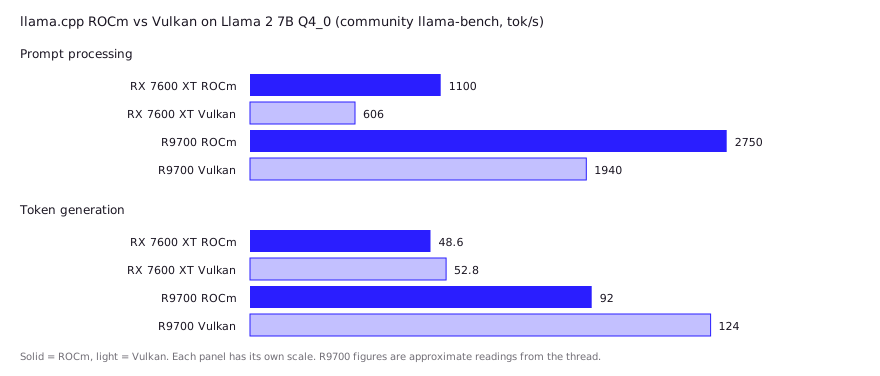
The short answer: start with Vulkan, then test ROCm if your card supports it. Vulkan needs no GPU target flag and runs on cards ROCm doesn’t officially cover, and ROCm tends to do better on prompt processing while Vulkan often leads on token generation.
The two builds are short, from the llama.cpp build docs:
# Vulkan (needs libvulkan-dev, glslc, spirv-headers on Debian-family distros)
cmake -B build -DGGML_VULKAN=1
cmake --build build --config Release

# ROCm / HIP (example target gfx1030; set GPU_TARGETS for your card)
HIPCXX="$(hipconfig -l)/clang" HIP_PATH="$(hipconfig -R)" \
  cmake -S . -B build -DGGML_HIP=ON -DGPU_TARGETS=gfx1030 -DCMAKE_BUILD_TYPE=Release \
  && cmake --build build --config Release -- -j 16
Run with -ngl 99 to offload as many layers as fit. If you see a “cannot find ROCm device library” error on the HIP build, the docs point you to HIP_DEVICE_LIB_PATH.
The practical rule: long prompts (big repos pasted into context) favor whichever backend wins prompt processing on your card, and short chat favors the generation winner. For coding agents that resend large contexts, prompt speed matters more than people expect.
How do Ollama and LM Studio handle AMD?
Both run on AMD, with Ollama documenting the details more clearly. Ollama on Linux needs the ROCm v7 driver stack for its supported cards, and its docs describe Vulkan as an additional backend you can control with OLLAMA_VULKAN=0 to disable it or GGML_VK_VISIBLE_DEVICES to pick devices. On some Linux distributions the ollama user must join the render group, and the docs suggest granting cap_perfmon on the binary so Ollama reports VRAM accurately.
LM Studio’s system requirements page says nothing specific about AMD at the time of writing, so rely on in-app runtime selection and the inference log to confirm the GPU is in use. Forum posters report running it on Strix Halo with the Vulkan runtime (see below). For a comparison of the two apps, see LM Studio vs Ollama, and for when to drop to raw llama.cpp, see Ollama vs llama.cpp vs vLLM.
If you want AMD’s own packaging, Lemonade lists these backends: llama.cpp with Vulkan (AMD iGPU and discrete GPUs, Windows and Linux), llama.cpp with ROCm, an experimental backend for gfx1100 and gfx1151, a vLLM backend for the Strix Halo iGPU on Linux, and NPU backends for the XDNA2 NPU. The ryzenai-llm NPU backend is Windows only, while the flm NPU backend lists Windows and Linux.
Are APUs with unified memory worth it? The Strix Halo case
Strix Halo-class APUs are worth it for one thing: fitting models that no consumer GPU can hold, at modest speed. The Ryzen AI Max+ 395 shares up to 128 GB of LPDDR5X between CPU and GPU, so a 120B-parameter mixture-of-experts model fits where a 24 GB card can’t.
The catch is that generation speed on dense models is limited by memory bandwidth, not capacity. Community reports line up with that:
| Model (quant) | Backend | Community-reported speed | Source |
|---|---|---|---|
| gpt-oss-20B | llama.cpp, Vulkan | about 77 tok/s generation | Framework thread, Nov 2025 |
| gpt-oss-120B (MXFP4) | llama.cpp, Vulkan | about 55 tok/s generation, about 539 tok/s prompt processing | Framework thread, Nov 2025 |
| gpt-oss-120B (MXFP4) | llama-bench, ROCm 6.4.4 | about 52 tok/s generation | Framework thread, Nov 2025 |
| gpt-oss-120B (MXFP4), 30k context | LM Studio, Vulkan | about 22 tok/s | Framework thread, Nov 2025 |
| 70B dense, Q4 | not stated | about 7 tok/s | Framework thread, Dec 2025 |
| Qwen3.6-35B-A3B Q8_0 | llama-bench, Vulkan vs ROCm | about 53 vs about 45 tok/s | Level1Techs thread, May 2026 |
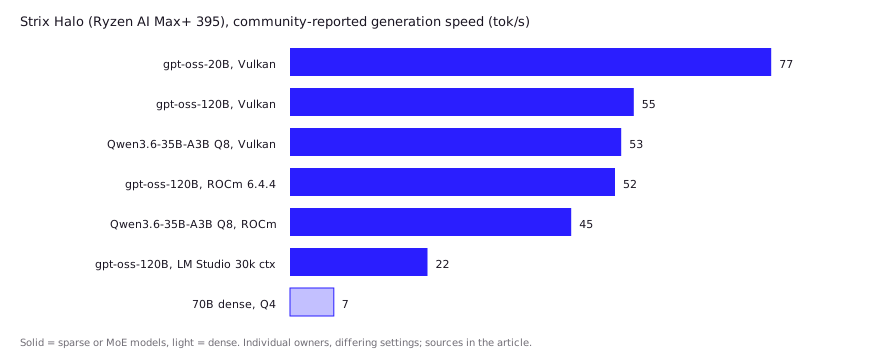
All of these are community reports from individual owners, not our measurements, and the settings differ. The spread on gpt-oss-120B (22 to 55 tok/s) is a reminder that app, context length and backend matter as much as the chip. One poster in the thread noted that the usual bandwidth-limit estimate applies to dense models, while sparse mixture-of-experts models such as gpt-oss only read their active parameters per token, which is why they run far faster than a dense model of similar total size.
Two other notes from the Level1Techs thread: a RADV setting (radv_enable_unified_heap_on_apu=true) was called important for Vulkan, and the poster found ROCm faster with empty context but much slower at full context for one 35B model (about 46 to 17 tok/s), while Vulkan degraded far less. That is one user’s setup, but long-context behavior is worth testing before you commit. Enabling unified memory for llama.cpp on integrated GPUs uses GGML_CUDA_ENABLE_UNIFIED_MEMORY=1 on Linux, per the build docs, and the same docs warn it hurts discrete GPUs.
How does AMD compare with NVIDIA for local coding models?
NVIDIA is still faster and simpler for the same class of card, while AMD often wins on memory per dollar. The two share the same model files and the same llama.cpp, so the difference is mostly kernels, drivers and support.
| Factor | AMD | NVIDIA |
|---|---|---|
| Runs GGUF models in llama.cpp, Ollama, LM Studio | Yes (ROCm or Vulkan) | Yes (CUDA) |
| Official support breadth | Narrow list, Linux first | Broad |
| Setup | Driver stack plus backend choice | Usually one install |
| Max consumer VRAM | 24 GB (RX 7900 XTX); 32 GB on Radeon AI PRO R9700 | 24 GB and up on recent cards |
| Large shared-memory option | Strix Halo (up to 128 GB shared) | Not comparable |
| Training, CUDA-only tools | Limited | Strong |
For a coding assistant, what matters is whether the model you want fits and how fast the prompt is processed. A 32B coder at Q4 needs roughly 20 GB before context, so a 24 GB Radeon is workable at short contexts, as the hardware requirements guide works out. Model choice is covered in best local LLM for coding.
What do developers report in practice?
Developers report that inference works but needs a first-hour of tuning, and that the best backend depends on the card. Three patterns recur across the threads above:
- Vulkan is the safe default; ROCm is the tuned path. Strix Halo posters in the Framework thread said ROCm usually beats Vulkan on speed but Vulkan is simpler to install. The llama.cpp numbers above show that isn’t universal.
- Fit before speed. Posters repeatedly stress checking that the model is fully offloaded to the GPU, since a partial offload silently falls back to the CPU.
- Prompt processing is the weak spot. On Strix Halo the Framework thread’s 120B run processed prompts at roughly 540 tok/s. Pasting a large codebase can take longer than generating the answer.
Each of these is a user report with the caveats that implies: different drivers, builds and dates. If a number matters to you, run llama-bench on your own machine.
Does this matter for uncensored or abliterated models?
The runtime doesn’t care what the weights were trained or edited to do; a GGUF of an abliterated model loads the same as any other. See running uncensored LLMs locally for model sourcing and license rules.
FAQ
Can I run Ollama on an AMD GPU?
Yes. Ollama supports many Radeon RX cards (RX 9000, 7000 and 6800 and up), Radeon PRO cards and several Ryzen AI APUs, using the ROCm v7 stack, with Vulkan also available as a backend.
Is ROCm or Vulkan faster for llama.cpp on AMD?
It depends on the card and the test. Community benchmarks show Vulkan ahead on token generation and ROCm ahead on prompt processing for several cards, with some near ties. Run llama-bench with both builds.
Does an unsupported Radeon card work with ROCm?
Sometimes. On Linux you can set HSA_OVERRIDE_GFX_VERSION to a close supported target, but this isn’t officially supported and doesn’t work on Windows. Vulkan is the safer fallback.
Can I use the AMD NPU for local LLMs?
Yes, in a limited way. Lemonade lists NPU backends for the XDNA2 NPU, and the ryzenai-llm one is Windows only. For most users the integrated GPU is the faster route.
How much memory does Strix Halo give me for LLMs?
Up to 128 GB shared LPDDR5X on the Ryzen AI Max+ 395 configurations, with about 124 GiB visible to the OS in one community report. Capacity is generous, but bandwidth limits dense-model speed.
Sources (9)
- ROCm on Radeon and Ryzen: Linux compatibility matrix (ROCm 7.2.1), AMD
- System requirements (Linux), ROCm documentation, AMD
- llama.cpp build documentation (HIP and Vulkan sections)
- Ollama GPU documentation: AMD Radeon support
- Lemonade: local AI server for GPU and NPU (README), lemonade-sdk
- Performance of llama.cpp on AMD ROCm (HIP), GitHub discussion #15021
- Strix Halo LLM inference notes, Level1Techs forum thread
- Ryzen AI Max, not so much? Framework community thread
- AMD ROCm vs. Vulkan Performance For Lemonade Local AI Server With Llama.cpp, Phoronix