Yes, you can run an LLM on CPU only. Memory bandwidth sets the speed, so small quantized and MoE models win. Setup steps and community-reported tok/s inside.
Yes. llama.cpp and Ollama run quantized LLMs on a plain CPU with no GPU. Generation speed is capped by memory bandwidth, not core count, so expect roughly 8 to 15 tokens/s for a 7B to 8B model at Q4 on a dual-channel DDR5 desktop. Mixture-of-experts models that activate only about 3B parameters per token, such as gpt-oss-20b and Qwen3-30B-A3B, are the best fit.
- Memory bandwidth
- ~10-13 tok/s (community)
- MoE, ~3B active
- --device none
Key takeaways
- Token generation reads the whole active model from RAM for every token, so tokens/s is capped at roughly memory bandwidth divided by model size.
- Dual-channel DDR5 desktops and laptops land around 8 to 15 tokens/s on 7B to 8B Q4 models in community reports. Old laptops with 12 GB of RAM manage 3 to 4.
- MoE models read only their active experts, which is why a 35B A3B model can reach about 10 tokens/s on a laptop CPU.
- More threads isn't always faster: generation tends to plateau near the number of physical cores, while prompt processing keeps scaling.
- Prompt processing is compute-bound and slow on CPU, so long contexts hurt more than short chats.
Can you run an LLM on CPU only?
Yes, any modern x86 or ARM CPU can run a quantized LLM without a GPU, and the only real question is whether the speed is acceptable. llama.cpp builds for CPU by default with two cmake commands, and its docs state you can fully disable GPU acceleration at runtime with --device none. Ollama does the same with a GGUF model and no GPU present.
What “acceptable” means depends on the job. It’s FOSS tested eight models on an older Intel i5 laptop with about 12 GB of RAM in May 2026 and treated roughly 15 to 30 tokens/s as responsive and 3 to 5 tokens/s as painfully slow. Interactive chat wants the first range. Batch work, summarization and “ask and wait” coding questions tolerate the second.
Why does memory bandwidth decide CPU speed?
Generating one token requires reading essentially all the active model weights from RAM, so tokens/s is capped at roughly memory bandwidth divided by the model’s size in memory. Databricks’ inference guide makes the same point for GPUs: at small batch sizes, token generation is limited by how fast parameters load, and achieved memory bandwidth predicts generation speed better than peak compute. It defines achieved bandwidth as (model size plus KV cache) divided by time per output token.
The arithmetic, which is ours and not a measured result:
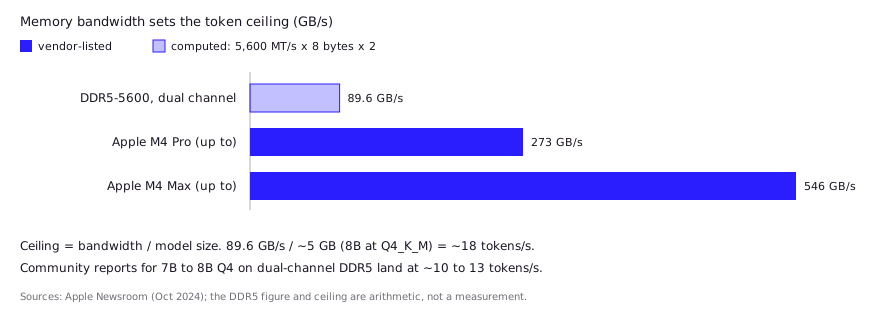
- Dual-channel DDR5-5600 moves at most 5,600 MT/s × 8 bytes × 2 channels = 89.6 GB/s.
- An 8B model at Q4_K_M is about 5 GB, so the ceiling is roughly 18 tokens/s.
- Real runs reach a fraction of the ceiling, and community reports for 7B to 8B Q4 models on dual-channel DDR5 sit around 10 to 13 tokens/s.
Three consequences follow:
- Memory channels and speed matter more than cores. Eight channels of slower DDR4 can beat two channels of fast DDR5, a point InsiderLLM’s CPU guide makes with its own bandwidth figures.
- Smaller files are faster files. Dropping from Q8_0 to Q4_K_M cuts bytes per token almost in half. See GGUF quantization explained for what each level costs in quality.
- Prompt processing is different. Reading your prompt is compute-bound, so it benefits from more cores and BLAS libraries, and it is slow on CPUs. A long prompt can take longer than the answer.
Which models make sense on a CPU?
One r/LocalLLaMA user with a Core Ultra 7 165H laptop and 64 GB of RAM reported about 10 tokens/s on a 35B-A3B model at Q4_K_M, which is why MoE models lead the CPU shortlist. The best CPU models are small dense models for speed and mixture-of-experts (MoE) models for capability per byte read. An MoE model stores many experts but activates only a few per token, so the bandwidth cost tracks the active parameters, not the total.
| Model | Total params | Active per token | Why it suits CPU |
|---|---|---|---|
| gpt-oss-20b | 21B | 3.6B | Apache 2.0; model card says it runs within 16 GB of memory |
| Qwen3-30B-A3B | 30.5B | 3.3B | 128 experts, 8 active per token; Apache 2.0 |
| Small dense (1B to 4B) | 1B to 4B | All | Fits any machine, fastest per token |
| Dense 7B to 8B | 7B to 8B | All | Best quality you can still read quickly on DDR5 |
Practical picks:
- 8 GB RAM or an old laptop: a 1B to 4B model at Q4_K_M. In the It’s FOSS test, Gemma 3 1B ran about 18.6 tokens/s and Phi 4 Mini (3.8B) about 6.9 on that i5 laptop.
- 16 GB RAM on DDR5: a 7B to 8B Q4 model, or gpt-oss-20b if the weights fit alongside your OS.
- 32 GB or more: a 30B-class MoE. This is the sweet spot for CPU-only coding work.
- Avoid: dense 30B and 70B models unless you have server-class bandwidth. InsiderLLM’s table lists 70B at Q4 as needing 48 GB or more of RAM, and every token reads all of it.
If you need a model with fewer refusals for security or reverse-engineering work, the same sizing applies. See how to run an uncensored LLM locally.
How do you set up CPU inference with llama.cpp or Ollama?
Build llama.cpp with the default CPU target, download a GGUF file, and pin the thread count. Per the llama.cpp build docs, a plain build is:
cmake -B build
cmake --build build --config Release -j 8
By default it compiles for the hardware connected at build time, so build on the machine you’ll run on. The same page says BLAS (OpenBLAS, Intel oneMKL, AMD AOCL) can speed up prompt processing for batch sizes above 32 but doesn’t affect generation speed. Run the model with the GPU disabled:
./build/bin/llama-cli -m model-Q4_K_M.gguf -t 8 --device noneOn macOS, Metal is on by default, so add -DGGML_METAL=OFF at build time if you want a true CPU run. For Ollama, ollama run <model> --verbose prints the eval rate in tokens/s after each reply, which is how It’s FOSS collected its numbers.
Then find your thread sweet spot instead of guessing. A poster running a very large MoE model on a Threadripper Pro 3945WS found 4 to 8 threads fastest, with full-core counts causing contention (community report). The llama-bench README shows a sweep (-t 1,2,4,8,16,32). In its example output, prompt processing keeps rising up to 32 threads while generation peaks at 8 threads, which matches the bandwidth story: extra cores can’t read RAM faster.
What do developers report in practice?
Developers report single digits to low teens of tokens/s on consumer hardware, with bandwidth, quant choice and threads explaining most of the spread. These are community reports, not our tests, and most don’t state every setting.
- Laptop MoE: One r/LocalLLaMA user with a Core Ultra 7 165H and 64 GB of RAM reported about 10 tokens/s for a 35B-A3B model at Q4_K_M in stock llama.cpp, usable in non-thinking mode but not thinking mode. Commenters said faster DDR5 (6000 MT/s and up) would help and that one similar-chip user saw 15 to 20 with
OMP_WAIT_POLICY=ACTIVE. That higher figure is a single unverified comment. - Big model, old DDR4: A poster with a Threadripper Pro 3945WS and 512 GB of DDR4-2666 reported 5 to 7 tokens/s on a very large MoE model. Replies split on thread count: several found 4 to 8 threads best, with full-core counts causing contention. Others suggested a lower-bit quant than Q8 and the ik_llama.cpp fork.
- Server-class: In a llama.cpp discussion, a contributor ran DeepSeek-R1 671B on dual Xeon 6980P servers with 1.5 TB of DDR5-6400. The best result was about 10 tokens/s, using ik_llama.cpp on a single socket with one NUMA node. Spanning both sockets was slower, and compiler and AMX tweaks gave little, which the author attributed to memory bandwidth.
- Older Hacker News data points: One commenter reported 3.5 tokens/s on Mixtral with 6 cores and DDR5-6000 in December 2023. Another measured 0.76 tokens/s for Llama 3 70B on an i5-11400 with no GPU in June 2024. Both show the dense-versus-MoE gap.
What speeds can you expect?
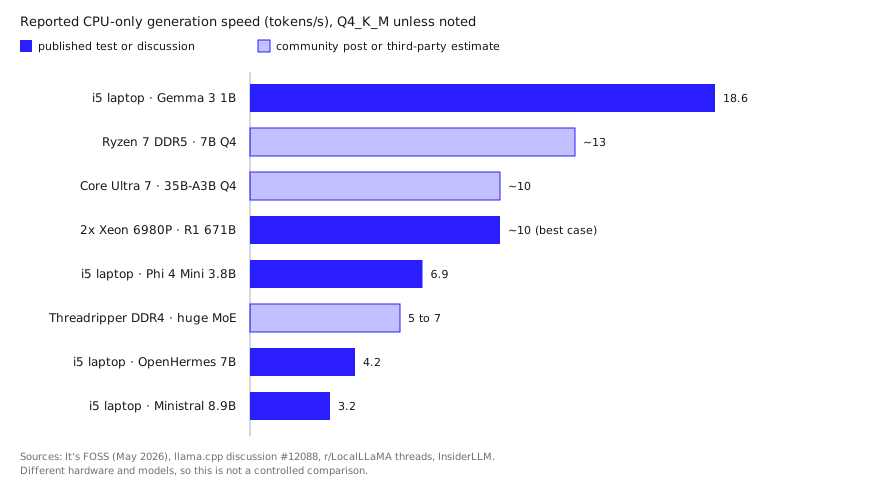
Expect about 3 to 4 tokens/s for 7B to 8B on an old laptop and 10 to 15 on a current DDR5 desktop. The chart and table pull from fetched sources and label each as a test, community report or third-party estimate.
| Hardware | Model and quant | Reported tokens/s | Source |
|---|---|---|---|
| Older i5 laptop, ~12 GB RAM | OpenHermes 7B, Q4_K_M | ~4.1 to 4.3 | It’s FOSS test, May 2026 |
| Same laptop | Ministral 3 8.9B, Q4_K_M | ~3.2 | It’s FOSS test, May 2026 |
| Same laptop | Gemma 3 1B, Q4_K_M | ~18.6 | It’s FOSS test, May 2026 |
| Ryzen 7 desktop, dual-channel DDR5 | 7B, Q4_K_M | ~13 | InsiderLLM guide (third-party estimate) |
| Core Ultra 7 165H, 64 GB | 35B-A3B, Q4_K_M | ~10 | r/LocalLLaMA, community-reported |
| Threadripper Pro 3945WS, DDR4-2666 | Very large MoE | 5 to 7 | r/LocalLLaMA, community-reported |
| Dual Xeon 6980P, DDR5-6400 | DeepSeek-R1 671B | ~10 (best case) | llama.cpp discussion #12088 |
Quant choice moves the numbers too. InsiderLLM’s 7B table on dual-channel DDR5 lists about 7 tokens/s at Q8_0, 13 at Q4_K_M and 14 at Q4_K_S. See GGUF quantization explained before dropping below Q4.
How does CPU compare with GPU and Apple Silicon?
CPUs lose to GPUs and unified-memory Macs on bandwidth, which is the same thing as losing on tokens/s. Apple lists up to 273 GB/s for the M4 Pro and up to 546 GB/s for the M4 Max, several times a dual-channel DDR5 desktop’s 89.6 GB/s. In the llama.cpp Apple Silicon thread, an M4 Max with 40 GPU cores generated about 83 tokens/s on Llama 2 7B Q4_0. That run uses the Metal GPU, not the CPU cores, so it is a comparison of memory systems, not of instruction sets.
| Typical bandwidth | What it costs you | Best for | |
|---|---|---|---|
| CPU + dual-channel DDR5 | ~90 GB/s | Slowest; cheapest; any RAM size | Small models, MoE, batch jobs, privacy on existing hardware |
| Apple Silicon (M4 Max) | up to 546 GB/s | Pricey unified memory | Large models in one box |
| Discrete GPU | Varies by card | VRAM cap limits model size | Fastest per token when the model fits |
For GPU sizing tables and VRAM requirements, see local LLM hardware requirements. If your GPU is AMD, local LLMs on AMD GPUs covers the backends. A small GPU can also take over the prompt-processing work while the CPU and RAM hold the weights, a split several commenters in the r/LocalLLaMA thread above suggested.
FAQ
Can you run an LLM on a CPU with no GPU?
Yes. llama.cpp and Ollama both run quantized GGUF models on CPU only, and llama.cpp accepts --device none to force it. The limit is speed, not capability.
What is the best LLM to run on CPU?
For most machines, a 1B to 4B dense model for speed, or an MoE model with about 3B active parameters, such as gpt-oss-20b or Qwen3-30B-A3B, if you have 16 to 32 GB of RAM. Check the model’s license and acceptable-use terms before shipping it in a product.
Is a CPU or a GPU better for running an LLM?
A GPU is faster whenever the model fits in its VRAM, because VRAM bandwidth is far higher than system RAM. A CPU is the choice when the model is larger than your VRAM or you have no GPU.
Can a mini PC run an LLM?
Yes, within the same rules. A mini PC’s RAM speed and channel count set its ceiling, so a DDR5 model with two channels will beat a single-channel DDR4 box. Low-end chips are limited to small models.
How much RAM do you need to run an LLM on CPU?
At least the model file size plus a few GB for the context and your OS. A Q4 8B model needs about 5 GB for weights, so 16 GB total is a comfortable floor.
Sources (10)
- llama.cpp build documentation (CPU build, BLAS, --device none)
- llama-bench README, llama.cpp (thread sweep example)
- LLM Inference Performance Engineering: Best Practices, Databricks
- openai/gpt-oss-20b model card, Hugging Face
- Qwen/Qwen3-30B-A3B model card, Hugging Face
- DeepSeek-R1 671B CPU-only benchmarks on dual Xeon 6980P, llama.cpp discussion #12088
- Performance of llama.cpp on Apple Silicon M-series, llama.cpp discussion #4167
- Apple introduces M4 Pro and M4 Max, Apple Newsroom (Oct 2024)
- Can You Run LLMs Locally Without a GPU? I Tested 8 Models on Linux, It's FOSS (May 2026)
- CPU-Only LLMs 2026: Real tok/s, Best Models & a 70B Dual-Xeon Build, InsiderLLM