Local LLM for coding hardware requirements: estimate VRAM as weights plus KV cache for Qwen3.5 9B, Qwen3.8 27B and a 35B MoE on 8 to 32 GB GPUs.
Memory for a local coding LLM is weights plus KV cache plus about 1 GB of overhead. Weights are parameters times bits per weight divided by 8. At Q4_K_M a 9B model needs about 5.7 GB, a 27B about 16.5 GB and a 35B MoE about 22 GB, before context. Recent Qwen models cache only 64 KiB per token or less, so long context costs far less than it did.
- params x bits / 8
- 16.46 GB
- 2.1 GB
- about 1 GB
Key takeaways
- Weights = parameters x bits per weight / 8. Q4_K_M averages 4.89 bits per weight, Q5_K_M 5.70, Q8_0 8.50 (llama.cpp's measured table).
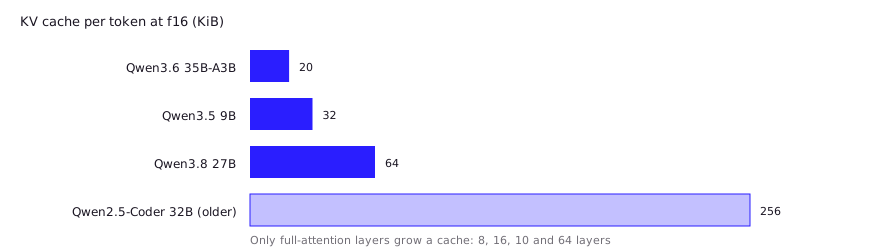
- KV cache = 2 x full-attention layers x KV heads x head dim x tokens x bytes per value. Qwen3.8 27B has only 16 full-attention layers, so it costs 64 KiB per token at f16; the older Qwen2.5-Coder-32B costs 256 KiB.
- A 24 GB card runs Qwen3.8 27B at Q4_K_M with room for 32k context (18.6 GB). 128k at f16 does not fit; with a q8_0 cache it does (about 21.8 GB with overhead).
- MoE models like Qwen3.6 35B-A3B must store all 36B weights, but llama.cpp can park the expert weights in system RAM with one flag. Community reports say this works on 12 to 16 GB cards.
- On 16 GB, developers report running the 27B only at 2-bit and 3-bit quants. Buy for VRAM first: capacity decides what loads, bandwidth decides how fast it answers.
Local LLM for coding hardware requirements come down to one sum: weights, plus KV cache, plus a little overhead, and that sum decides whether you need an 8, 16 or 24 GB GPU. This page shows the arithmetic once, with real model files and real architecture numbers, so you can answer it for any model. Figures below were fetched from Hugging Face and llama.cpp documentation on 2026-10-26 and 2026-10-27. The examples are Alibaba’s current Qwen models (Qwen3.5 9B, Qwen3.8 27B, Qwen3.6 35B-A3B) plus one older Qwen2.5-Coder model as a contrast, because their configs and GGUF sizes are public. For which model to pick, see the best local LLM for coding.
How do you estimate memory for a model?
Memory for a model is its weights plus its KV cache plus runtime overhead, and the weights part is simple: parameters times bits per weight, divided by 8.
The catch is that “4-bit” is not 4.0 bits. GGUF quant types mix precisions across tensors, so the average is higher. llama.cpp’s quantize README measures it on Llama 3.1 8B:
| Quant | Bits per weight |
|---|---|
| Q4_K_M | 4.89 |
| Q5_K_M | 5.70 |
| Q6_K | 6.56 |
| Q8_0 | 8.50 |
| F16 | 16.00 |
Worked example: Hugging Face lists about 27.8 billion parameters for Qwen3.8 27B. At Q4_K_M, 27.8 x 4.89 / 8 = 17.0 GB. The published Unsloth GGUF is 16.46 GB, so the formula lands about 3% high. Part of that is the vision tower included in the parameter count, and part is that Unsloth’s “UD” quants mix bit widths per tensor. Use the real file size when you can; use the formula when you can’t.
Weights below come from the file sizes in the Unsloth Qwen3.8-27B GGUF repo and the matching repos for the other two models, not from the formula. Sizes are decimal gigabytes.
| Model | Params (HF metadata) | Q4_K_M | Q5_K_M | Q8_0 |
|---|---|---|---|---|
| Qwen3.5 9B | 9.7B | 5.68 GB | 6.58 GB | 9.53 GB |
| Qwen3.8 27B | 27.8B | 16.46 GB | 19.77 GB | 29.05 GB |
| Qwen3.6 35B-A3B (MoE) | 36.0B | 22.13 GB | 26.46 GB | 36.90 GB |
| Qwen2.5-Coder 32B (older, for contrast) | 32.8B | 19.85 GB | 23.26 GB | 34.82 GB |
The Qwen3.x rows use Unsloth’s “UD” variants for Q4_K_M and Q5_K_M, so they are not byte-identical to a plain llama.cpp quant. The last row is from Qwen’s own GGUF repo.
How much does context length add (KV cache)?
Context length adds a KV cache that grows linearly with every token in the window. How fast it grows depends on how many layers use full attention, and that changed with the current Qwen generation. The formula:
KV bytes = 2 x full-attention layers x KV heads x head dim x tokens x bytes per value
The 2 is for keys and values. Default storage is f16, which is 2 bytes per value, per the llama.cpp server’s --cache-type-k default. The numbers come from each model’s config.json. Qwen3.5, 3.6 and 3.8 are hybrid models: their configs set full_attention_interval to 4, so only every fourth layer keeps a growing KV cache and the rest use linear attention. Head dim is 256 for all three.
| Model | Layers | Full-attention layers | KV heads | KV per token (f16) |
|---|---|---|---|---|
| Qwen3.5 9B | 32 | 8 | 4 | 32 KiB |
| Qwen3.8 27B | 64 | 16 | 4 | 64 KiB |
| Qwen3.6 35B-A3B | 40 | 10 | 2 | 20 KiB |
| Qwen2.5-Coder 32B (older) | 64 | 64 | 8 | 256 KiB |
The older model, with head dim 128, shows what “every layer caches” costs: four times the 27B per token, from a similar-sized dense model. The linear-attention layers do keep a fixed-size state that does not grow with context. That state is not sized here, so the 1 GB overhead allowance below has to cover it.
Multiply by tokens and you get the cache. Totals add it to the Q4_K_M weights from the table above (128k means 131,072 tokens, within the 262,144 each Qwen3.x config lists as its maximum):
| Model | KV at 8k | KV at 32k | KV at 128k | Total at 8k | Total at 32k | Total at 128k |
|---|---|---|---|---|---|---|
| 9B | 0.27 GB | 1.07 GB | 4.29 GB | 5.95 GB | 6.75 GB | 9.97 GB |
| 27B | 0.54 GB | 2.15 GB | 8.59 GB | 17.0 GB | 18.6 GB | 25.1 GB |
| 35B-A3B (MoE) | 0.17 GB | 0.67 GB | 2.68 GB | 22.3 GB | 22.8 GB | 24.8 GB |
| 32B older, full attention | 2.15 GB | 8.59 GB | 34.4 GB | 22.0 GB | 28.4 GB | 54.3 GB |
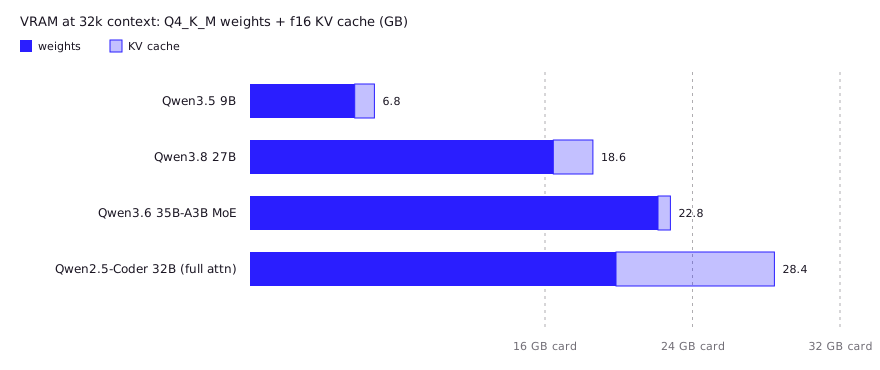
The totals exclude overhead. This page budgets about 1 GB for compute buffers and the CUDA context. That is an editorial planning allowance, not a measured figure, so check your own runtime.
You can shrink the cache. llama.cpp lets you store K and V as q8_0, q4_0 and other types with -ctk and -ctv. Since q8_0 stores roughly 8.5 bits per value against 16 for f16, expect about half the cache. Quality impact varies by model and has not been measured here. One developer using a 12 GB RTX 4070 reports about the same decode speed with a q8_0 cache at 32k as with f16 at 4k, from one run per setting and no perplexity number, so treat that as a single data point and test on your own code.
What hardware does a local LLM for coding need at 8, 12, 16, 24 and 32 GB?
You can run a 9B model on 8 GB, the 27B on 24 GB with room for context, and a 35B MoE at the 24 to 32 GB tier. One developer with a 16 GB RTX 5070 Ti ran the 27B at 2-bit with 128k context and a 4-bit KV cache and reported 50 to 60 tokens/sec (Hacker News); the table below puts that setup in its “tight” cell. Using the totals above plus the 1 GB allowance:
| VRAM | Comfortable | Tight | Does not fit |
|---|---|---|---|
| 8 GB | 9B Q4_K_M at 8k (5.95 GB) | 9B Q4_K_M at 32k (6.75 GB); 9B Q5_K_M at 8k (6.85 GB) | 9B Q5_K_M at 32k, 9B Q8_0 at any context, 27B at Q4 |
| 12 GB | 9B Q5_K_M at 32k (7.65 GB); 9B Q8_0 at 8k (9.80 GB) | 9B Q8_0 at 32k (10.6 GB); 9B Q4_K_M at 128k (9.97 GB) | 27B even at Q3_K_XL (13.15 GB of weights) |
| 16 GB | 9B Q8_0 at 32k (10.6 GB); 27B Q3_K_XL at 8k (13.7 GB) | 27B Q2_K_XL (9.83 GB) at 128k with a 4-bit cache | 27B Q4_K_M at any context (16.46 GB of weights alone) |
| 24 GB | 27B Q4_K_M at 32k (18.6 GB); 27B Q5_K_M at 8k (20.3 GB) | 27B Q4_K_M at 128k with q8_0 cache (20.8 GB); 27B Q5_K_M at 32k (21.9 GB); 35B-A3B Q4_K_M at 8k (22.3 GB) | 27B Q4_K_M at 128k with f16 cache (25.1 GB), 27B Q8_0 |
| 32 GB | 27B Q5_K_M at 128k (28.4 GB); 35B-A3B Q4_K_M at 128k (24.8 GB) | 35B-A3B Q5_K_M at 128k (29.1 GB) | 27B Q8_0 at 32k (31.2 GB plus overhead) |
The 4-bit cache figure assumes q4_0 stores roughly 4.5 bits per value, about 0.28 of f16, so 128k on the 27B costs about 2.4 GB. Coding agents use context quickly, so if you work at 32k or more, read the 32k column, not the 8k one. When a model does not fit, the failure is either an out-of-memory error or a silent slowdown. On Linux, llama.cpp’s CUDA unified memory option “allows swapping to system RAM instead of crashing when the GPU VRAM is exhausted”, which keeps the process alive but is exactly the slow path you were trying to avoid.
If you’re picking a quant and wondering what you lose by going lower, GGUF quantization explained covers the quality side.
What do developers report on 16 GB and 24 GB cards?
Community reports match the arithmetic: the 27B fits on 16 GB only at 2-bit or 3-bit, and context, not weights, is the constraint. These are single-user reports from Hacker News, not tests run for this page, and they have not been reproduced.
- A developer with a 16 GB RTX 5070 Ti ran the 2-bit UD-Q2_K_XL at 128k context with a 4-bit KV cache and reported 50 to 60 tokens/sec (HN). That is the “tight” cell in the table: 9.83 GB of weights plus about 2.4 GB of cache.
- Another with an RTX 5080 (16 GB) reported 46 tokens/sec at UD-Q3_K_XL (HN). A third, on a 2016 Pascal GPU with 16 GB, works at roughly 100k context with a q8 cache but had to drop to Q2 for usable speed (HN).
- A commenter on a launch thread argued that 4-bit quants leave too little context on 16 GB, and that agents with heavy prompts can burn 30k tokens before doing any work (HN). That is why the 8k column understates real coding use.
- Spilling to system RAM hurts. One user with a 20 GB RTX 3080 running UD-Q4_K_XL with the KV cache offloaded to RAM saw 10 tokens/sec at first, dropping to 5 at 50k context (HN).
What changes on Apple Silicon unified memory?
On Apple Silicon the CPU and GPU share one memory pool, so you size against total RAM minus what macOS holds back, not a separate VRAM figure. Apple’s M4 Pro supports up to 64 GB at 273 GB/s and the M4 Max up to 128 GB at up to 546 GB/s, which is why a 64 GB Mac can hold Qwen3.8 27B at Q8_0 with a 32k context (31.2 GB, if you raise the GPU limit) where a 24 GB GPU cannot.
The GPU can’t use all of it by default. A llama.cpp discussion reports a default reserve of about a third of memory (a quarter above 32 GB) and describes raising the limit with sudo sysctl iogpu.wired_limit_mb=<mb>, which does not persist across reboots. Those figures date from 2023 threads, so check the recommendedMaxWorkingSetSize value in llama.cpp’s Metal startup output instead of trusting a percentage. Don’t hand the GPU everything: a maintainer advised against 100%.
Capacity is the strength; bandwidth is the weakness. The 546 GB/s ceiling on a Max chip is set by the chip, and token generation is generally limited by memory bandwidth, so check a bandwidth figure for any GPU you compare against; a model that fits can still answer slowly. For MLX versus GGUF on a Mac, see GGUF vs MLX.
Is CPU offload fine, and what about MoE models?
CPU offload is fine for MoE models and painful for dense ones. A dense 27B reads all its weights for every token, so any layer parked in system RAM runs at RAM speed. A mixture-of-experts model like Qwen3.6 35B-A3B stores about 36B parameters but, per its config, routes each token to 8 of 256 experts, so only a small fraction is read per token.
The memory bill is for the full 36B, but each token touches a fraction of it. llama.cpp exposes two flags for this, documented in the server README:
# keep every expert tensor in system RAM, everything else on the GPU
llama-server -m Qwen3.6-35B-A3B-UD-Q4_K_M.gguf -ngl all --cpu-moe -c 32768

# keep only the first N layers' experts on the CPU, the rest on the GPU
llama-server -m Qwen3.6-35B-A3B-UD-Q4_K_M.gguf -ngl all --n-cpu-moe 20 -c 32768
With --cpu-moe, the GPU holds attention weights and the KV cache, so a card in the 8 to 12 GB range can plausibly serve this model if you have about 24 GB of free system RAM for the 22.13 GB file. Developers report it works. One says Qwen3.6 35B-A3B runs well at Q4 on about 32 GB of combined RAM and VRAM by offloading most experts, and that “it doesn’t hurt performance too much” compared with dense models (HN). A 12 GB RTX 4070 owner reports about 34 tokens/sec decoding a 35B MoE with --cpu-moe and a q8_0 cache at 32k context (dev.to), though the post doesn’t state the quant. I haven’t measured speed, and you shouldn’t expect GPU-only throughput. Raise --n-cpu-moe only until the model loads, then lower it as VRAM allows. For choosing between runtimes, see Ollama vs llama.cpp vs vLLM.
Which GPU should a developer buy in 2026?
Buy the most VRAM you can afford on a current-generation NVIDIA card, then check memory bandwidth. VRAM capacity sets which models load; bandwidth sets tokens per second. Prices move too fast to print here, so these are the criteria:
- Capacity tiers matter more than model names. The jumps that change what you can run are 8, 12, 16, 24 and 32 GB. NVIDIA lists the RTX 5070 at 12 GB and the 5070 Ti at 16 GB, the RTX 3090 at 24 GB, and the RTX 5090 at 32 GB on a 512-bit bus.
- 24 GB is the step where the 27B runs at Q4. Below that, you are on 3-bit quants or MoE offload.
- Check power and case. The RTX 5090’s listed total graphics power is 575 W.
- System RAM is your MoE budget. If you plan to use
--cpu-moe, 32 GB of RAM is a floor, not a luxury. - Skip splitting across cards unless you must. llama.cpp’s docs warn that peer access can cause crashes or corrupted output on some motherboard and BIOS settings.
Rule of thumb from the tables: 8 GB is the entry point for a 9B coder; 16 GB runs the 27B only at 2-bit or 3-bit; 24 GB is the entry point for the 27B at Q4 and a usable context; 32 GB is where long context on the 27B stops being a compromise.
FAQ
How much VRAM do I need for a local coding LLM?
For Qwen3.5 9B at Q4_K_M with an 8k context, about 7 GB including overhead. For Qwen3.8 27B, about 18 GB. For the 35B-A3B MoE, about 23 GB unless you offload experts to system RAM. These grow by the KV cache if you raise the context.
Is 16 GB of VRAM enough for local coding?
Yes for a 9B model at high quality. The 27B does not fit at Q4_K_M, since its 16.46 GB of weights exceed the card, but developers report running it at Q2 and Q3 with 100k+ context.
Is 8 GB of VRAM enough?
It runs a 9B coder at Q4_K_M or Q5_K_M with a short to moderate context. The 27B won’t fit on the GPU, though a MoE model with --cpu-moe might, if you have the system RAM.
Does a longer context window use more VRAM?
Yes, linearly. For Qwen3.8 27B at f16, each token costs 64 KiB, so 8k tokens is 0.54 GB and 128k tokens is 8.6 GB. An older full-attention model like Qwen2.5-Coder 32B costs 256 KiB per token.
Can I run a local coding LLM on a Mac?
Yes. Apple Silicon shares memory between CPU and GPU, so a 64 GB M4 Pro can hold the 27B at Q8_0 with a 32k context (31.2 GB plus overhead) if you raise the GPU limit. The default GPU memory cap is lower than total RAM and can be raised with iogpu.wired_limit_mb.
Sources (10)
- llama.cpp quantize README: bits per weight by quant type (ggml-org/llama.cpp)
- llama.cpp server README: --cache-type-k/v, --cpu-moe, --n-cpu-moe, --n-gpu-layers
- llama.cpp build docs: CUDA unified memory fallback
- Qwen3.8-27B model card and config.json, Hugging Face (Qwen)
- Qwen3.6-35B-A3B model card and config.json, Hugging Face (Qwen)
- Qwen3.5-9B model card and config.json, Hugging Face (Qwen)
- Qwen3.8-27B-GGUF file sizes, Hugging Face (Unsloth)
- Hacker News: Qwen3.8 27B at 2-bit on a 16 GB RTX 5070 Ti, 128k context
- Hacker News: offloading MoE experts to system RAM for agentic coding
- llama.cpp discussion #2182: raising the GPU memory limit on Apple Silicon