llama.cpp vs Ollama vs vLLM for local coding models: formats, hardware, OpenAI-compatible APIs, concurrency and setup effort, with a pick for each use case.
Use Ollama if you are one developer who wants a local coding model running in a few commands. Use llama.cpp when you want direct control over GGUF files, quantization and server flags. Use vLLM when many people or agents share GPUs and you need batching. All three expose OpenAI-compatible endpoints, so your editor tooling rarely decides the choice; concurrency and hardware do.
- Ollama MIT, llama.cpp MIT, vLLM Apache-2.0
- 1 request per model
- 4k under 24 GiB VRAM
- Highly experimental
Key takeaways
- Ollama and llama.cpp are MIT-licensed and run on laptops; vLLM is Apache-2.0 and built for GPU serving with continuous batching.
- Ollama's docs set OLLAMA_NUM_PARALLEL to 1 by default, and memory use scales with parallelism times context length.
- llama.cpp's server enables continuous batching by default and exposes parallel slots through --parallel.
- vLLM's own docs call GGUF support highly experimental, so it prefers Hugging Face-format weights.
- Ollama's default context depends on VRAM: 4k under 24 GiB, 32k at 24-48 GiB, 256k above that. Its docs suggest at least 64k for coding tools.
- Community benchmarks agree vLLM wins at high concurrency, but one October 2026 test found llama.cpp matching it on a 24 GB card.
Developers comparing llama.cpp vs Ollama vs vLLM keep reporting the same pattern: on one stream the gap is small or traces to build flags and defaults, and the engines only separate under concurrency. In one October 2026 test, llama.cpp matched vLLM on a 24 GB card at 32 requests. Claims below come from each project’s repository or docs, fetched on 2026-10-26, and the numbers from other people’s benchmarks are marked as theirs. We ran no tests ourselves. These tools ship weekly, so check the linked pages before you pin a version.
What is the difference between Ollama, llama.cpp and vLLM in one sentence each?
They sit at three different layers, which is why the comparison is less direct than the search term suggests.
- llama.cpp is an MIT-licensed C/C++ inference engine that runs GGUF models on almost any hardware, with minimal setup.
- Ollama is an MIT-licensed model runner for macOS, Linux and Windows with a model library, a REST API and a one-command workflow. Its README lists llama.cpp as a supported backend.
- vLLM is an Apache-2.0 serving engine, started at UC Berkeley’s Sky Computing Lab, designed for high-throughput serving on GPUs with PagedAttention and continuous batching.
Put differently: llama.cpp is the engine, Ollama is the packaged product around it, and vLLM is a different engine aimed at servers.
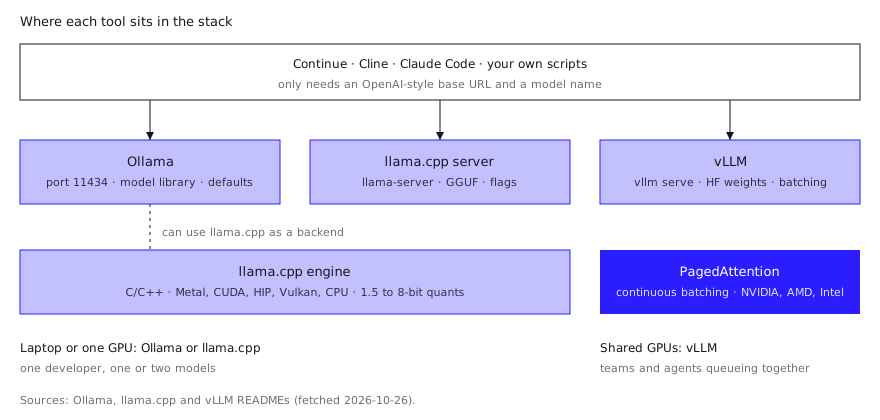
llama.cpp vs Ollama vs vLLM: how do they compare on formats, hardware, API and concurrency?
They compare most sharply on concurrency and weight format, and least on API compatibility.
| Ollama | llama.cpp | vLLM | |
|---|---|---|---|
| License | MIT | MIT | Apache-2.0 |
| Primary model format | Its own library plus imported GGUF and Safetensors | GGUF (with HF-to-GGUF conversion scripts) | Hugging Face-format weights; GGUF “highly experimental” |
| Hardware | macOS, Linux, Windows | Apple silicon (Metal), NVIDIA (CUDA), AMD (HIP), Vulkan, SYCL, CPU with AVX/NEON and more | NVIDIA, AMD and Intel GPUs, several CPU architectures, plugins for TPUs, Gaudi and Apple silicon |
| OpenAI-compatible API | Yes, at localhost:11434/v1/ | Yes, via its server | Yes, via vllm serve |
| Concurrency default | 1 request per model | Parallel slots, continuous batching on by default | Continuous batching core feature |
| Setup effort | Lowest | Low to medium | Highest |
| Best fit | One developer | Control and newest quants | Teams and agents on shared GPUs |
Sources: the Ollama, llama.cpp and vLLM repositories, plus the docs linked in the sections below.
When is Ollama enough?
Ollama is enough when one person runs one or two models for their own editor and agent, and wants it to just work. Install it with a shell script on macOS or Linux or a PowerShell installer on Windows, then pull a model by name. The server listens on port 11434 and, per the OpenAI compatibility docs, serves /v1/chat/completions, /v1/responses, /v1/completions, /v1/models and /v1/embeddings. Chat completions support tools and streaming; logprobs are not supported.
Know the defaults before you blame the model:
- Context can be short. The context length docs set the default by VRAM: 4k under 24 GiB, 32k from 24 to 48 GiB, 256k at 48 GiB and above. You can override it with
OLLAMA_CONTEXT_LENGTH, and the docs suggest at least 64k for agents and coding tools. On a typical consumer GPU, expect to raise it. - Parallelism is off.
OLLAMA_NUM_PARALLELdefaults to 1, and required RAM scales withOLLAMA_NUM_PARALLELmultiplied byOLLAMA_CONTEXT_LENGTH. Raising it costs memory. - Queueing is bounded.
OLLAMA_MAX_QUEUEdefaults to 512; beyond that the server returns a 503.
If you outgrow the library, you can import your own weights. A Modelfile with FROM /path/to/file.gguf and ollama create works, but the import docs state that Ollama does not quantize GGUF models on import, so quantize first. For how quant levels trade quality for memory, see GGUF quantization explained. For a GUI-first alternative, see LM Studio vs Ollama.
When should you drop down to llama.cpp?
Drop to llama.cpp when you need a specific build, flag or quant that a wrapper does not expose yet, or when you want one small dependency-free binary. One user in an August 2026 Hacker News thread reported the same model running about twice as fast after compiling llama.cpp for their own CUDA and CPU setup instead of using Ollama’s precompiled build, and said they did not know why. Another commenter listed complaints about Ollama: a small default context, no engine flags on the command line, and GGUF files copied into its own store. Treat those as opinions, then check the docs. The README describes plain C/C++ with no external dependencies and lists backends for Metal, CUDA, HIP, Vulkan, SYCL, OpenCL and more, plus CPU+GPU hybrid inference that helps when a model is larger than your VRAM. It supports integer quantization from 1.5 to 8 bits.
Getting started is short. The current quick start installs with a script, then:
llama serve -hf ggml-org/Qwen3.5-0.8B-GGUFThe server README (which names the binary llama-server) documents the details that matter for shared use:
-np, --parallel Nsets the number of slots; the default is auto.- Continuous batching (
-cb) is enabled by default. --api-keyaccepts comma-separated keys, so you can put a local network behind a token.-md, --model-draftand--spec-typeconfigure speculative decoding.- A built-in web UI is on by default;
--no-webuiturns it off. - It serves chat completions, responses, embeddings,
/v1/completionsand/v1/models.
The cost of this control is that you own the decisions: layer offload, context size, threads, which GGUF to download. That is the right trade for some people and a tax for others. Hardware sizing lives in local LLM hardware requirements.
When do you need vLLM?
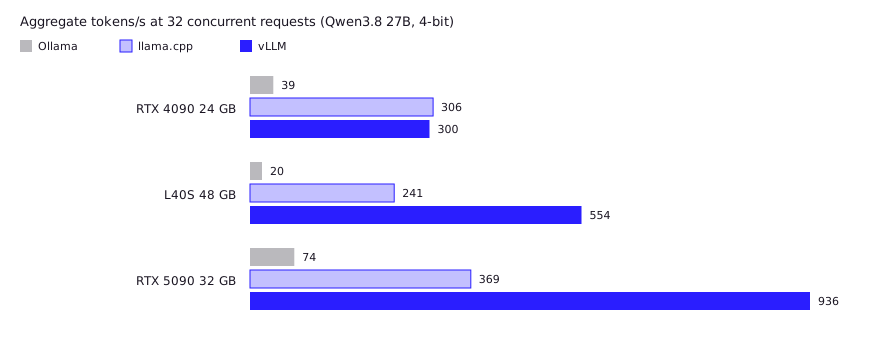
You need vLLM when several developers or agents hit the same GPUs at once. An October 2026 ComputingForGeeks test of Qwen3.8 27B at 4-bit on rented cards reported vLLM pulling far ahead of Ollama at 32 concurrent requests, because Ollama served that model one request at a time. The lead depended on the card: llama.cpp roughly matched vLLM on a 24 GB RTX 4090 (306 against 300 tokens/s) while vLLM reached 936 against 369 on an RTX 5090. The author recommends vLLM for shared endpoints on big cards and llama.cpp for multi-user on 24 GB. One blog, one model, versions pinned in the post.
vLLM’s README lists PagedAttention for memory management, continuous batching, chunked prefill, prefix caching, tensor, pipeline, data and expert parallelism, speculative decoding, multi-LoRA, and quantization including FP8, INT8, INT4, GPTQ and AWQ. It serves an OpenAI-compatible API, and the README also lists Anthropic Messages API support.
Three caveats matter for local coding use:
- GGUF is a second-class citizen. The vLLM docs call GGUF support “highly experimental and under-optimized” and note it now requires a separate plugin. Plan on Hugging Face-format weights or the quantization formats vLLM prefers, not the GGUF files you already downloaded.
- Hardware is server-shaped. The installation page lists NVIDIA CUDA, AMD ROCm and Intel XPU GPUs, several CPU families, and Apple silicon via the separate vLLM-Metal project. It does not state Windows support. A Mac laptop is not its home turf.
- Setup is real work. You manage Python environments, CUDA compatibility and model-specific flags. Worth it for a team endpoint, overkill for one person.
A single developer rarely saturates a GPU, so batching buys little. The calculus flips when a team plus a few background agents queue behind each other, which is the case Ollama’s default of one parallel request per model handles worst. Red Hat’s vLLM vs Ollama explainer reaches the same split, without benchmark numbers.
What do developers report in practice?
Docs describe intent; users describe what happens on their machines. These are other people’s reports, not our tests, and they vary with hardware, build and version.
- Single stream, small gap or none. A Hugging Face post from January 2025 ran DeepSeek R1 Distill 1.5B on both engines (hardware and quant unstated) and reported about 138 tokens/s on llama.cpp against 122 on Ollama, with a much larger prompt-processing gap. Mozilla.ai’s September 2026 benchmark of four servers (Qwen3.5 on a Mac Studio, an L40S and a Steam Deck) found them close on prompt processing, and said build flags and speculative-decoding settings moved results more than the choice of server. It did not test concurrency.
- Concurrency is where the engines separate. See the chart in the vLLM section above. Robert McDermott’s 2025 write-up reported up to 3.2 times vLLM’s requests per second versus Ollama on identical hardware, while calling Ollama hard to beat for laptops and a few users.
What the reports agree on: for one developer the engines are within normal tuning noise, and for a shared box vLLM or a tuned llama.cpp pulls ahead. Where they disagree, the cause is usually settings, not the logo.
How do they plug into coding tools like Continue, Cline and Claude Code?
All three work with any tool that accepts an OpenAI-style base URL, so the tool seldom decides.
| Tool | Ollama | llama.cpp or vLLM |
|---|---|---|
| Continue | provider: ollama, optional apiBase for a remote host | See Continue’s model provider pages for generic OpenAI-compatible endpoints |
| Cline | Covered by its Ollama provider docs | “OpenAI Compatible” provider with base URL, key and model ID |
| Claude Code | ollama launch claude, or ANTHROPIC_BASE_URL=http://localhost:11434 | vLLM lists Anthropic Messages API support; check the project docs for your version |
Details worth knowing:
- Ollama’s Claude Code guide recommends a context window of at least 64k tokens for local models and a model with tool calling. A 4k default will cripple an agent, so check yours first. See running a local LLM with Claude Code for the full setup.
- Continue’s docs warn that Continue may request a higher default context than other Ollama tools, which can trigger a “Model requires more system memory” error. Lower
contextLengthor pick a smaller model. - Cline’s OpenAI-compatible mode requires a base URL that is not the official OpenAI one, plus any key your server expects. llama.cpp’s
--api-keyand vLLM’s server can both supply that.
Which one should you pick?
Pick by who uses it, not by which tool is fastest in a blog chart.
- One developer, one machine: Ollama. Fewest decisions, good editor support.
- One developer who wants control, or an odd GPU: llama.cpp. You get the newest quants and backends first and a lean server.
- A team or fleet of agents on shared NVIDIA or AMD GPUs: vLLM, with Hugging Face-format weights.
- Mixed: prototype on Ollama, then move the same OpenAI-compatible client config to the server you pick later. Only the base URL and model name change.
FAQ
Is llama.cpp faster than Ollama?
Ollama can use llama.cpp as a backend, so the underlying kernels overlap. Differences come from defaults such as context size and parallelism, and from build versions. Community reports range from no gap to about 2x, and the high end usually traces to builds or settings. Benchmark on your hardware with the same model file and settings instead of trusting a generic percentage.
Is vLLM better than Ollama for coding?
Only if multiple people or agents share the GPUs. For one developer, Ollama’s simpler setup wins; vLLM’s batching helps when requests queue.
Can vLLM run GGUF models?
Yes, but the vLLM docs call it highly experimental and under-optimized, and it needs a separate plugin. Prefer Hugging Face-format weights.
Do all three support the OpenAI API?
Yes. Ollama serves /v1/ on port 11434, llama.cpp’s server exposes OpenAI-compatible routes, and vllm serve provides /v1/chat/completions and related endpoints. Feature coverage differs, for example Ollama does not support logprobs.
Which runs on a Mac?
Ollama and llama.cpp both support Apple silicon. vLLM lists Apple silicon only through the separate vLLM-Metal project.
Sources (10)
- Ollama repository (README, license, integrations)
- Ollama docs: FAQ (concurrency, queueing)
- Ollama docs: Context length (VRAM-based defaults)
- llama.cpp repository (README, backends, quick start)
- llama.cpp server README (flags, endpoints)
- vLLM repository (README, features, license)
- vLLM docs: GGUF quantization
- ComputingForGeeks: Ollama vs vLLM vs llama.cpp benchmark (Oct 2026, community blog)
- Mozilla.ai: Benchmarking local LLM servers (Sep 17, 2026)
- Hacker News discussion: Why your local LLM feels dumber than it is (Aug 2026)