LM Studio vs Ollama for developers: CLI and headless modes, OpenAI-compatible APIs, MLX on Mac, model sources and work-use licensing, from each project's docs.
Ollama is the better default for developers who want a scriptable, MIT-licensed local model server for editors, containers and CI. LM Studio is the better pick if you want a GUI to browse Hugging Face models and tune settings, and it can also run headless. Both expose OpenAI-compatible APIs, both run MLX on Apple Silicon, and both are free to use at work.
- MIT
- 11434 (Ollama), 1234 (LM Studio)
- Free since Jul 8, 2025
- v0.40.0, supported architectures
Key takeaways
- Ollama is CLI and daemon first, MIT licensed, and listens on 127.0.0.1:11434. LM Studio is GUI first, with an `lms` CLI and a headless `llmster` daemon on port 1234.
- Both serve OpenAI-style `/v1/chat/completions`, `/v1/embeddings` and `/v1/responses`. Ollama documents gaps such as no `tool_choice` or `logprobs` on chat completions.
- On Apple Silicon, LM Studio runs MLX models through its bundled mlx-engine. Ollama moved to MLX by default for supported architectures in 0.40.0, and still uses llama.cpp for the rest.
- LM Studio has been free for work use since July 8, 2025, but its app terms are not an open source license. Ollama is MIT.
- Community reports are mixed on speed: a September 2026 Mozilla.ai benchmark found server choice mattered less than build and settings, and LM Studio trailed on small models on a Mac.
- Neither tool changes a model's own license. Llama, Gemma or Qwen terms still apply to whatever you load.
What are the core differences in LM Studio vs Ollama?
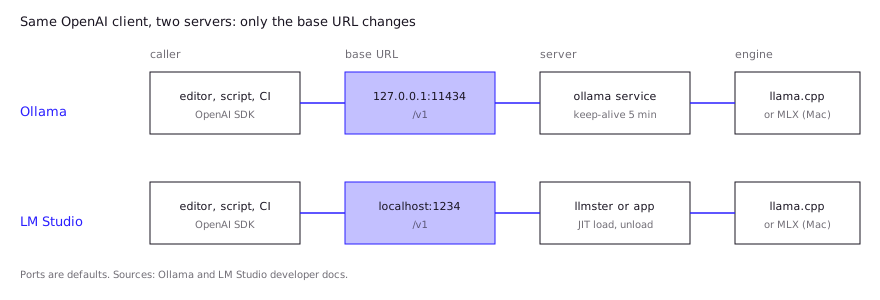
In the LM Studio vs Ollama question, the core difference is where each tool starts. Ollama starts as a background server and a CLI, and everything else (apps, editors, scripts) talks to it over HTTP. LM Studio starts as a desktop app with a model browser and chat UI, then adds a CLI and a headless daemon around the same engine.
For a developer, that means the question is rarely “which runs models better” and more “which fits how I will call the model”. Both are wrappers around the same underlying inference stack on most hardware. Ollama’s repository credits llama.cpp as its backend, and LM Studio’s app docs say it runs models with llama.cpp and, on Apple Silicon, MLX.
- Ollama:
curl -fsSL https://ollama.com/install.sh | shon macOS and Linux, a Windows installer, an officialollama/ollamaDocker image, andpip install ollamaornpm i ollamaclients. Models run withollama run <model>. - LM Studio: a GUI app for Mac, Windows and Linux, plus the
lmsCLI (lms get,lms server start,lms chat) and Python and TypeScript SDKs.
The practical split: pick Ollama when the model is a service your tooling consumes, and LM Studio when you want to look at the model, switch quants and settings interactively, and sometimes serve it.
How do LM Studio and Ollama compare side by side?
LM Studio and Ollama differ most on interface, licensing and model sourcing, and are close on API coverage. This table uses each project’s own documentation as of October 26, 2026.
| Ollama | LM Studio | |
|---|---|---|
| Primary interface | CLI and background server | Desktop GUI, plus lms CLI |
| Headless / server use | Native (systemd service, Docker image) | llmster daemon via lms daemon up, or the desktop app in headless mode |
| Default API address | 127.0.0.1:11434 | Port 1234 (examples use http://localhost:1234/v1) |
| OpenAI-compatible endpoints | /v1/chat/completions, /v1/completions, /v1/embeddings, /v1/models, /v1/responses (non-stateful), /v1/audio/speech | /v1/chat/completions, /v1/completions, /v1/embeddings, /v1/models, /v1/responses |
| Engines | llama.cpp, MLX on Apple Silicon for supported models | llama.cpp, MLX on Apple Silicon |
| Model sources | Ollama library, plus ollama run hf.co/{user}/{repo} for GGUF | Hugging Face browser built into the app |
| License | MIT | App governed by LM Studio’s terms; lms and mlx-engine are MIT |
| Cost for work use | Free | Free since July 8, 2025 |
| Platforms | macOS, Windows, Linux, Docker | macOS (Apple Silicon only), Windows x64 and ARM, Linux x64 and ARM64 |
Sources for each row are in the sections below. The Ollama cloud models feature, which runs some models on Ollama’s servers, can be turned off with OLLAMA_NO_CLOUD=1, per the Ollama FAQ.
Which is better on a Mac (MLX)?
On Apple Silicon, a commenter in a September 2026 Hacker News thread said LM Studio with MLX was faster on M-series Macs than the alternatives they had tried, with the caveat that the model must be packaged in the right format. That is one report, not a benchmark. Both tools run MLX models, so neither is locked out of Apple’s framework. The difference is how mature and how automatic it is.
LM Studio has shipped its own MLX layer for a while. The mlx-engine repository (MIT) says “LM Studio 0.3.4 and newer for Mac ships pre-bundled with mlx-engine”, with text, vision and speculative decoding support. LM Studio’s system requirements list Apple Silicon (M1 through M4) and macOS 14 or later, and state that Intel Macs aren’t supported.
Ollama arrived later. Its March 30, 2026 announcement put an MLX backend in preview in Ollama 0.19, initially for a single model (Qwen3.5-35B-A3B), and recommended a Mac with more than 32GB of unified memory. heise online reports that Ollama 0.40.0 made MLX the default on Apple Silicon “for supported models”, with Gemma 4, Qwen 3.6 and Qwen 3.5 listed. Models whose architecture isn’t supported stay on llama.cpp, so the engine you get depends on the model, not on a setting.
What neither vendor publishes is a neutral head-to-head speed comparison, though Mozilla.ai’s independent benchmark (below) measured a roughly 10% prompt-processing gain from MLX builds for 27B in both tools. Ollama’s own numbers compare two of its versions with different quantizations, so they don’t say which app is faster on your Mac. If tokens per second matters, run the same model, quant and prompt in both. For the format question underneath this, see GGUF vs MLX.
Which is better for serving an API to your editor?
Developers who serve a model to their tools describe the trade-off in terms of scripts and timeouts. In a December 2025 r/LocalLLaMA thread about leaving Ollama, one user kept it for simplicity because their scripts already talked to it, another was moving Python workflows to llama.cpp, and a third liked that LM Studio has a GUI and model switching. A Hacker News user running Roo Code switched from Ollama to LM Studio over memory-overload handling, then hit a 2-to-3-minute hard timeout on LM Studio’s API server.
Ollama is the simpler default for an always-on API, while LM Studio is a close second if you already use its app. Both can be pointed at by any OpenAI client by changing the base URL.
from openai import OpenAI

# Ollama
client = OpenAI(base_url="http://localhost:11434/v1/", api_key="ollama")  # key required but ignored

# LM Studio
client = OpenAI(base_url="http://localhost:1234/v1")
Differences that matter in practice:
- Lifecycle. Ollama runs as a service (systemd on Linux, the app on macOS and Windows) and keeps a model in memory for 5 minutes by default, controlled by
OLLAMA_KEEP_ALIVE. LM Studio’s headlessllmsterdaemon can load models just in time on first request and unload them after idle time. The headless docs say this is on by default and don’t give a duration. - Network exposure. Ollama binds to
127.0.0.1unless you setOLLAMA_HOST. Check LM Studio’s server settings in the app before exposing it beyond your machine, and don’t put either on the open internet without a proxy and auth. - API gaps. Ollama documents what it doesn’t support: on chat completions,
logprobs,tool_choice,logit_biasandn, and image URLs (base64 only). Its Responses API is non-stateful. Read the compatibility page if your code relies on any of these. LM Studio’s docs list its supported endpoints and note that Codex works becausePOST /v1/responsesis implemented. They don’t publish an equivalent unsupported-parameters list, so test your client. - Concurrency. Ollama’s
OLLAMA_NUM_PARALLELandOLLAMA_MAX_LOADED_MODELSare documented in the FAQ. If you need real multi-user throughput, neither is the right tool; see Ollama vs llama.cpp vs vLLM.
For wiring a local model into an IDE as a Copilot replacement, the self-hosted Copilot alternative guide covers the editor side.
Where do the models come from?
LM Studio downloads from Hugging Face inside the app, and Ollama pulls from its own library but can also run Hugging Face GGUF files directly.
LM Studio’s download docs say its downloader gets “any supported model from Hugging Face”, and you can search by keyword, by user/model string or by pasting a URL. Ollama’s curated library gives short tags like gpt-oss:20b. For anything outside it, the Hugging Face docs show ollama run hf.co/{username}/{repository}, with an optional quantization tag. The default is Q4_K_M when present.
This matters if you work with community fine-tunes. The Hugging Face page itself uses an abliterated Llama 3.1 repo as an example. How to run those models is covered in abliterated models on Ollama.
Can you use LM Studio and Ollama at work? Licensing and terms
You can use both at work, but they are licensed differently. Ollama’s repository carries the MIT license. LM Studio is not open source in the same sense: the desktop app is governed by its terms of use, though its lms CLI and mlx-engine repositories are MIT.
LM Studio’s commercial status changed in 2025. Its announcement dated July 8, 2025 says “LM Studio is free to use both at home and at work”, replacing an earlier rule that companies get a separate commercial license. The paid Enterprise plan covers features like SSO, model and MCP gating and private collaboration. The current app terms (version dated August 23, 2026) grant a license for “personal and / or internal business purposes” and prohibit sublicensing, distributing, or running the software as a service bureau or application service provider. So embedding LM Studio inside a product you ship or host for customers is not what that license describes. Ask the vendor if that is your plan. This is a reading of the public terms, not legal advice.
Two further points:
- The model has its own license. Both tools just load weights. Meta’s, Google’s or Alibaba’s license on the model still governs your use, including acceptable-use clauses.
- Privacy depends on settings. Ollama states “We don’t see your prompts or data when you run locally”, but its optional cloud models send prompts to Ollama’s servers. LM Studio’s terms point to a separate privacy policy for data handling.
What do developers report in practice?
These are community reports, not our tests, and they come from specific hardware and versions.
- Speed depends on settings more than on the app. Mozilla.ai’s September 2026 benchmark ran llama.cpp, llamafile, LM Studio and Ollama on a Mac Studio M4 Max, an L40S and a Steam Deck with Qwen models. It found prompt processing close across servers, LM Studio trailing on the smaller models on the Mac and the Deck, and some LM Studio and Ollama setups with high run-to-run variance. Its conclusion was that build configuration and speculative-decoding settings moved results by more than the choice of server. It did not test concurrency or time to first token.
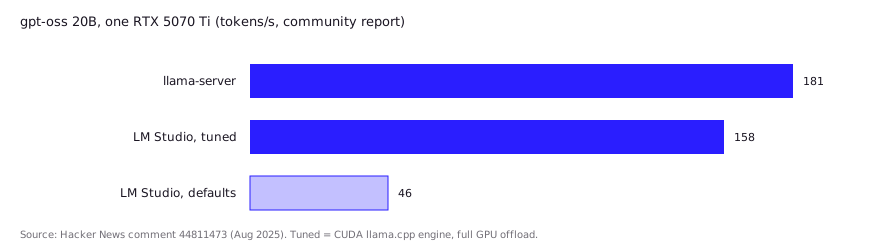
- Defaults can cost you a lot. When gpt-oss 20B launched in August 2025, one Hacker News user on an RTX 5070 Ti reported about 181 tokens/s with llama-server, 46 with LM Studio’s defaults, and 158 after switching to the CUDA llama.cpp engine and full GPU offload. The same user saw 90 tokens/s with llama-server against 46 on Ollama on a three-GPU A4000 box. One user, one model, and these builds are old, but it shows why you should check offload settings before blaming the app.
- Model behavior can differ between the two. Another commenter said the same gpt-oss GGUF reasoned well in LM Studio, where they could set reasoning effort in the system prompt, but failed or reasoned less in Ollama’s CLI and UI. Chat templates and prompt handling are not identical across runtimes, so test your own prompts.
- Reasons people switch. One developer who also moved to LM Studio praised Ollama’s new frontend work and easier context length changes, while noting Ollama is FOSS and LM Studio is not.
The pattern is consistent with the docs: both are wrappers over similar engines, so tune offload, context and quant first, then compare.
Which should you choose in LM Studio vs Ollama? A verdict by persona
Pick by how you will call the model, not by benchmark folklore.
| You are… | Pick | Why |
|---|---|---|
| Wiring a model into editors, scripts, Docker or CI | Ollama | Service-first, MIT, Docker image, documented env vars |
| Trying many Hugging Face models and quants | LM Studio | Built-in browser, per-model settings in a GUI |
| On an Apple Silicon Mac running MLX models | Either | LM Studio has the longer MLX track record; Ollama defaults to MLX for supported architectures since 0.40.0 |
| Running a headless Linux box | Ollama, or LM Studio’s llmster | Ollama is the more conventional service; llmster suits you if you already use LM Studio elsewhere |
| In a company that needs OSI-approved licenses | Ollama | MIT, versus LM Studio’s terms of use |
| Serving many concurrent users | Neither | Look at vLLM or similar |
Nothing stops you from running both: LM Studio to explore and compare models, Ollama as the endpoint other tools depend on. They use different default ports (11434 and 1234), so they don’t collide.
FAQ
Is LM Studio or Ollama faster?
Neither vendor publishes a neutral head-to-head. Mozilla.ai’s independent September 2026 benchmark found server choice mattered less than build and settings, with LM Studio trailing on small models on a Mac. Speed depends on the model, quantization, engine (llama.cpp or MLX) and hardware, so run the same model and prompt in both on your machine.
Is LM Studio free for commercial use?
Yes for use at work. LM Studio announced on July 8, 2025 that it is free at home and at work, and its August 2026 terms allow personal and internal business use. Redistribution and offering it as a hosted service are restricted, and Enterprise features are paid.
Does Ollama have an OpenAI-compatible API?
Yes. It serves /v1/chat/completions, /v1/completions, /v1/embeddings, /v1/models and /v1/responses at http://localhost:11434/v1/, with documented gaps such as tool_choice and logprobs on chat completions.
Can LM Studio run without the GUI?
Yes. Since LM Studio 0.4.0, the llmster daemon runs standalone (lms daemon up, then lms server start). The desktop app can also run headless on machines with a GUI.
Can I use both on the same machine?
Yes. They listen on different default ports (11434 and 1234), so they don’t collide. Each app manages its own downloads, so expect to fetch a model separately in each unless you import a local GGUF file.
Sources (11)
- Ollama on GitHub: README and license
- Ollama docs: OpenAI compatibility
- Ollama blog: Ollama is now powered by MLX on Apple Silicon in preview (Mar 30, 2026)
- heise online: Local AI on the Mac, Ollama uses MLX as default (Oct 2026)
- LM Studio docs: OpenAI compatibility endpoints
- LM Studio docs: Headless mode, llmster, JIT loading and auto-unload
- LM Studio blog: LM Studio is free for use at work (Jul 8, 2025)
- LM Studio app terms (version dated Aug 23, 2026)
- Mozilla.ai: Benchmarking local LLM servers (Sep 17, 2026)
- r/LocalLLaMA thread on leaving Ollama (Dec 2025), user reports on scripts, GUI and model switching
- Hacker News: Open models by OpenAI, user reports on Ollama vs LM Studio (Aug 2025)