GGUF vs MLX on a Mac: GGUF runs on llama.cpp, MLX is Apple's framework. Compare speed, memory and apps, plus what users report for local coding models.
GGUF is a single-file model format loaded by llama.cpp and the apps built on it; MLX is Apple's array framework for Apple silicon, with its own model layout. On a Mac, MLX often generates tokens faster in academic and vendor tests, but independent user benchmarks on M1 Max and M5 Max found llama.cpp with GGUF equal or ahead. GGUF also has the wider catalog and the better 4-bit quantization. Test your own model before committing.
- MIT
- llama.cpp (Metal)
- 20.43 GB
- 22.13 GB
Key takeaways
- GGUF is a file format; MLX is a framework plus a model layout. The comparison is really llama.cpp (Metal) versus mlx-lm.
- The one peer-reviewed-style comparison on Apple silicon (arXiv 2511.05502, M2 Ultra) found MLX had the highest sustained generation throughput, with llama.cpp efficient for light single-stream use.
- MLX's lead is not universal. A June 2026 vendor comparison on an M5 Max found GGUF faster on short prompts, and two independent user write-ups (M5 Max, M1 Max) found llama.cpp equal or ahead of MLX.
- For Qwen3.6-35B-A3B, the 4-bit MLX weights are about 20.4 GB and the Unsloth UD-Q4_K_M GGUF is 22.1 GB, so plan on a Mac with 32 GB at the very least, and more for long contexts.
- The format matters less than the app: Ollama, LM Studio and llama.cpp all load GGUF, and LM Studio and Ollama now also run MLX. Since version 0.40, Ollama uses MLX by default on Apple silicon for supported architectures.
What are GGUF and MLX?
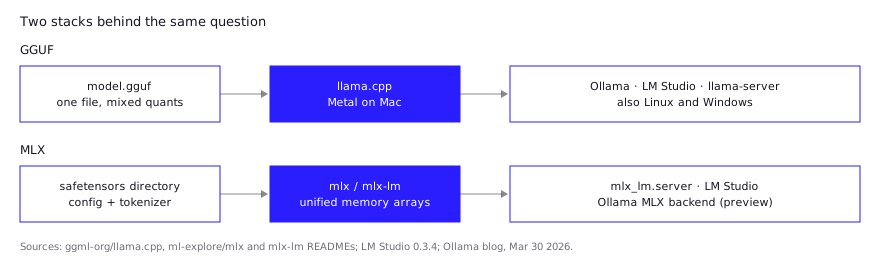
GGUF is a model file format; MLX is a machine-learning framework. That asymmetry is the first thing to get straight, because “GGUF vs MLX” is shorthand for two stacks: GGUF files running on llama.cpp, and MLX-format weights running on Apple’s MLX library.
GGUF is a binary format for GGML-based runtimes. A model ships as a single file holding a header, typed key-value metadata (architecture, hyperparameters, tokenizer) and the tensor data, aligned so it can be memory-mapped. It succeeded the older GGML, GGMF and GGJT formats. Each tensor declares its own type, which is why one GGUF can mix quantization levels, as in the common Q4_K_M files. The same file runs on a Mac, a Linux box with an NVIDIA GPU, or a Windows laptop. For how the quant names work, see GGUF quantization explained.
MLX is “an array framework for machine learning on Apple silicon” from Apple machine learning research, MIT licensed. Its arrays live in unified memory, so operations can run on CPU or GPU without copying data between them. mlx-lm is the companion package for text generation and fine-tuning. It loads models straight from the Hugging Face Hub, and the MLX Community organization there hosts many pre-converted, quantized models. An MLX model is a directory of safetensors shards plus config and tokenizer files, not one file.
| GGUF | MLX | |
|---|---|---|
| What it is | Single-file model format | Framework plus safetensors model directory |
| Main runtime | llama.cpp (Metal on Mac) | mlx / mlx-lm |
| Platforms | macOS, Linux, Windows, many GPU backends | Apple silicon first; Linux CUDA and CPU builds exist |
| Quantization | 1.5 to 8-bit integer, K-quant mixes | Group quantization, plus learned methods such as DWQ and AWQ |
| Model catalog | Very wide | Large and growing, but conversion is required |
Which runtimes support each on macOS?
Both are well supported, and most Mac apps now cover at least one of them. llama.cpp calls Apple silicon “a first-class citizen”, optimized through ARM NEON, Accelerate and Metal, and lists integer quantization from 1.5 to 8 bits. Anything built on llama.cpp loads GGUF.
For MLX the options are:
- mlx-lm directly.
pip install mlx-lm, thenmlx_lm.generateormlx_lm.chat. It also shipsmlx_lm.server, which serves a chat-completions endpoint described in its docs as similar to the OpenAI API, but not recommended for production. - LM Studio. Since version 0.3.4 (October 2024) it runs MLX models on Apple silicon through a local OpenAI-compatible server, and lets you load llama.cpp and MLX models side by side.
- Ollama. In March 2026 Ollama announced a preview of an MLX backend in version 0.19, covering one model, Qwen3.5-35B-A3B. With version 0.40 (September 25, 2026), “model architectures supported by the MLX runtime will automatically run on MLX” on Apple silicon. GGUF models still run on Ollama’s llama.cpp-based engine.
If you are choosing between those apps rather than formats, LM Studio vs Ollama covers it.
GGUF vs MLX: what do Mac users report in practice?
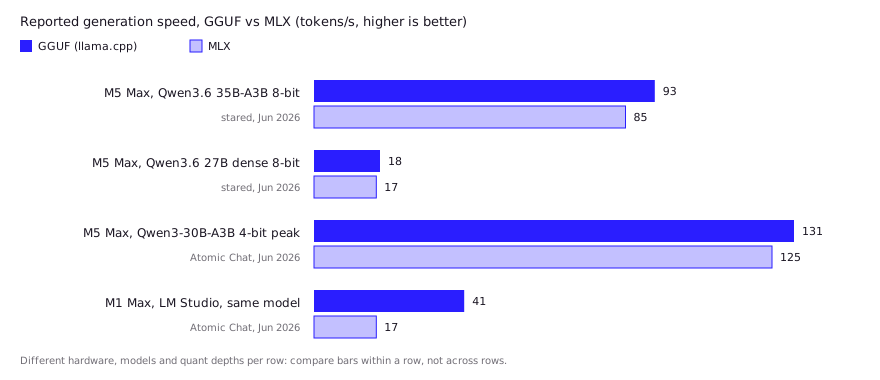
Independent reports split: some find MLX clearly faster, others measure llama.cpp equal or ahead, and several point at the runtime or the quantization recipe as the real variable. One developer benchmarking Qwen3.6 coding models on an M5 Max 128 GB expected MLX to win and found llama.cpp with GGUF slightly ahead (stared, June 2026). These are community reports, not our tests, and each comes from one machine.
| Report | Setup | What they found | Caveat |
|---|---|---|---|
| stared, GitHub benchmark repo (Jun 14, 2026) | M5 Max 128 GB, 8-bit, Qwen3.6 models, median of 3 runs | llama.cpp GGUF decoded about 93 tok/s on the 35B-A3B MoE against 85 for MLX, and about 18 against 17 on the dense 27B. MLX used less memory (37 GB against 44 GB). | The author expected the opposite. 8-bit only, one chip. |
| famstack.dev (Mar 20, 2026) | M1 Max 64 GB, Gemma 3 12B and Qwen3 30B-A3B | With default bf16 MLX weights, GGUF led by 4 to 68% on effective tok/s. Converting to fp16 shrank the gap to single digits, since M1 and M2 chips lack native bf16. Ollama ran about 37% slower than raw llama.cpp on the same engine. | The author’s own harness, older chips, older models. |
| r/LocalLLM thread | Mac mini M4 Pro 64 GB, Qwen3-Coder-30B-A3B 4-bit | mlx-lm was about 3x faster than Ollama and used less RAM (about 35 GB against 40 GB). A commenter said LM Studio is much faster on GGUF than Ollama, and that MLX’s uniform quants may cost quality. | Compares MLX against Ollama, not against llama.cpp. No absolute tok/s given. |
| HN post (Aug 2026) | M4 Pro 24 GB, LM Studio, 4-bit MLX and GGUF, 4B to 35B | Speeds ranged from 3 to 40 tok/s, and the dense 27B ran at about 5 tok/s on 24 GB. The poster found no single best model across tasks. | Code reading only; the poster did not test code generation. |
Two patterns repeat. First, the runtime wrapper matters: both the famstack write-up and the Reddit commenter put Ollama behind LM Studio or raw llama.cpp on GGUF, which is why Ollama’s move to MLX by default matters. The community tests below predate it. Second, quantization quality is the quieter difference. MLX’s default 4-bit applies one bit depth across the model, while GGUF’s K-quants spend more bits on sensitive tensors (see GGUF quantization explained). That is a mechanism the reports suggest, not a measured quality gap on code, and mlx-lm’s mixed-precision options exist to narrow it.
Is MLX faster than GGUF?
Often for sustained generation, but not everywhere, and the evidence is thinner than the confident blog posts suggest. These are the datapoints I could trace to a named source and date; the community reports above mostly complicate them.
- Academic comparison. Rajesh et al. (arXiv, October 2025) benchmarked MLX, MLC-LLM, llama.cpp, Ollama and PyTorch MPS on a Mac Studio with an M2 Ultra and 192 GB, using Qwen-2.5 models and prompts from a few hundred to 100,000 tokens. MLX had the highest sustained generation throughput. llama.cpp was “highly efficient for lightweight, single-stream use”. Ollama trailed on throughput and time to first token. Note the paper tested the Ollama of that time, which was not MLX-backed.
- Ollama’s own numbers. Ollama reported, for Qwen3.5-35B-A3B on March 29, 2026, decode rising from 58 to 112 tokens/s and prefill from 1,154 to 1,810 tokens/s between 0.18 and 0.19. That mixes a backend change with Ollama’s other engineering, so it is evidence of Ollama improving, not a clean MLX-versus-llama.cpp ratio. It is also a vendor benchmark of one model on one setup.
- A GGUF win. An Atomic Chat comparison (June 10, 2026) ran Qwen3-30B-A3B as Q4_K_M and MLX 4-bit on an M5 Max with 64 GB. GGUF finished a short classification prompt in 1.0 s against 2.2 s for MLX, and JSON extraction in 0.7 s against 0.9 s. On a roughly 300-token explanation MLX took 7.1 s against 16.4 s, though the author calls that result directional because output length varied. Peak generation was 131 tokens/s for GGUF and 125 for MLX. This is a single vendor-published run.
Two things follow. Time to first token and decode speed are different measurements, and the winner can differ for each. And the runtime around the format can swing results as much as the format does: in the same Atomic Chat write-up, a table of runtimes on an M1 Max put LM Studio on GGUF and a llama.cpp source build near 41 tokens/s, while LM Studio on MLX measured 17, and Ollama on GGUF 26. Treat that table as a reminder that results are setup-specific, not a ranking.
I have not run these benchmarks myself. If speed decides the purchase or the setup, run llama-bench on a GGUF and mlx_lm.generate on the MLX build of the same model, with the same quantization depth, on your machine, with your real prompt lengths.
How much unified memory do you need for coding models?
Weights have to fit in unified memory with room left for the KV cache, macOS and your editor. On Apple silicon the CPU and GPU share one pool, so there is no separate VRAM figure to count; the number on the box is the budget for everything.
Take Qwen3.6-35B-A3B, a recent Mixture-of-Experts model (35B total parameters, about 3B active per token) under Apache 2.0 that Mac users in the reports above run for coding. It replaces the earlier Qwen3-Coder-30B-A3B as the example, since newer builds now exist for both formats:
| Build | Weights on disk | Source |
|---|---|---|
| MLX 4-bit (mlx-community) | 20.43 GB (whole repo) | Hugging Face |
| GGUF UD-Q4_K_M (Unsloth) | 22.13 GB | Hugging Face |
| GGUF UD-Q4_K_XL (Unsloth) | 22.36 GB | same repo |
| GGUF Q8_0 (Unsloth) | 36.9 GB | same repo |
Sizes are from the file listings checked on 2026-10-27 and use 1 GB = 10^9 bytes. File size is not runtime memory. Context length adds a KV cache on top, and that grows with every token of code you feed in. My own arithmetic, not a measured figure: with roughly 22 GB of weights, a 32 GB Mac leaves about 10 GB for macOS, apps and the cache before you hit pressure, which is workable for short contexts and cramped for repo-scale ones. A 48 or 64 GB machine is where 30B-class models stop being a juggling act. Ollama’s own MLX announcement also asks for “more than 32GB of unified memory” for its 35B preview model. For the broader hardware picture, see local LLM hardware requirements.
The format difference here is small. The MLX 4-bit build is about 8% smaller than the UD-Q4_K_M file for this model, but Unsloth’s dynamic GGUFs mix precision across tensors and MLX 4-bit is closer to uniform, so the sizes reflect different quality trade-offs and not a free saving. mlx-lm does offer learned quantization (DWQ, AWQ, GPTQ and dynamic mixed precision) that narrows that gap, but you only get it if the converter you downloaded used it.
Which should you choose?
Start with whichever your app makes easiest, then switch only if you measure a reason to. A decision table:
| If you… | Pick | Why |
|---|---|---|
| Use Ollama or llama.cpp-based tools and want it to just work | GGUF | Widest catalog, one file, every tool loads it |
| Run long generations (agents, long code output) on Apple silicon | Try MLX | Highest sustained throughput in the published comparison |
| Send many short prompts (classification, tool calls) | Benchmark both | The one recent comparison found GGUF ahead |
| Need one model file for a Mac plus a Linux or Windows GPU box | GGUF | MLX is Apple silicon first |
| Want to fine-tune or script in Python on a Mac | MLX | mlx-lm supports LoRA and full fine-tuning |
| Need a model that has no MLX conversion yet | GGUF | Conversion lag is real for new releases |
For coding specifically, model choice beats format choice. Which model to run is covered in best local LLM for coding; once you have picked one, check whether it has both a GGUF and an MLX build and compare them on your own repository.
FAQ
Is MLX better than GGUF on a Mac?
Often faster at sustained generation, but not always better. The one academic comparison on Apple silicon found MLX had the highest throughput, while a June 2026 vendor test and an independent M5 Max benchmark found GGUF on llama.cpp equal or faster. GGUF has the wider catalog and runs on non-Apple hardware.
Can I convert a GGUF file to MLX?
Not directly in the official tooling. mlx-lm converts and quantizes from Hugging Face weights with mlx_lm.convert --model <repo> -q, so you convert from the original model, not from a GGUF. Most popular models already have pre-converted builds in the MLX Community organization on Hugging Face.
Does LM Studio support both MLX and GGUF?
Yes. LM Studio added an MLX engine in version 0.3.4 and can run llama.cpp (GGUF) and MLX models at the same time.
Does Ollama use MLX now?
Yes, by default on Apple silicon since version 0.40 (September 25, 2026), for model architectures the MLX runtime supports. It started as a one-model preview in 0.19 in March 2026. GGUF models still run on the llama.cpp-based engine.
Which format is better for running a coding model on a 16 GB Mac?
Neither format fixes a memory shortfall. At 4-bit, a 30B-class model’s weights alone are around 20 to 22 GB, so on 16 GB you need a smaller model. Pick the model first, then pick the format.
Sources (11)
- ml-explore/mlx: an array framework for machine learning on Apple silicon (GitHub)
- ml-explore/mlx-lm: run LLMs with MLX (GitHub)
- ggml-org/llama.cpp README: backends and quantization (GitHub)
- Production-Grade Local LLM Inference on Apple Silicon, Rajesh et al., arXiv 2511.05502 (Oct 2025)
- Ollama is now powered by MLX on Apple Silicon in preview, Ollama blog (Mar 30, 2026)
- Ollama v0.40.0 release notes: MLX by default on Apple Silicon (Sep 25, 2026)
- GGUF vs MLX, Atomic Chat guide (Jun 10, 2026)
- mlx-community/Qwen3.6-35B-A3B-4bit, Hugging Face model repo
- unsloth/Qwen3.6-35B-A3B-GGUF, Hugging Face model repo
- Benching local coding LLMs on Apple Silicon (llama.cpp vs MLX, M5 Max), stared, GitHub (Jun 2026)
- GGUF vs MLX on Apple Silicon: Same Engine, 37% Slower, famstack.dev (Mar 20, 2026)