Run abliterated models in Ollama with one hf.co command or a Modelfile, or in LM Studio with lms get. How to vet the card, pick a quant and check the license.
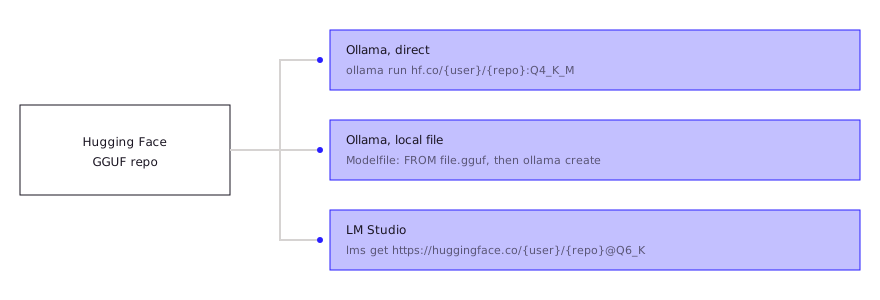
An abliterated model is an ordinary open-weight model with its refusal direction edited out, so it runs in Ollama and LM Studio like any other GGUF. In Ollama, one command pulls it straight from Hugging Face: ollama run hf.co/{user}/{repo}:{quant}. In LM Studio, search the Hugging Face repo or use lms get. Read the model card and license first.
- ollama run hf.co/{user}/{repo}
- Q4_K_M, if present
- lms get, lms import
- 4k tokens
Key takeaways
- Ollama runs any public Hugging Face GGUF with ollama run hf.co/{username}/{repository}, and defaults to Q4_K_M when the repo has it.
- A local GGUF needs only a one-line Modelfile (FROM /path/to/file.gguf) and ollama create; Ollama does not quantize on import.
- LM Studio can pull a repo with lms get, pick a quant with an @ qualifier, or import a local file with lms import.
- Check base model, license and uploader on the card before you run anything; the base model's license still applies after abliteration.
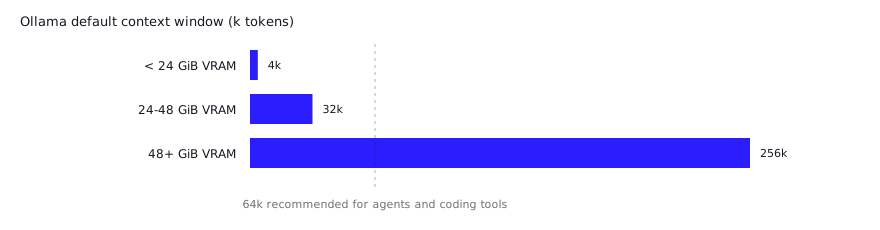
- Ollama's default context window depends on VRAM (4k tokens under 24 GiB), so raise it before judging a coding model.
All commands and behaviors below come from the Ollama, LM Studio and Hugging Face documentation as fetched on 2026-10-26. Both tools move fast, so check the linked docs if a flag has changed.
Where do abliterated models come from, and how do you vet one?
Abliterated models are published on Hugging Face by individual uploaders, usually as a full-precision repo plus separate GGUF repos made by other people. The edit itself follows Arditi et al., who found refusal is mediated by a single direction across 13 open chat models; the pillar article covers the method. Here you only need to know the output is a normal model file.
Before you download, read the model card for five things:
- Base model. Which model was edited, and which version.
- License. The card’s license field. Abliteration does not replace it.
- Method and evals. A card that says how the model was made, and reports any evaluation, is worth more than one that says neither. The huihui-ai card for an abliterated Qwen3-Coder-Next, for instance, calls its method “a crude, proof-of-concept implementation” and lists no evaluation results.
- Who made the GGUF. The abliterator and the quantizer are often different people. The bartowski GGUF repo, for example, repackages huihui-ai’s weights with llama.cpp, so you are trusting both.
- Stated limits. The same huihui-ai card warns that safety filtering is “significantly reduced” and advises against direct use in production or public-facing commercial applications.
A GGUF file also carries metadata. The Hugging Face Hub has a viewer that shows a file’s metadata and tensor information, which is a quick way to confirm architecture and quantization before downloading tens of gigabytes.
How do you run a GGUF from Hugging Face directly in Ollama?
Ollama runs any public GGUF on Hugging Face with a single command and no Modelfile. One caveat from practitioners comes first: a user pulling a bartowski Gemma 4 GGUF found its own tokenizer.chat_template intact, but the hf.co endpoint served a short generic template, so check the template after your first pull (HF forum, May 2026). Hugging Face’s docs give the format as ollama run hf.co/{username}/{repository}, and huggingface.co works as the domain too.
ollama run hf.co/mlabonne/Meta-Llama-3.1-8B-Instruct-abliterated-GGUFThat example appears in Hugging Face’s own Ollama docs. To pick a specific quantization, add a tag. The tag is case-insensitive, and a full filename also works:
ollama run hf.co/bartowski/huihui-ai_Qwen3-Coder-Next-abliterated-GGUF:Q4_K_MThree details matter in practice:
- Default quant. If you give no tag, Ollama uses
Q4_K_Mwhen the repo has it, otherwise “one reasonable quant type present inside the repo”. - Chat template. Ollama picks a template automatically from the
tokenizer.chat_templatemetadata inside the GGUF. If the file has none, the repo can include atemplatefile, which must be a Go template, not Jinja. - Private repos. Add your Ollama public key (
~/.ollama/id_ed25519.pub) to your Hugging Face SSH keys.
Some uploaders also publish straight to Ollama’s own registry. The huihui-ai card, for example, lists ollama run huihui_ai/qwen3-coder-next-abliterated and asks for Ollama 0.15.5 or later. The registry copy and a third-party GGUF can be different builds, so pick one source and note which.
Verify the model works with a plain coding task before anything else:
ollama run hf.co/{user}/{repo}:Q4_K_M "Write a Python function that parses a CSV and returns the rows where column 3 is empty."How do you import a local GGUF with a Modelfile?
Import a GGUF you already downloaded with a one-line Modelfile and ollama create. Ollama’s import docs show the minimal case:
# Modelfile
FROM /path/to/file.ggufollama create my-abliterated-model
ollama run my-abliterated-modelFor a GGUF split across shards, keep the original filenames and use a wildcard, such as FROM /path/to/model-*.gguf. Note that Ollama does not quantize a GGUF during import, so quantize beforehand with a tool such as llama.cpp’s llama-quantize if needed.
The Modelfile reference lists the other instructions you may want: PARAMETER for runtime settings, TEMPLATE for the full prompt template, SYSTEM for the system message and LICENSE for the legal license. If a model behaves oddly, a missing or wrong TEMPLATE is the first thing to check. Compare against a working model with ollama show --modelfile <name>.
How do you run the same model in LM Studio?
LM Studio gets the model from the same Hugging Face repos, through the app, the browser button or the lms CLI. Hugging Face’s LM Studio docs describe three routes:
- The “Use this model” button. Enable LM Studio in your Hugging Face Local Apps settings, then pick it from the dropdown on any GGUF model page.
- The in-app downloader. Press Cmd+Shift+M (Ctrl+Shift+M on Windows and Linux), search, or paste a full Hugging Face URL. Each model lists its quantization options, and LM Studio highlights the recommended one for your hardware.
- The CLI. Run
lms getwith a repo URL, and select a quant with an@qualifier:
lms get https://huggingface.co/{user}/{repo}@Q6_KTo import a file you already have, LM Studio’s docs describe lms import <path/to/model.gguf>, marked experimental. You can also place the file manually in ~/.lmstudio/models/{publisher}/{model}/, matching how models are organized on Hugging Face. For how the two apps compare, see LM Studio vs Ollama.
Which quantization should you pick?
Pick the largest quantization that fits in memory with room left for context. Bartowski’s model card gives a concrete rule: choose a file 1 to 2 GB smaller than your GPU’s total VRAM for speed, or smaller than VRAM plus system RAM for maximum quality. The same card recommends Q4_K_M as the default for most use cases and notes that K-quants are the simple choice.
| Quant | Bits per weight (Hugging Face docs) | When to use it |
|---|---|---|
| Q8_0 | Legacy 8-bit type | Plenty of memory, highest fidelity |
| Q6_K | 6.5625 | Memory to spare, close to full quality |
| Q5_K | 5.5 | Good balance when Q4 feels lossy |
| Q4_K | 4.5 | Default starting point |
| Q3_K | 3.4375 | Only when nothing larger fits |
| Q2_K | 2.625 | Last resort |
Sizes depend on the model. For one real data point, bartowski lists Q4_K_M at 48.56 GB and Q8_0 at 84.81 GB for the 80B-parameter Qwen3-Coder-Next abliteration. Our quantization explainer covers the trade-offs in depth.
LM Studio’s own guidance is similar: choose a 4-bit option or higher if your machine can run it.
What should you expect from an abliterated model, and does the license still apply?
Expect a model that refuses less, may be somewhat worse than its source, and still carries the source’s license. The quality cost is documented in the abliteration explainer, so test on your own code instead of assuming parity.
Two setup mistakes cause more disappointment than the abliteration itself:
- Context length. Ollama’s context-length docs give defaults by VRAM: 4k tokens under 24 GiB, 32k from 24 to 48 GiB, 256k at 48 GiB or more. The docs recommend at least 64,000 tokens for agents and coding tools. Set
OLLAMA_CONTEXT_LENGTH=64000when you start the server, then check allocation withollama ps, whoseCONTEXTandPROCESSORcolumns show the window and any CPU offload. - Wrong template. A Hugging Face forum user found the
hf.coendpoint serving a generic template over an intact one in the GGUF (thread). If answers look garbled or the model never stops, suspect the chat template, not the weights; see the next section.
On licensing, the base model’s terms follow the weights. The huihui-ai card uses Apache 2.0, while mlabonne’s abliterated Llama 3.1 cards list the llama3.1 license. Meta’s Llama 3 acceptable use policy bars using the model to “create, generate, or facilitate the creation of malicious code, malware, computer viruses”. Abliteration doesn’t lift that. Read the policy for your exact version, keep the work on systems you are authorized to touch, and treat removing refusals as moving responsibility from the model to you. For specific picks by size and task, see best abliterated models in 2026.
What do developers report in practice?
Community reports focus on three problems: wrong chat templates, refusals that survive, and trust in the uploader. These are individual reports, not our tests, and they come from threads we could read in full or in search snippets.
| Problem | What was reported | Source |
|---|---|---|
Template served by hf.co | A user pulling a bartowski Gemma 4 GGUF found that the GGUF’s own tokenizer.chat_template was intact, but the Hugging Face Ollama endpoint served a short generic template. Replies in the thread suspect HF’s template conversion rather than the quantizer. No fix was confirmed. | HF forum, May 2026 |
| Garbled output | A user of a non-abliterated GGUF got nonsense replies even to “hello” after pulling it into Ollama, and traced it to a template reduced to a bare prompt. Disabling flash attention did not help. | HF model discussion |
| Refusals remain | One commenter on a Hacker News thread said abliterated models they tried were “not 100% successful” and could still hit the same walls as the original. | HN, Oct 2026 |
| Why people bother | A commenter running Qwen 3.8 27B locally to manage their media library said the stock model refused the task and got snarky, which they expected an abliterated build not to do. | HN, Oct 2026 |
Two lessons follow. If a pulled model misbehaves, run ollama show --modelfile and compare the template with the one on the model card before blaming the weights. And treat refusal removal as partial until you test your own prompts.
The trust point is concrete. ProjectDiscovery’s October 2026 research showed a small fine-tune (about 0.6% of a 7B model’s parameters, under $50 of compute) could turn a model into a tool-calling backdoor that passed normal use. They note one abliterated Qwen3 build had over two million downloads in a month, and recommend sandboxing the model’s runtime, separating network from command execution, and keeping secrets out of reach (ProjectDiscovery; HN discussion). That is research, not evidence that any listed uploader is malicious, but it is a good reason to run a coding agent backed by an unvetted model in a sandbox.
FAQ
Can Ollama run abliterated models?
Yes. Abliterated models are normal open-weight models, and Ollama runs any public Hugging Face GGUF with ollama run hf.co/{username}/{repository}.
What is the difference between pulling from hf.co and from the Ollama library?
The hf.co route fetches a GGUF repo directly from Hugging Face. The Ollama library route fetches a model an uploader pushed to Ollama’s registry. They can be different builds of the same model, so check the uploader and note the source.
Why does my abliterated model give short or broken answers?
The usual causes are a missing chat template, a context window that is too small for your prompt, or an aggressive quantization. Check the template first, then context with ollama ps, then try a larger quant.
Is it legal to run an abliterated model?
Downloading and running one is generally permitted, but the base model’s license still applies to the edited weights, and so does the law wherever you work. This is general information, not legal advice.
Does LM Studio support abliterated GGUFs?
Yes. LM Studio loads GGUF files, so you can pull one with the in-app downloader, the “Use this model” button or lms get, or import a local file with lms import.
Sources (10)
- Use Ollama with any GGUF Model on Hugging Face Hub, Hugging Face docs
- Importing a model, Ollama docs
- Context length, Ollama docs
- GGUF usage with LM Studio, Hugging Face docs
- Import models, LM Studio docs
- GGUF and quantization types, Hugging Face docs
- huihui-ai/Huihui-Qwen3-Coder-Next-abliterated model card, Hugging Face
- bartowski/huihui-ai_Qwen3-Coder-Next-abliterated-GGUF model card, Hugging Face
- Refusal in Language Models Is Mediated by a Single Direction, Arditi et al., arXiv 2406.11717
- Ollama model registry provides wrong chat template, Hugging Face forum (May 2026, community report)