Best self-hosted GitHub Copilot alternative? Tabby, Continue, Cline, Aider, twinny and llama.vscode compared on autocomplete, agents, telemetry and hardware.
For inline autocomplete on your own server, Tabby is the closest Copilot replacement, and llama.vscode is the lightest. For chat and agents against a local model, Cline and Aider are the main picks, and Continue is a risk because its repository is now read-only. All of them are open source, but only some are telemetry-free by default.
- Tabby, llama.vscode, twinny, Continue
- Cline, Aider, llama.vscode agent
- Aider, twinny, Continue 2.0
- 2026-10-26
Key takeaways
- Autocomplete and agents are different jobs. Tabby, llama.vscode and twinny do inline completion; Cline and Aider are agents with no inline completion.
- Continue's GitHub repository says it is no longer actively maintained and is read-only, so check the docs before you standardize on it.
- Tabby and Cline collect usage telemetry by default and can be switched off; Aider is opt-in; twinny states it has none.
- The backend is a separate choice from the tool. Ollama, LM Studio and llama.cpp all plug in, so the privacy question is where the model runs, not which extension you install.
- llama.vscode's README maps VRAM to a Qwen autocomplete model, from 1.5B under 8 GB to 30B above 64 GB.
Why self-host a coding assistant?
The best self-hosted GitHub Copilot alternative depends on the job: Tabby for team-wide autocomplete, Cline or Aider for agents. Teams look for one when source code isn’t allowed to leave their network. GitHub’s own Copilot feature overview describes completion, codebase chat and multi-step agentic work, and says nothing about running locally; its only deployment pointer is a separate article on Copilot for GitHub Enterprise Server. If your policy is “no prompts to a third-party cloud”, you need an assistant whose model runs on hardware you control.
The usual reasons are narrow and practical:
- Data residency. Prompts include the file you’re editing and its neighbors. With a local backend, they never leave the machine or the VPC.
- Predictable behavior. A pinned model file doesn’t change under you. A hosted model can.
- Air-gapped work. Some environments have no outbound access at all.
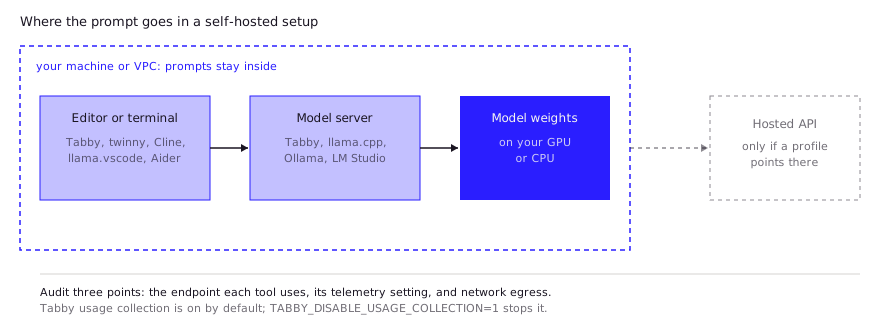
One caution before the comparison. “Open source” is not the same as “private”. Several tools below can point at a hosted API as easily as a local one, so the extension, the agent and the model server each need checking separately. Section six has a checklist.
How do the main self-hosted GitHub Copilot alternatives compare?
Six tools cover most of what people mean by a self-hosted Copilot. They split cleanly into inline-autocomplete tools and agent tools. The table reflects each project’s README and docs as fetched on 2026-10-26.
| Tool | Inline autocomplete | Chat | Agent | Editors | License | Telemetry |
|---|---|---|---|---|---|---|
| Tabby | Yes | Yes | Private preview | VS Code, Vim, IntelliJ | Apache 2.0, except an ee/ directory under its own license | On by default; opt out with an env var |
| llama.vscode | Yes (FIM) | Yes | Yes (Llama Agent) | VS Code; Vim/Neovim via llama.vim | MIT | Not stated in README |
| twinny | Yes | Yes | Experimental | VS Code | MIT | States none |
| Continue | Listed in docs | Yes | Yes | VS Code, JetBrains, CLI | Apache 2.0 | Removed in 2.0.0 |
| Cline | Not described | Yes | Yes | VS Code, JetBrains, CLI, desktop | Apache 2.0 | On by default; opt out |
| Aider | No | Terminal chat | Edits files, commits to git | Terminal; comment-driven from any editor | Apache 2.0 | Opt-in |
Two notes on reading it. “Not stated” means the README is silent, not that the project is clean. And an agent column of “yes” says nothing about quality: how well an agent works depends mostly on the model behind it.
Which is best for inline autocomplete?
One Hacker News user running llama.vim with Qwen3-Coder 30B says local completion feels better than Copilot to them, and that they keep hotkeys to switch between the two but find themselves going back to local (comment, Dec 2025). For a team, the closest drop-in for Copilot-style completion is Tabby, because it’s a server your team runs once and every editor connects to. Its README describes itself as “an open-source and on-premises alternative to GitHub Copilot”, with code completion that pulls context from local LSP declarations and recently modified code, a chat panel, and clients for VS Code, Vim and IntelliJ. The documented Docker example runs a StarCoder-1B completion model and a Qwen2-1.5B-Instruct chat model on an NVIDIA GPU, with the NVIDIA Container Toolkit installed first:
docker run -d --name tabby --gpus all -p 8080:8080 \
  -v $HOME/.tabby:/data \
  registry.tabbyml.com/tabbyml/tabby \
  serve --model StarCoder-1B --chat-model Qwen2-1.5B-Instruct --device cuda
Two Tabby details matter for a security review. Usage collection is on by default and covers items like the serve command, loaded models, CPU and CUDA device info and the Tabby version; set TABBY_DISABLE_USAGE_COLLECTION=1 to stop it, per the usage-collection docs. And the repository’s license is Apache 2.0 outside an ee/ directory, which has its own license, so read it before assuming every feature is free to use.
For a single developer who wants the smallest footprint, llama.vscode is the lightweight option. It is MIT-licensed, talks to a llama.cpp server, and offers fill-in-the-middle (FIM) completion with accept-line and accept-word shortcuts. The Vim and Neovim version is the separate llama.vim. twinny is a VS Code extension with completion, chat and inline edits that works with Ollama, LM Studio, llama.cpp and any OpenAI-compatible server. It says it has no telemetry and no account, but describes itself as written and maintained by one person, which is a bus-factor consideration for a team.
Which is best for chat and agents?
A developer who prefers Cline, Roo Code and Kilo Code for most work reports that none of them offers Copilot-style multi-symbol autocomplete (comment, Jan 2026), which is why they are the two established choices for agentic work against a local model rather than for completion. They work very differently. Cline is an autonomous agent that edits files and runs terminal commands inside your IDE. Its README lists VS Code, JetBrains, a CLI and a desktop app, and names Ollama and LM Studio under “Run local models on your machine”, plus any OpenAI-compatible endpoint. Aider is a terminal pair programmer that builds a map of your codebase and commits each change to git with a generated message; its README says it can connect to “almost any LLM, including local models”.
Continue needs a warning. Its README says: “The continuedev/continue repository is no longer actively maintained and is read-only for all users,” while describing a final 2.0.0 release of the VS Code extension, CLI and JetBrains plugin. The Continue docs site is still live and lists agent, chat, edit and autocomplete modes, plus guides for running with Ollama and without internet. A frozen tool can still work well, but you inherit its bugs and model-compatibility gaps. For a team standard, treat it as a stable snapshot rather than a moving target.
Telemetry differs here too:
- Cline is on by default and opt-out. Its docs say it excludes your code, file contents and prompts, with an exception for requests routed through Cline’s own provider.
- Aider is opt-in, and its docs say it “never collects your code, chat messages, keys or personal info”.
- Continue dropped anonymous telemetry in the 2.0.0 release, per its README.
For a one-line pick: Cline if you want an agent inside the editor, Aider if you live in the terminal and want clean git history, and Claude Code against a local model if your team already uses that workflow.
What server and model do you need?
The tool decides the workflow; the model and hardware decide the quality. The best sourced sizing guide is the llama.vscode README, which maps free VRAM to a Qwen FIM model:
| Free VRAM | Autocomplete model tier |
|---|---|
| Under 8 GB | 1.5B |
| Under 16 GB | 3B |
| Over 16 GB | 7B |
| Over 64 GB | 30B |
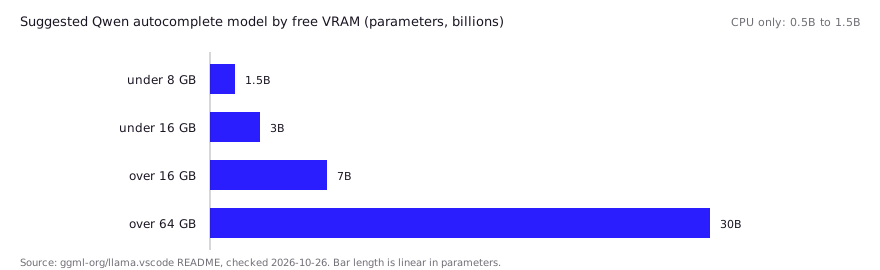
For CPU-only machines it suggests the smaller Qwen2.5-Coder variants (1.5B or 0.5B) and warns that quality will be lower. For the agent role it named gpt-oss 20B as the best local option at the time of writing, so check the README again before copying it. Tabby’s docs, by contrast, give no minimum GPU memory.
Practical pairing, based on those sources:
- Autocomplete wants a small, fast model. Latency matters more than depth, which is why the tiers above top out at modest sizes unless you have a lot of VRAM.
- Chat and agents want a larger instruct model. None of the tools above publishes a VRAM requirement for it, so size it using our hardware requirements guide and the best local LLMs for coding.
- Pick a runtime once. Ollama and LM Studio both expose an OpenAI-compatible endpoint that Cline, twinny and Aider can use; see LM Studio vs Ollama for the trade-offs.
What do developers report in practice?
These are Hacker News comments, not our tests, and each reflects one person’s setup.
- A small model is enough for completion. Another runs llama.vim with a Qwen2.5-Coder 7B model on a 16 GB GPU, reports it is fast even on a 70-watt RTX 2000 card, and switches to a hosted agent when they need something more sophisticated (comment, Jan 2026). That agrees with the llama.vscode sizing table above.
- Agent tools don’t replace autocomplete. The same Jan 2026 commenter found Continue’s Ollama autocomplete buggy. That fits the table: Cline and Aider cover chat and agents, not inline completion.
- Model support lags. In Oct 2025 a llama.vscode user was still on Qwen2.5 7B and was waiting on an open request for Qwen3 support (comment). Check the repository’s current state for the model family you plan to use.
- Small models still struggle with agents. One commenter finds that Devstral 24B and Qwen3 30B-A3B handle simple tasks but often fail at tool use, especially quantized, so self-hosting an agent means budgeting for a bigger model (comment, Dec 2025).
Read together, the reports suggest pairing a small local FIM model for autocomplete with a larger model for agent work, rather than expecting one setup to do both.
What should a security and data-retention checklist include?
A security review should confirm that no component sends code anywhere you didn’t approve. Treat it as four checks.
- Model endpoint. Verify every tool points at your server, not a default hosted provider. twinny, Cline and Aider all support both local and hosted backends, so a misconfigured profile can leak prompts.
- Telemetry. Disable Tabby’s usage collection with its env var, clear “Allow error and usage reporting” in Cline’s settings, and leave Aider’s analytics opted out (
aider --analytics-disablemakes it permanent). - License terms. Tabby’s
ee/directory and twinny’s paid team-gateway features sit outside the open-source license. - Network egress. Run the setup with outbound traffic blocked and confirm completion still works. That is the only test that proves air-gapped operation.
FAQ
Is there a self-hosted version of GitHub Copilot?
Not from GitHub in the sense of running the models yourself: its feature documentation describes no local or self-hosted option, and points Enterprise Server customers to a separate article. Tabby is the most direct open-source substitute.
What is the best self-hosted Copilot alternative for VS Code?
For inline completion, Tabby or llama.vscode. For chat and edits, Cline or twinny. All four have VS Code extensions.
Can I use Ollama with these tools?
Yes for most. Cline lists Ollama and LM Studio, twinny supports both, and Aider connects to local models. Tabby and llama.vscode use their own model servers instead.
Do I need a GPU?
Not strictly. llama.vscode suggests 0.5B or 1.5B Qwen2.5-Coder models for CPU-only use, with lower quality. Tabby’s Docker guide uses CUDA and also notes Apple Metal support in its README.
Is Continue still maintained?
Its GitHub README says the repository is read-only and no longer actively maintained, while its docs site remains online. Confirm the current state before you commit.
Sources (10)
- TabbyML/tabby, README (GitHub)
- Tabby: usage collection (docs)
- Community report: llama.vim with Qwen3-Coder 30B vs Copilot, Hacker News (Dec 2025)
- continuedev/continue, README (GitHub)
- Community report: llama.vim with Qwen2.5-Coder 7B on a 16 GB GPU, Hacker News (Jan 2026)
- cline/cline, README (GitHub)
- Cline telemetry (docs)
- Aider-AI/aider, README (GitHub)
- Aider analytics (docs)
- ggml-org/llama.vscode, README (GitHub)