Roo Code Ollama setup for 2026: the num_ctx it needs, LM Studio on port 1234, fixes for API request failed, local codebase indexing, and the Zoo Code fork.
To use Roo Code with Ollama, pull a tool-capable model, give it a num_ctx of 32k to 64k in a Modelfile, then pick the Ollama provider at http://localhost:11434. LM Studio works the same way on port 1234. Know first that Roo Code was shut down on May 15, 2026: the same steps apply in Zoo Code, its maintained community fork.
- http://localhost:11434
- http://localhost:1234
- 32k–64k num_ctx
- Shut down May 15, 2026
Key takeaways
- Roo Code was shut down on May 15, 2026. Its repo is archived and its Marketplace listing unpublished. Zoo Code (ZooCodeOrganization.zoo-code) is the maintained fork and imports Roo settings.
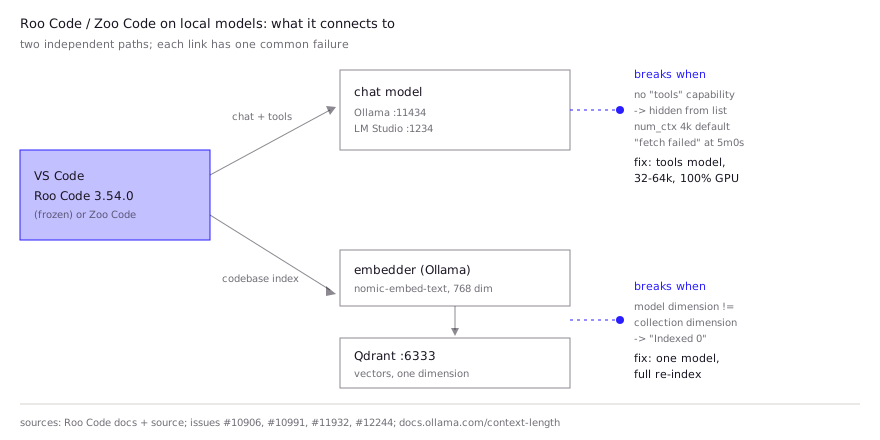
- Roo only lists Ollama models that report the tools capability. A model missing from the dropdown is filtered out, not broken.
- Context lives in Ollama: set num_ctx in a Modelfile (16k for ~8 GB VRAM, 32k for ~16 GB, 64k for 24 GB+, per Roo's docs). Ollama's own default is 4k under 24 GiB.
- 'fetch failed' at exactly 5 minutes is a Node HTTP client timeout, not Ollama. The Roo fixes for it were still open PRs when the repo was archived.
- Codebase indexing needs Ollama for embeddings plus Qdrant on port 6333. Pick one embedding model and keep its dimension, or re-index.
Roo Code with Ollama comes down to three settings: the Ollama provider, the base URL http://localhost:11434, and a model whose context window you have raised in Ollama itself (Roo Code docs). LM Studio is the same on port 1234. One fact changes the advice, though. The Roo Code extension was shut down on May 15, 2026, and its GitHub repository is archived and read-only. The README points users to Zoo Code, a community fork, and to Cline. Everything below works in an existing Roo install and, with the same field names, in Zoo Code. The bugs marked as open stay open in Roo for good.
Is Roo Code still usable in 2026?
Roo Code still runs where it is installed, but it gets no fixes, so new setups should use Zoo Code. The status as of November 3, 2026, from primary sources:
| Roo Code | Zoo Code | |
|---|---|---|
| Status | Shut down May 15, 2026; repo archived | Maintained community fork |
| VS Code Marketplace | RooVeterinaryInc.roo-cline, last version 3.54.0 (May 15, 2026), listing unpublished | ZooCodeOrganization.zoo-code, updated November 2, 2026, ~114k installs |
| Other registry | Open VSX still serves 3.54.0 | VS Code Marketplace |
| Docs | roocodeinc.github.io/Roo-Code (frozen May 15, 2026) | docs.zoocode.dev |
| Ollama and LM Studio providers | Yes | Yes, same setup steps |
Version and install figures come from the VS Code Marketplace and Open VSX APIs on November 3, 2026. The last changelog entry in the Roo repo (3.53.0) says the original team was going “all-in on Roomote”, its cloud agent, and that a community team would carry the extension forward.
Moving takes two steps per the Zoo Code migration page: export your settings in Roo Code, then use Import Settings in Zoo Code. The export file can contain API keys, so don’t commit or share it. The page doesn’t say whether chat history or the codebase index carries over; plan on re-indexing.
How do you connect Roo Code to Ollama?
Pull a tool-capable model, bake a larger context into it, and select the Ollama provider. These are the steps in Roo’s Ollama docs, which Zoo Code’s docs repeat:
- Install Ollama and start it with
ollama serve. - Pull a model:
ollama pull qwen2.5-coder:32b- Create a variant with a fixed context window. The docs recommend a Modelfile:
cat > Modelfile <<'EOF'
FROM qwen2.5-coder:32b
PARAMETER num_ctx 32768
EOF
ollama create qwen-32k -f Modelfile- In Roo, open the settings gear, choose Ollama as the API Provider, and enter the model name (
qwen-32k). - Leave the base URL at
http://localhost:11434unless Ollama runs on another machine. The API key field is only for an Ollama server that requires authentication, including Ollama Cloud (Ollama’s Roo Code page).
Roo’s docs size num_ctx by VRAM: 16384 for about 8 GB, 32768 for about 16 GB, 65536 for 24 GB or more. Ollama’s integration page asks for at least 32K for Roo, and Ollama’s context-length docs recommend at least 64,000 tokens for coding tools. The final builds also have an optional “Context Window Size (num_ctx)” field in the Ollama provider settings, per the extension’s settings strings; leave it empty and the Modelfile value applies.
If your model isn’t in the dropdown, that is by design. Roo’s Ollama fetcher drops any model whose capabilities don’t include tools, with the comment “Models without tool capability won’t work.” Typing the name by hand then fails with “The model ID … is not available.” Issue #10906 lists glm-4.7-flash and gemma3:27b-it-qat as hidden, and gpt-oss:20b and qwen3-next:80b as shown. Run ollama show <model> and look for tools under Capabilities before you blame the extension.
How do you connect Roo Code to LM Studio?
Start LM Studio’s local server with a model loaded, choose the LM Studio provider, and enter the loaded model’s ID. From Roo’s LM Studio docs:
- Download a GGUF model in LM Studio.
- Open the local server tab, select the model and click Start Server. The default address is
http://localhost:1234. - In Roo, pick LM Studio, enter the model ID shown on the server tab, and change the base URL only if you moved the port.
Set the context length when you load the model, since Roo can’t change it for you:
lms server start
lms load <model-key> --context-length 32768
If Roo shows “Please check the LM Studio developer logs to debug what went wrong”, the docs point to the context length setting in LM Studio. Issue #11924 also reports Roo’s token count drifting away from LM Studio’s over a session with Qwen 3.5 35B-A3B on Roo 3.51.1, so trust LM Studio’s logs over Roo’s context bar.
Why does Roo Code say “API request failed” with local models?
Most failures come from one of five causes: a timeout during long prefill, a context window that’s too small or too large, a filtered model, a cold start, or a network block. The table maps each symptom to the fix and the source.
| Symptom | Likely cause | Fix | Source |
|---|---|---|---|
“fetch failed” at exactly 5m0s; Ollama logs a 500 on /api/chat | Node’s HTTP client gives up on a long prefill, whatever Roo’s timeout says | In VSCodium/VS Code, enable http.electronFetch; shrink the prompt or context. The Roo fix (PR #11933) was never merged | Issue #11932 |
LM Studio HeadersTimeoutError near 300 s, retry loops | Same 300 s headers timeout; apiRequestTimeout of 600 s doesn’t override it | Faster model or smaller context; Roo fix PR #12245 also unmerged | Issue #12244 |
| “The model ID … is not available” | Model lacks the tools capability | Pick a model with tools in ollama show | Issue #10906 |
| Out of memory on the first request | Cold start allocates a bigger context than expected | Pin num_ctx, preload with ollama run, check ollama ps, ollama stop leftovers | Roo Ollama docs |
Remote Ollama shows only localhost models or EHOSTUNREACH | macOS Local Network permission, firewall | Allow local network access for VS Code, or SSH-tunnel port 11434 | Issue #11466 |
| “API Request” spins, Ollama log stays empty | Regression reported in 3.47.2 | Update or move to Zoo Code | Issue #11049 |
The 5-minute case is the one people hit most on consumer GPUs. In issue #12244, a developer running Qwen3.6 27B at Q4_K_M on an RTX 2080 Ti saw LM Studio requests die around 300 seconds even with the timeout set to 600. The proposed fix, a custom HTTP agent with longer header and body timeouts, sat in an open PR when the repo was archived. Cline shipped the equivalent fix in 4.1.25, which our Cline Ollama guide covers.
For the context side, the rule is that model plus KV cache must stay on the GPU. Ollama defaults to 4k tokens under 24 GiB of VRAM (Ollama docs), which silently truncates Roo’s long system prompt. Go too high and the cache spills to the CPU, which slows prefill into the timeout above. ollama ps shows both the allocated context and the GPU/CPU split. Our local LLM context length page explains the trade-off in detail.
How do you set up codebase indexing with local embeddings?
Run Qdrant locally, pick Ollama as the embedder, choose an embedding model, and start the index. Roo’s indexing docs need two parts, an embedding provider and Qdrant:
docker run -d --name qdrant --restart unless-stopped \
  -p 6333:6333 -v qdrant_data:/qdrant/storage qdrant/qdrant
ollama pull nomic-embed-text
Then, in the indexing settings: Embedder Provider Ollama, base URL http://localhost:11434, the embedding model, and Qdrant URL http://localhost:6333. The Ollama embedder needs no API key.
Roo ships these Ollama embedding profiles in its source:
| Ollama model | Vector dimension | Default score threshold |
|---|---|---|
nomic-embed-text (default) | 768 | 0.4 |
nomic-embed-code | 3584 | 0.15, with a code-search query prefix |
mxbai-embed-large | 1024 | 0.4 |
all-minilm | 384 | 0.4 |
Indexing limits from the docs:
- Files over 1 MB and binaries are skipped.
- Supported languages are split into functions and classes with Tree-sitter; others fall back to line chunks.
.gitignoreand.rooignoredecide what gets indexed, so excludenode_modulesand build output.- Changing the model’s dimension forces a full re-index.
The dimension rule is where local setups break. In issue #10991, a developer using qwen3-embedding configured 1536 dimensions while the model produced 4096-dimension vectors; Qdrant rejected every upsert and the index sat at 0. Setting 4096 everywhere and restarting VS Code fixed it. An older report, issue #5517, had nomic-embed-text on an M1 Max failing with a llama.cpp decode error until a fix landed in July 2025. If you’re choosing between embedding models on quality, our best embedding model for code comparison covers that.
Which local models work in Roo Code?
Any model Ollama tags with tools will appear, but community reports favor 20B to 35B tool-trained models with the whole context on the GPU. Roo’s own default Ollama model ID in its provider types is devstral:24b, and Ollama’s Roo page suggests qwen3 or qwen3-coder.
| Model | Runtime | Report | Source |
|---|---|---|---|
| gpt-oss:20b, qwen3-next:80b | Ollama | Listed (have tools) | Issue #10906 |
| glm-4.7-flash, gemma3:27b-it-qat | Ollama | Hidden (no tools in that build) | Issue #10906 |
| Nemotron-3-Nano-30B-A3B | llama.cpp | “good with tool calling”, works with Roo | HN comment |
| Granite 4.0 H Small (Q4_K_XL) | LM Studio | ~26 GB VRAM, ~30 tok/s, “Roo code does not work with it” | HN comment |
| Qwen3.6 27B Q4_K_M | LM Studio, RTX 2080 Ti | Timeouts at 300 s on long prompts | Issue #12244 |
All rows are community-reported, not our tests. The capability tag can change when a model’s Ollama template is updated, so check ollama show on your own pull.
What do developers report in practice?
Developers report that Roo works with local models when prompts and toolsets are kept small, and that the runtime’s limits show up before the model’s.
- Customization was the draw. An April 2026 Hacker News commenter who used Cline and then Roo with local models said Roo “was a bit better because it offered more customisation (prompts, tool choice, etc)”, and that “local models need shorter prompts and less tools to be effective.” The same comment notes Roo’s discontinuation and that Cline “works fine for most of the cases” with a vLLM back end (HN comment).
- Runtime limits. An August 2025 commenter running Qwen coder models moved from Ollama plus Roo to LM Studio because Ollama handled memory overload badly, then hit “a very annoying hard timeout of 2-3 minutes” on LM Studio’s API server (HN comment).
- Model fit is uneven. The Granite report above found the same model failed in Roo but ran in Kilo Code at about 22 GB of VRAM, on an AMD card after switching LM Studio from Vulkan to ROCm (HN comment).
- Remote servers are fiddly. The thread in issue #11466 shows several users on macOS and Linux unable to reach a LAN Ollama box until they fixed macOS’s Local Network permission or used an SSH tunnel.
The practical setup: a 24B to 32B tool-tagged model, num_ctx at 32k to 64k, everything on GPU, short tasks, and Zoo Code for anything new. If you’re weighing Roo’s successors against Aider or OpenCode on the same model, see our local LLM coding agent guide, and Continue vs Cline for the editor-extension choice.
FAQ
Does Roo Code still work after the shutdown?
Installed copies of the last version (3.54.0) still run, and Open VSX still serves it, but the repo is archived and no bugs will be fixed. The maintainers’ README sends users to Zoo Code or Cline.
Why doesn’t my Ollama model show up in Roo Code?
Roo hides Ollama models that don’t report the tools capability (source). Run ollama show <model> and pick one with tools listed.
What context length does Roo Code need with Ollama?
At least 32k tokens per Ollama’s Roo page, and 64k if your VRAM allows it. Roo’s docs suggest 16k for about 8 GB, 32k for 16 GB and 64k for 24 GB or more, set with num_ctx in a Modelfile.
How do I fix Roo Code “fetch failed” with Ollama?
If it fails at exactly five minutes, it’s the HTTP client timeout from issue #11932. Enable http.electronFetch, reduce context so the model stays on GPU, or move to Zoo Code or Cline, which keep getting fixes.
Can Roo Code index my codebase without a cloud API?
Yes. Use Ollama as the embedder (nomic-embed-text is the default) and run Qdrant in Docker on port 6333. Nothing leaves your machine.
Sources (10)
- Roo Code docs: Ollama provider
- Roo Code docs: LM Studio provider
- Roo Code docs: Codebase indexing
- RooCodeInc/Roo-Code repository (archived May 15, 2026)
- Roo Code source: Ollama model fetcher (tools filter)
- Roo Code source: embedding model profiles
- Ollama docs: Context length
- Ollama docs: Roo Code integration
- Zoo Code repository
- Zoo Code docs: Roo to Zoo migration