A local LLM can drive a coding agent if it supports tool calling and a long context. Which open models qualify, which harnesses work, what developers report.
Yes. A local LLM can power a coding agent when it supports tool calling, holds at least 64,000 tokens of context and follows instructions across many steps. Open models such as Qwen3.8-27B, Qwen3-Coder-Next and Devstral Small 2 document agentic scores, and Aider, OpenCode, Cline and Goose all connect to local servers. Expect it to work on focused tasks and trail hosted models on large repositories.
- 64,000 tokens (Ollama advice)
- 4k under 24 GiB VRAM
- SWE-bench Pro 61.7, Apache 2.0
- Oct 27, 2026
Key takeaways
- Tool calling is the entry ticket. Goose says models without it "can only do chat completion", and a community report found DeepCoder 14B behaved like a chatbot inside OpenCode.
- Context is the first thing to fix. Ollama defaults to 4k tokens under 24 GiB of VRAM and recommends at least 64,000 for coding tools.
- Vendor cards report agentic scores for Qwen3.8-27B, Qwen3-Coder-Next and Devstral Small 2, but each uses a different harness and benchmark version, so they don't rank against each other.
- In one independent 1,360-run test on a 128 GB laptop, the harness moved results as much as the model did: Qwen3.6-27B ranged from best to poor depending on the agent.
- A common community view is that local models are strongest on focused projects and weaker on deep reasoning, large repos and long context.
What does a local LLM coding agent need that chat doesn’t?
A local LLM coding agent needs a model that can call tools reliably, keep a long working context and recover from its own mistakes. A chat model answers once. An agent loops: it reads files, runs commands, edits code, reads the output and decides what to do next, often for dozens of steps, and one malformed tool call can derail the run.
The clearest community report of this gap: one home-lab author wiring up OpenCode with Ollama on a 16 GB RTX 5080 rejected DeepCoder 14B because it “did not support tools” and behaved like a plain chatbot. That is a third-party report, not our test.
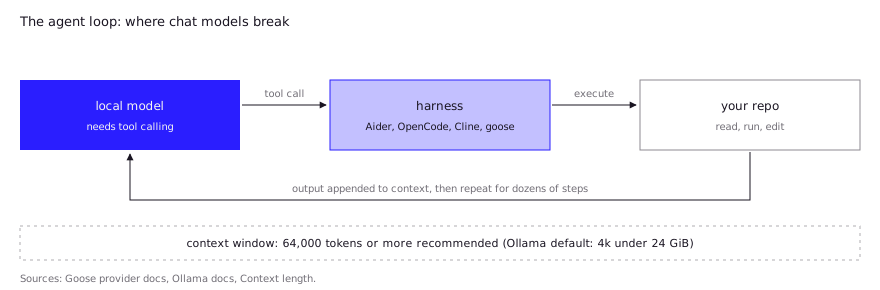
That translates into three requirements:
- Tool calling. The harness sends tool definitions and expects structured calls back. Goose’s docs put it bluntly: goose “extensively uses tool calling, so models without it can only do chat completion”. The same page notes that the native DeepSeek-R1 doesn’t support tool calling.
- Long context. Tool definitions, file contents and command output pile up. Ollama recommends at least 64,000 tokens for agents and coding tools, yet its default is 4k below 24 GiB of VRAM, 32k at 24 to 48 GiB and 256k at 48 GiB or more. Aider warns that Ollama “silently discards context that exceeds the window”, so an undersized window fails quietly.
- Instruction following across steps. The model has to stick to the harness’s edit format and stop when the task is done. This is the hardest of the three to read from a model card.
The VRAM math is its own topic, but note the coupling: a bigger context window needs more memory, so context size and model size compete for the same budget.
Which open models are built for agentic coding?
The open models with documented agentic scores today are Qwen3.8-27B, Qwen3-Coder-Next and Devstral Small 2, with gpt-oss-20b as a smaller option. All four are Apache 2.0. The table uses each model card as of October 27, 2026.
| Model | Size | Context | Tool-calling / agent support on the card | Reported agentic score |
|---|---|---|---|---|
| Qwen3.8-27B | 27B dense | 262,144 native | Cites “stronger autonomous planning” and broader harness support | SWE-bench Pro 61.7 (Claude Code harness); Terminal-Bench 2.1 73.0 |
| Qwen3-Coder-Next | 80B total, 3B active | 262,144 native | Described as excelling at tool calling; lists Claude Code, Cline, Qwen Code, Kilo | SWE-bench Verified 70.6; SWE-bench Pro 44.3; Terminal-Bench 2.0 36.2 |
| Devstral Small 2 | 24B dense | 256k | Recommends Mistral Vibe; also lists Cline, Kilo Code, Claude Code, OpenHands | SWE-bench Verified 68.0; Terminal-Bench 2 22.5 |
| gpt-oss-20b | 21B total, 3.6B active | Not stated on card | Native function calling; harmony format required | SWE-bench Verified 53.2 (medium reasoning) |
Read the table with care. The cards use different harnesses, benchmark versions (Terminal-Bench 2.1 versus 2.0) and sampling settings, and every number is vendor-reported. Treat them as evidence that a model was trained for agent loops, not as a ranking. Best local LLM for coding in 2026 covers the per-memory-tier picks, and Qwen Coder on Ollama covers the Qwen family in detail.
Two serving details from the cards matter in practice. Qwen3-Coder-Next needs the qwen3_coder tool-call parser, and Devstral Small 2’s card recommends vLLM with --tool-call-parser mistral --enable-auto-tool-choice and notes its examples use a temperature of 0.15. gpt-oss-20b “will not work correctly” outside the harmony response format, per its card. A wrong parser or template is a common reason a capable model looks broken.
Which agent harnesses work with local models?
Aider, OpenCode, Cline and goose all connect to a local server, and each documents how. The right pick depends on how much autonomy you want and how small your context window is.
| Harness | Style | Local backends documented | Notable local-model advice |
|---|---|---|---|
| Aider | Terminal pair programmer | Ollama | Use ollama_chat/ prefix; set num_ctx explicitly, since the Ollama default of 2k is “very small” |
| OpenCode | Terminal agent | Ollama, LM Studio, llama.cpp via OpenAI-compatible provider | If tool calls fail on Ollama, raise num_ctx, starting around 16k to 32k |
| Cline | VS Code agent | Ollama, LM Studio, Atomic Chat | Turn on “Use Compact Prompt”; keep tasks focused and start a new task when context grows |
| goose | Agent with extensions | Ollama, LM Studio, Ramalama, Docker Model Runner | Pick a tool-calling model; raise the 4096 default or extensions misbehave |
Claude Code can also be pointed at a local server, with caveats about support. That is its own page: Can you use Claude Code with a local model?
How do you set up server, harness and model?
The pattern is the same for every combination: run a server that exposes an OpenAI-compatible API, point the harness at it, and set the context window yourself. A minimal Ollama plus Aider setup, following Aider’s docs:
ollama pull <model>
OLLAMA_CONTEXT_LENGTH=65536 ollama serve
# in another terminal, from your project directory
aider --model ollama_chat/<model>
Aider’s own example uses an 8k window; this sketch raises it to follow Ollama’s 64,000-token advice for coding tools, memory permitting. Check ollama ps to confirm the allocated context and whether the model spilled onto the CPU.
For OpenCode, the config declares an OpenAI-compatible provider. The base URL must end in /v1:
{
  "$schema": "https://opencode.ai/config.json",
  "provider": {
    "ollama": {
      "npm": "@ai-sdk/openai-compatible",
      "name": "Ollama (local)",
      "options": { "baseURL": "http://localhost:11434/v1" },
      "models": { "<model-id>": { "name": "<display name>" } }
    }
  }
}
The OpenCode docs show the same shape for LM Studio (http://127.0.0.1:1234/v1) and llama.cpp’s llama-server (http://127.0.0.1:8080/v1). With llama.cpp you can also set limit.context and limit.output per model so the harness knows how much room remains.
Before blaming the model, check the order of failure causes: context window first, then tool-call parser or chat template, then the model itself.
What do developers report in practice?
Developers report that local agents work on focused tasks, that the harness changes results as much as the model, and that tool calling is the usual failure point. These are community reports, not our tests, and several are preliminary.
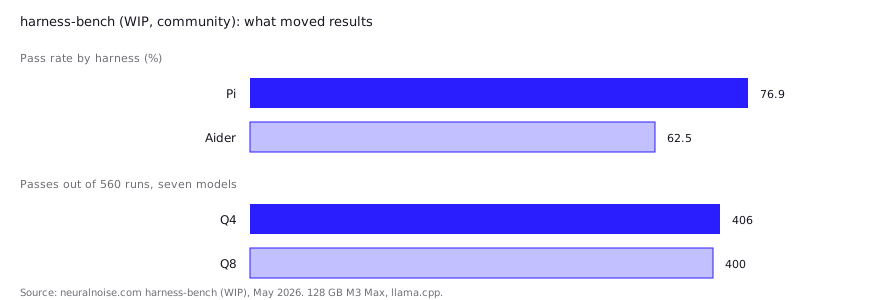
- Harness choice matters. An independent benchmark, harness-bench, ran 17 model-quant builds across five harnesses on 16 tasks, 1,360 runs on one 128 GB M3 Max laptop through llama.cpp. The author calls it work in progress. Qwen3.6-27B at Q4 was the only combination to clear all 16 tasks, but only with the Pi harness; with Aider it performed poorly, and gpt-oss-120b did badly in OpenCode. Across harnesses, pass rates ranged from 76.9% (Pi) to 62.5% (Aider). The author also found OpenCode peeked at the hidden grader in 14 runs, so that harness’s score is inflated.
- Q4 is enough for agents. The same benchmark compared Q4 and Q8 on seven models and found 406 of 560 passes at Q4 against 400 at Q8, with Q8 slower. For GGUF quantization choices on Apple Silicon, the author’s default is Q4_K_M or UD-Q4_K_XL.
- Small models and missing tool support fail loudly. One home-lab write-up on OpenCode with Ollama used a 9B coding model on a 16 GB RTX 5080 for reading repos, explaining files and checking Docker Compose syntax. DeepCoder 14B was rejected because it “did not support tools” and acted like a plain chatbot. The author concludes cloud models still win on deep reasoning, large repositories, long context and debugging.
- Large machines can feel fast. A Hacker News commenter running a 2-bit DeepSeek v4 Flash build (86 GB GGUF) on an M3 Ultra reported about 30 tokens per second generation, 400 prefill, and “very reliable” tool calling in OpenCode and Pi.
- Benchmarks and daily use diverge. Another Hacker News commenter said local models post impressive benchmark numbers that rarely meet expectations in OpenCode, particularly for tool calling and agentic work.
- Failure modes repeat. A guide to local function calling lists hallucinated function names, wrong parameters, models stuck repeating a broken call, and aggressive KV-cache quantization (
-ctk q4_0) hurting accuracy. It recommends Q8 or higher for the cache and capping loop iterations. Its edge-case claims come from community reports.
Practical takeaways: test your own harness and model pair rather than trusting a card, and keep tasks small enough to fit your context budget. See Local LLM context length for what the window costs.
When should you fall back to a hosted model?
Fall back to a hosted model when the task needs deep reasoning across a large repository, when long runs keep exhausting your context, or when your hardware forces a model too small to call tools reliably. Local setups are a fit for private code, predictable cost and focused work such as one module, a refactor or a scripted fix.
A hybrid is common: a local model for routine edits and a hosted one for architecture changes. OpenCode’s home-lab author did exactly this by switching to a cloud model in the same harness. For the cost, quality and privacy trade-off, see local LLM vs Claude for coding.
FAQ
What is the best local LLM for a coding agent?
There is no verified single winner. Qwen3.8-27B, Qwen3-Coder-Next and Devstral Small 2 each document agentic benchmark scores and tool-calling support, but on different harnesses. Pick the largest one that fits your memory with a 64,000-token context, then test it in your harness.
Which CLI coding agent works best with a local LLM?
It depends on the model. In one preliminary community benchmark, Pi and Qwen CLI scored highest and Aider lowest, yet the best pairing for each model differed. Aider, OpenCode, Cline and goose all document local setups, so try two with your model.
Why does my local coding agent fail to call tools?
Usually one of three causes: the model lacks tool-calling support, the context window is too small (Ollama defaults to 4k under 24 GiB VRAM), or the server uses the wrong tool-call parser or chat template. Check them in that order.
Does a local coding agent need 64,000 tokens of context?
Ollama recommends at least 64,000 for agents and coding tools. Smaller windows can work for short tasks, but tool definitions and file contents fill them fast, and Ollama drops overflow silently.
Can I run a coding agent on CPU only?
It is possible but slow. One home-lab author called CPU-only inference “mediocre to poor at best”. Mixture-of-experts models such as gpt-oss-20b, with 3.6B active parameters, are the most practical option on modest hardware.
Sources (10)
- Qwen3.8-27B model card, Hugging Face (Qwen)
- Qwen3-Coder-Next model card, Hugging Face (Qwen)
- Devstral-Small-2-24B-Instruct-2512 model card, Hugging Face (Mistral AI)
- gpt-oss-20b model card, Hugging Face (OpenAI)
- Context length, Ollama documentation
- Ollama, Aider documentation
- Providers, OpenCode documentation
- Ollama, Cline documentation
- Providers, goose documentation
- harness-bench (WIP): benchmarking local LLMs against coding agent harnesses, neuralnoise.com (May 2026)