Set the context length in Ollama (OLLAMA_CONTEXT_LENGTH, num_ctx), LM Studio and llama.cpp (-c), see what it costs in memory, and confirm the value in use.
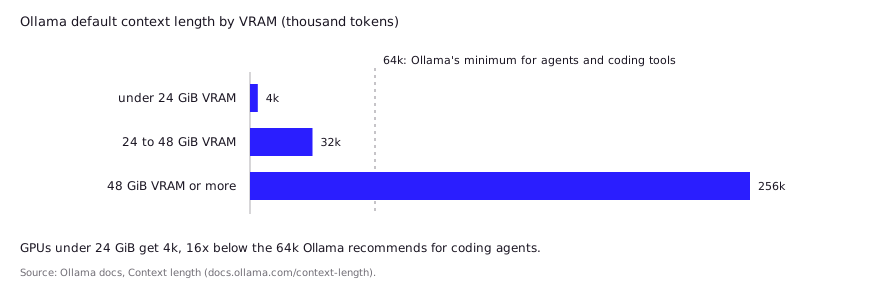
In Ollama, set the context length with the OLLAMA_CONTEXT_LENGTH environment variable, the app's slider, or a num_ctx parameter in a Modelfile or API request. In LM Studio, set it in the model's load settings or with lms load --context-length. In llama.cpp, pass -c. Ollama defaults to 4k tokens on GPUs under 24 GiB of VRAM, and its docs recommend at least 64k for coding agents.
- 4k tokens
- 64k+ tokens
- 0 (from model)
- f16
Key takeaways
- Ollama's default context depends on VRAM: 4k tokens under 24 GiB, 32k from 24 to 48 GiB, 256k at 48 GiB or more.
- Ollama's docs say agents and coding tools should run with at least 64,000 tokens of context.
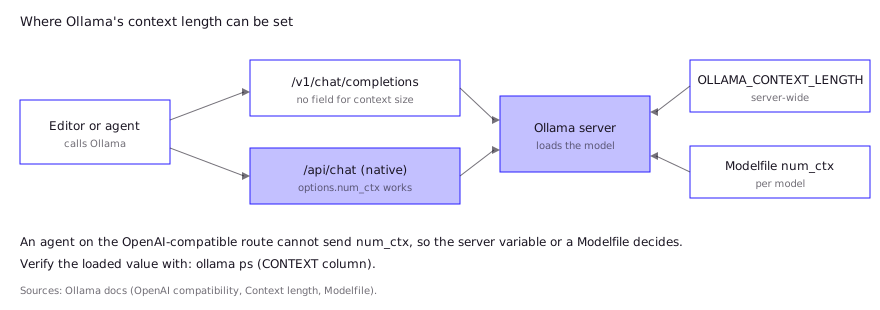
- Ollama's OpenAI-compatible endpoint has no way to set context size per request, so use the server variable or a Modelfile.
- Check what is really loaded with ollama ps (Ollama) or lms ps (LM Studio), not with the model card's advertised maximum.
- Context costs memory. Flash attention and a quantized KV cache are the two levers that shrink it.
Why does context length break local coding setups?
A June 2026 GitHub issue on Hermes Agent shows the failure: the agent read a larger context from the model file, but because it used Ollama’s OpenAI-compatible route, Ollama ran at 4096 anyway, and users saw truncated replies and garbled retries. A context window that is too small fails quietly: the runtime keeps working, but the model never sees the start of your prompt. For coding that means the system prompt, the tool definitions and the first files an agent read can fall out of the window, and the model then looks “dumber” than it is. Ollama’s own docs say that tasks such as web search, agents and coding tools should be set to at least 64,000 tokens, while the app’s default on a typical consumer GPU is far lower.
The failure has a recognizable shape:
- The agent forgets its instructions or repeats tool calls halfway through a task.
- Pasting a long file gives an answer about only the end of it.
- A reasoning model stops mid-thought, because its thinking tokens used up the window.
- The same model behaves well in a hosted playground and badly locally.
Fixing it takes one setting per tool, but each tool names it differently. The sections below cover the three runtimes most coding setups use.
What is Ollama’s default context length, and how do you change it?
An August 2026 Hacker News commenter warned that Ollama defaults to a 4K context on GPUs under 24GB of VRAM, enough to cut a thinking model off mid-answer. Ollama’s default context length depends on your VRAM: 4k tokens under 24 GiB, 32k from 24 to 48 GiB, and 256k at 48 GiB or more. Older writeups and some Ollama pages still quote 2,048 or 4,096, so check what your installed version applies (see the verification section below).
There are four ways to raise it, from broadest to narrowest:
| Scope | How | Notes |
|---|---|---|
| Ollama app | Context length slider in settings | Applies to every model the app serves |
| Server-wide | OLLAMA_CONTEXT_LENGTH environment variable | Read when the server starts, so restart it |
| One model | PARAMETER num_ctx in a Modelfile, then ollama create | Saves a named variant of the model |
| One session or request | /set parameter num_ctx in ollama run, or "options": {"num_ctx": ...} on the native API | Ignored by the OpenAI-compatible route |
The commands:
# Server-wide, for a foreground server
OLLAMA_CONTEXT_LENGTH=65536 ollama serve

# Per model: write a Modelfile, then build a named variant
#   FROM qwen2.5-coder:14b
#   PARAMETER num_ctx 65536
ollama create qwen-coder-64k -f ./Modelfile
For a Linux service, set the variable with systemctl edit ollama.service (an Environment="OLLAMA_CONTEXT_LENGTH=65536" line under [Service]), then run systemctl daemon-reload and systemctl restart ollama. On macOS, the FAQ says to use launchctl setenv and restart the app. On Windows, quit Ollama, edit your account’s environment variables, and start it again.
One trap matters for coding tools. Ollama’s OpenAI compatibility page says plainly that “the OpenAI API does not have a way of setting the context size for a model.” Editors and agents that talk to /v1/chat/completions cannot pass num_ctx, so for them the server variable or a Modelfile variant is the only route. The OpenAI-compatible API guide covers the endpoint in full.
How do you set context length in LM Studio?
In LM Studio, you set context length when a model loads, and you can save it as that model’s default. In the app, open the model’s load settings and change the context length before loading. Per the LM Studio docs, you can also open My Models, click the gear icon for a model, and save default load parameters, including a particular context size, so they apply the next time it loads.
From the command line, the lms load command takes a --context-length flag:
lms load <model_key> --context-length 32768Two behaviors are worth knowing:
- Changing it means reloading. Context length sets the size of the KV cache buffer, which is allocated at load time.
- Memory guardrails can lower it. Since version 0.3.27, LM Studio’s pre-load estimate accounts for context length and flash attention, warns you if you are likely to run out of memory, and lets you override the guardrails. The docs don’t state a default context length, so read the value from the load dialog rather than assuming one.
How do you set context length in llama.cpp?
In llama.cpp, pass -c (long form --ctx-size) to llama-server or llama-cli. The server README lists the default as 0, which means “loaded from model”, so an unset -c uses the context length stored in the model file. The matching environment variable is LLAMA_ARG_CTX_SIZE.
llama-server -m ./model.gguf -c 32768 -fa onThe related flags that change how much memory that context needs:
| Flag | What it does | Default |
|---|---|---|
-c, --ctx-size N | Prompt context size in tokens | 0 (from model) |
-np, --parallel N | Number of server slots (concurrent requests) | -1 (auto) |
-fa, --flash-attn | Flash attention: on, off or auto | auto |
-ctk, -ctv | KV cache type for keys and values (f16, bf16, q8_0, q4_0 and others) | f16 |
--rope-scaling, --rope-scale, --yarn-orig-ctx | Stretch context beyond the training length | model-specific |
--fit, --fit-ctx | Adjust unset arguments to fit device memory; --fit-ctx sets the smallest context it may pick | on, 4096 |
The --fit default is the one to notice. With it on, llama.cpp can shrink settings you did not set explicitly to fit your memory, so set -c yourself if you need a specific number. Slots matter too: more parallel slots means more KV cache, and the README documents --kv-unified-per-slot for sizing the pool per slot. If you serve one editor, -np 1 keeps the whole budget for one session.
How much memory does more context cost?
More context costs memory in proportion to the number of tokens, because the runtime stores a key and a value for every token in every layer. The exact figure depends on the model’s layer count, KV heads and head size, which the hardware requirements guide works through. Here is what the runtimes’ own docs say about shrinking it:
| Lever | Effect | Source |
|---|---|---|
| Larger context | “Will increase the amount of memory required to run a model” | Ollama context docs |
Flash attention (OLLAMA_FLASH_ATTENTION=1) | Can significantly reduce memory as context grows; used automatically when supported | Ollama FAQ |
OLLAMA_KV_CACHE_TYPE=q8_0 | About half the f16 KV memory, with very small quality loss | Ollama FAQ |
OLLAMA_KV_CACHE_TYPE=q4_0 | About a quarter of the f16 KV memory, with more visible loss at large contexts | Ollama FAQ |
OLLAMA_NUM_PARALLEL above 1 | Memory scales with parallel requests times context length | Ollama FAQ |
Two cautions from the FAQ: KV cache quantization is a global setting that applies to all models and needs flash attention, and models with a high GQA count (it cites Qwen2) can lose more precision from it. The Ollama docs also say performance is best when you avoid offloading the model to the CPU, so a context that spills layers off the GPU can cost more in speed than it buys in capacity.
How do you verify the context length actually in use?
Ask the runtime what it loaded, because the model card’s advertised maximum is not the value in force. In Ollama, run ollama ps: the CONTEXT column shows the allocated context and PROCESSOR shows the CPU and GPU split. In LM Studio, lms ps lists loaded models, and the load dialog shows the value. In llama.cpp, the server prints its context size at startup.
A quick behavioral check also works: paste a long document, put a unique phrase in its first lines, and ask the model to quote it back. If it can’t, the start of the prompt was cut. Treat that as a check of your setup, not a benchmark.
If an editor extension is in the loop, check it too. Continue’s docs note that it may set a higher default context length than other Ollama tools, and the fix for a “model requires more system memory” error is to lower contextLength under defaultCompletionOptions. The VS Code setup guide and the coding agent guide cover where each tool keeps these settings.
What do developers report in practice?
Community reports are consistent on one point: the default was too small for agentic work, and the limit was easy to miss. These are posts by individual users, not tests by this site.
- Silent truncation. In 2025 Hacker News threads, commenters said Ollama’s default was then 2,048 tokens and that a prompt over the limit is truncated with no error, and that raising
num_ctxfixed thinking models. They also reported that/show infoshowed the model’s capability, not the context Ollama applied. - Still 4k on small GPUs. An August 2026 commenter warned that Ollama defaults to a 4K context on GPUs under 24GB of VRAM, which can cut off a thinking model’s output mid-answer.
- Big contexts on one consumer card. One June 2026 Hacker News user said a single 3090 held a 180k context in about 23GB with flash attention on and the KV cache set to q8_0. It is one report with one model, so treat it as a ceiling to try, not a promise.
- The agent never sends the value. A June 2026 GitHub issue on Hermes Agent says the agent read a larger context from the model file but, because it used the OpenAI-compatible route, Ollama ran at 4096 anyway. Reported symptoms were truncated replies and garbled retries. Users worked around it with
OLLAMA_CONTEXT_LENGTH, a Modelfile, or the native/api/chat. - A guardrail can lower your number. A July 2026 LM Studio bug report describes a 16 GB MacBook Air where a requested 6,144 context was loaded as 4,864 because of the memory guardrail, and requests for 4,096 were fitted to the same value. The user confirmed it with
lms ps.
The pattern: set the variable on the server, then confirm with ps. Don’t trust the client’s config, since some clients cannot pass the value.
FAQ
What is the default context length in Ollama?
It depends on VRAM: 4k tokens under 24 GiB, 32k from 24 to 48 GiB, and 256k at 48 GiB or more, per Ollama’s docs. Older Modelfile docs and many posts still say 2,048 or 4,096, so confirm with ollama ps.
What is the Ollama context length environment variable?
OLLAMA_CONTEXT_LENGTH, for example OLLAMA_CONTEXT_LENGTH=65536 ollama serve. It is read when the server starts, so restart the server after changing it.
Is a bigger context length always better?
No. It costs memory in proportion to the tokens held, and Ollama’s docs note that spilling a model to the CPU hurts performance. Choose the smallest value that holds your system prompt, tools and working files, which for agents is at least 64k per Ollama’s guidance.
Why does my coding agent ignore my num_ctx setting?
If it connects through the OpenAI-compatible endpoint, num_ctx can’t be passed. Set OLLAMA_CONTEXT_LENGTH on the server or bake num_ctx into a Modelfile and point the agent at that model name.
How do I change context length in LM Studio?
Change it in the model’s load settings, save it as the model’s default from My Models, or run lms load <model_key> --context-length N. Reload the model for the change to apply.
Sources (10)
- Context length, Ollama docs
- FAQ: context window, flash attention, KV cache and parallel requests, Ollama docs
- Modelfile reference (num_ctx), Ollama docs
- OpenAI compatibility, Ollama docs
- lms load command, LM Studio docs
- Per-model default parameters, LM Studio docs
- LM Studio 0.3.27: model resource estimates, LM Studio blog (Sep 24, 2025)
- llama.cpp server README (ctx-size, parallel, flash-attn, cache types)
- Ollama provider troubleshooting (contextLength), Continue docs
- Issue #43900: Ollama models stuck at 4096 context, NousResearch/hermes-agent (Jun 2026)