Ollama serves a native API and OpenAI- and Anthropic-compatible endpoints on localhost:11434. Base URLs, auth, streaming, num_ctx and LAN exposure explained.
Ollama serves an HTTP API on http://localhost:11434. Its native endpoints live under /api (chat, generate, embed), and an OpenAI-compatible subset lives under /v1. A local server needs no API key, so clients send a dummy one. The catch is per-request context length: /v1 cannot set it, so use /api/chat with options.num_ctx or set it server-side.
- 127.0.0.1:11434
- None (dummy key)
- 4k tokens
- Modelfile or env var
Key takeaways
- Native API: http://localhost:11434/api. OpenAI-compatible: http://localhost:11434/v1. Anthropic clients use http://localhost:11434 as the base URL.
- A local Ollama server has no authentication. OpenAI and Anthropic SDKs still require an api_key value, so pass any string.
- Use /api/chat for application code. /api/generate is single-shot and has no messages array.
- The OpenAI-compatible layer has no way to set context length. Ollama's maintainers say to use the native API's options.num_ctx, a Modelfile, or OLLAMA_CONTEXT_LENGTH.
- Ollama binds to 127.0.0.1 by default. Binding it to 0.0.0.0 without an authenticating proxy is how researchers found thousands of open instances.
What endpoints does Ollama expose?
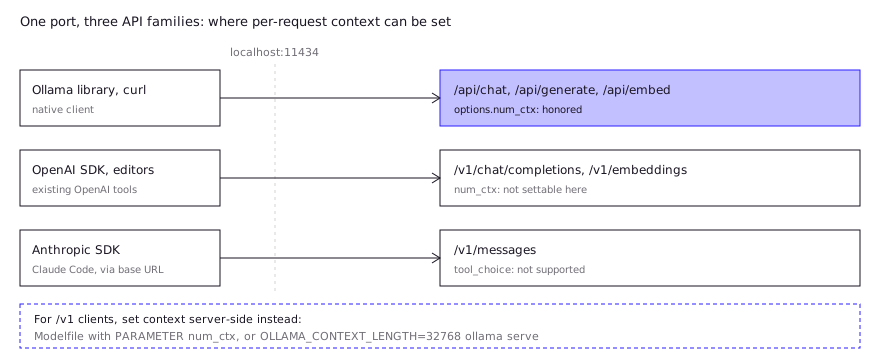
Ollama exposes three API families on one port: its own native API under /api, an OpenAI-compatible subset under /v1, and an Anthropic-compatible /v1/messages. The Ollama docs list the local base URLs:
| API | Local base URL | Main endpoints |
|---|---|---|
| Ollama (native) | http://localhost:11434/api | /api/chat, /api/generate, /api/embed, /api/tags, /api/ps, /api/show, /api/pull |
| OpenAI-compatible | http://localhost:11434/v1 | /v1/chat/completions, /v1/completions, /v1/responses, /v1/embeddings, /v1/models |
| Anthropic-compatible | http://localhost:11434 (client appends /v1/messages) | /v1/messages |
The same paths exist on Ollama’s hosted cloud (https://ollama.com/api, /v1), where a real API key is required. This page is about the local server, which is what you get after ollama serve or installing the desktop app.
Two management notes from the docs: creating or deleting models needs a local server, and the API “isn’t strictly versioned” but is expected to stay backwards compatible, with deprecations announced in release notes. Pin your client library version anyway.
Native API or OpenAI-compatible API: which should you use?
Use the OpenAI-compatible API when you are plugging Ollama into code or a tool that already speaks OpenAI, and the native API when you are writing new code against Ollama and need its per-request controls. The deciding factor is usually context length.
Native /api/chat | OpenAI-compatible /v1/chat/completions | |
|---|---|---|
| Works with existing OpenAI SDKs and tools | No | Yes |
Per-request num_ctx | Yes, in options | No (documented workaround: Modelfile) |
keep_alive per request | Yes | No |
| Streaming | NDJSON, on by default | SSE, off unless stream: true |
| Tool calling | Yes | Yes (tool_choice not supported) |
n, logit_bias, logprobs | logprobs supported | Not supported |
The compatibility layer is a documented subset. Per the OpenAI compatibility page, /v1/chat/completions supports streaming, JSON mode, seed, vision (base64 only, no image URLs), tools and reasoning_effort, and does not support tool_choice, logit_bias, user or n. /v1/responses exists (added in v0.13.3) but only in its stateless form, with no previous_response_id.
If your client expects the Anthropic Messages format instead, Ollama’s Anthropic compatibility layer supports messages, streaming, system prompts, tools, vision and thinking, but not tool_choice. Pointing Claude Code at it is covered in Claude Code with a local model.
What is the difference between /api/generate and /api/chat?
/api/generate takes a single prompt string and returns a completion. /api/chat takes a messages array with roles, so it carries conversation history, system prompts and tool definitions. For application code, use /api/chat. Reserve /api/generate for one-shot jobs such as classification or summarization where there is no history to send.
How do you call Ollama from Python, JavaScript and curl?
You call it by pointing a client at http://localhost:11434 and naming a model you have already pulled. Start with ollama pull <model>; a request for a model that is not present returns a 404.
curl, native API (non-streaming, so you get one JSON object):
curl http://localhost:11434/api/chat -d '{
  "model": "gpt-oss:20b",
  "messages": [{"role": "user", "content": "Why is the sky blue?"}],
  "stream": false
}'
The answer is in message.content. Without "stream": false, the native endpoints stream newline-delimited JSON, one object per line, ending with "done": true.
Python, OpenAI SDK against /v1:
from openai import OpenAI

client = OpenAI(
    base_url="http://localhost:11434/v1/",
    api_key="ollama",  # required by the SDK, ignored by Ollama
)

resp = client.chat.completions.create(
    model="gpt-oss:20b",
    messages=[{"role": "user", "content": "Say this is a test"}],
)
print(resp.choices[0].message.content)
Python, official client (native API):
from ollama import chat

resp = chat(
    model="gpt-oss:20b",
    messages=[{"role": "user", "content": "Why is the sky blue?"}],
)
print(resp.message.content)
Install it with pip install ollama. The JavaScript equivalent is npm i ollama followed by ollama.chat({ model, messages }), and both official libraries accept stream=True / stream: true to iterate over chunks. The OpenAI JavaScript SDK works the same as the Python one: set baseURL to http://localhost:11434/v1/ and apiKey to any string.
Does the local Ollama API need an API key?
No. The authentication docs state that the local API at http://localhost:11434 does not require authentication. OpenAI and Anthropic SDKs refuse to construct a client without an api_key, so pass a placeholder such as "ollama"; the docs mark it “required but ignored”. Real keys are only for direct calls to ollama.com, sent as Authorization: Bearer.
For tools that hard-code an OpenAI model name like gpt-3.5-turbo, the docs suggest aliasing a local model with ollama cp llama3.2 gpt-3.5-turbo.
How do you set context length and other options per request?
A developer on Ollama 0.30.7 sent num_ctx to /v1/chat/completions and got a 262,144-token load anyway, and a maintainer’s reply in ollama/ollama #16814 was that the compatibility layer ignores it (community report). That is the rule: on the native API, put options in the options object; on /v1, you cannot set context length per request. The native options field accepts num_ctx, num_predict, temperature, top_p, top_k, min_p, seed and stop, and keep_alive sits at the top level of the request.
curl http://localhost:11434/api/chat -d '{
  "model": "qwen3-coder",
  "messages": [{"role": "user", "content": "Summarize this diff."}],
  "options": {"num_ctx": 32768, "temperature": 0.2},
  "keep_alive": "10m",
  "stream": false
}'
The OpenAI compatibility page says plainly that the OpenAI API has no way to set context size, and tells you to build a Modelfile instead:
FROM qwen3-coder
PARAMETER num_ctx 32768
Run ollama create qwen3-coder-32k, then use qwen3-coder-32k as the model name. The third option is server-wide: OLLAMA_CONTEXT_LENGTH=32768 ollama serve.
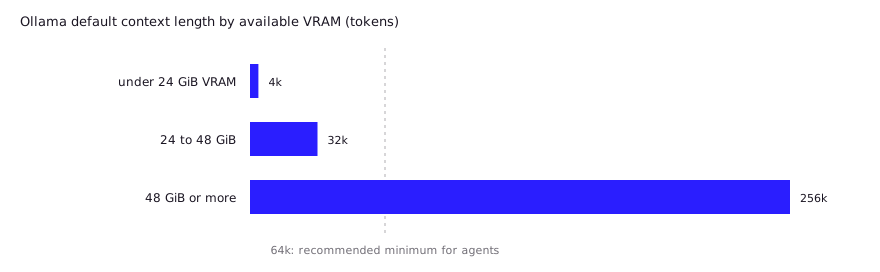
This matters because the default is small. Per the context length docs, Ollama defaults to 4k context below 24 GiB of VRAM, 32k at 24 to 48 GiB, and 256k at 48 GiB or more, and recommends at least 64,000 tokens for agents and coding tools.
 Larger contexts cost memory, so check the result with
ollama ps, whose CONTEXT and PROCESSOR columns show what was actually allocated and whether any of it spilled to CPU. For sizing guidance, see local LLM context length.
One more server setting to know: OLLAMA_NUM_PARALLEL (default 1) multiplies context. The FAQ notes that a 2K context with 4 parallel requests becomes an 8K allocation.
What do developers report in practice?
The most consistent community complaint is silent truncation from the context default, and it is worth designing around. These are user reports, not our tests:
num_ctxignored on/v1. In the same issue #16814, the maintainer showed theoptionsform on the native API, and a later commenter asked for it to be accepted as a documented extension, and a pull request proposing that (#16825) was still open at last check.- Truncation that looks like a model bug. A Hermes Agent issue describes local models through
/v1returningfinish_reason="length"with empty or cut-off output while the agent believed it had plenty of context left. Reporters saidoptions.num_ctxinextra_bodyhad no effect, and that a Modelfile alias orOLLAMA_CONTEXT_LENGTHfixed it. One said their cron job success rate went from 3 of 5 to 5 of 5 after baking the context into a Modelfile. - Same finding, independent setup. A TradingAgents issue on Ollama 0.32.3 reproduced it: with
num_ctxset to 16384,/v1/chat/completionsstopped at 4,096 total tokens in every request shape tried, while/api/chatcompleted the same request. It reported thatthink: falsewas likewise honored natively but not on/v1. - Older lore is stale. Hacker News comments from 2025 say the default is 2,048 tokens and that prompts are silently cut to fit. Current docs list 4k and up, depending on VRAM, so check your version before copying old advice.
The pattern: if you use /v1, set context on the server or in a Modelfile and verify with ollama ps; if you call /api/chat, pass options.num_ctx and it works.
How do you expose Ollama beyond localhost safely?
Keep it on localhost unless you must, and if you must, put an authenticating reverse proxy in front of it. Ollama binds to 127.0.0.1:11434 by default and has no built-in authentication, so anyone who can reach an open port can run inference on your GPU.
To listen on other interfaces, set OLLAMA_HOST, for example OLLAMA_HOST=0.0.0.0:11434, using the platform-specific method in the FAQ (a systemd override on Linux, launchctl setenv on macOS). Browser apps on another origin additionally need OLLAMA_ORIGINS.
Real-world exposure is not hypothetical:
- SentinelLABS and Censys reported about 175,000 publicly reachable Ollama hosts across 130 countries in January 2026. They attribute this to operators binding beyond localhost, and found over 48% of hosts advertising tool-calling.
- LeakIX counted 12,269 instances with no authentication in February 2026 and recommends binding to 127.0.0.1, an authenticated reverse proxy, firewall rules and access logging, since Ollama does not log requests by default.
A defensible LAN setup, in order of preference:
- Bind to
127.0.0.1and reach it over SSH forwarding or a VPN overlay. - If you bind to a LAN address, firewall port 11434 to known hosts only.
- Put nginx or Caddy in front with an auth check (API key header, basic auth or mTLS) and TLS.
- Never port-forward 11434 on a router.
The Nginx example in the Ollama FAQ only forwards requests with a Host header fix; it does not add authentication, so that part is yours to write. For a team-serving setup with real access control, see Ollama vs llama.cpp vs vLLM.
What errors will you hit, and what do they mean?
Most failures are a wrong model name, a wrong URL path, or a connection refused because the server is not running or not bound where you think. The error docs define the status codes:
| Symptom | Likely cause | Fix |
|---|---|---|
404 on a request | Model not pulled, or wrong path (/v1 vs /api) | ollama pull <model>; check the base URL |
400 | Bad JSON, missing fields, or an unsupported field | Check the request against the compatibility tables above |
| Connection refused | Server not running, or bound to a different address | ollama serve; check OLLAMA_HOST |
Empty or cut-off output, finish_reason: length | Default context too small (community-reported) | Set num_ctx via options, Modelfile or env var |
| Slow first request | Model loading into memory | Use keep_alive (-1 keeps it loaded, 0 unloads) |
502 (cloud models) | Cloud model unreachable | Retry; check sign-in |
Errors are JSON with an error string. If a failure happens mid-stream, the HTTP status is already 200, so the error arrives as a final {"error": ...} line in the stream. Streaming clients must check for it.
FAQ
What is the Ollama API base URL?
http://localhost:11434/api for the native API and http://localhost:11434/v1 for the OpenAI-compatible API. Anthropic clients use http://localhost:11434 and append /v1/messages themselves.
Does Ollama need an API key locally?
No. The local server has no authentication. SDKs that insist on a key accept any placeholder string. Only direct calls to ollama.com need a real key.
Can I use the OpenAI Python SDK with Ollama?
Yes. Set base_url="http://localhost:11434/v1/" and any api_key. Chat completions, streaming, tools, JSON mode and embeddings work; tool_choice and n do not. Set context length outside the request.
Does Ollama support the Anthropic API?
Yes, /v1/messages supports messages, streaming, tools, vision and thinking, without tool_choice. Use ANTHROPIC_BASE_URL=http://localhost:11434 and a dummy auth token.
Why is my Ollama response cut off?
Usually the context window is too small. Below 24 GiB of VRAM the default is 4k tokens. Raise it with options.num_ctx on /api/chat, a Modelfile, or OLLAMA_CONTEXT_LENGTH, then confirm with ollama ps.
Sources (10)
- Ollama docs: API introduction (base URLs, libraries, versioning)
- Ollama docs: Authentication
- Ollama docs: OpenAI compatibility
- Ollama docs: Anthropic compatibility
- Ollama docs: Context length
- Ollama docs: FAQ (OLLAMA_HOST, proxies, keep_alive, concurrency)
- Ollama docs: Streaming and Errors
- ollama/ollama issue #16814: Ollama ignores num_ctx on the request (community report, maintainer reply)
- NousResearch/hermes-agent issue #43900: local models silently capped at 4096 tokens (community report)
- SentinelLABS and Censys: 175,000 publicly exposed Ollama hosts, via The Hacker News (Jan 29, 2026)