Continue vs Cline for local models in 2026: Roo Code shut down, Continue is frozen after Cursor bought it. What each does, autocomplete, tool calls, licences.
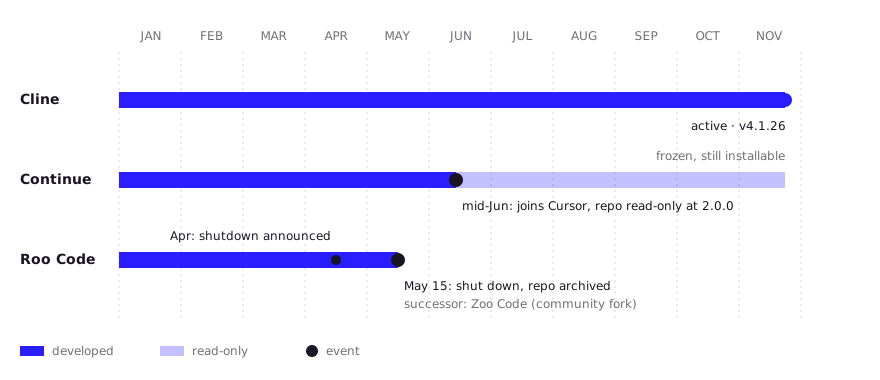
Continue vs Cline comes down to workflow: Continue does chat, edits and tab autocomplete from one config.yaml; Cline is a plan-and-act agent with no autocomplete. For local models in late 2026, Cline is the only one of the three still developed. Continue's repo went read-only after Cursor acquired it in June 2026, and Roo Code shut down on May 15, 2026. Use Continue for frozen-but-working autocomplete, Cline for agent work.
- Cline (4.1.26); Continue and Roo Code read-only
- Continue only (of the three)
- Apache-2.0 for all three
- 64k tokens (Ollama docs)
Key takeaways
- Continue is chat, edit, autocomplete and agent in one extension, configured in config.yaml. Its repo is read-only since the Cursor acquisition; the final 2.0.0 release removed telemetry.
- Cline is an agent: Plan mode proposes, Act mode edits files and runs commands with approval. It has no tab autocomplete. It is the only one of the three still shipping releases.
- Roo Code, a Cline fork with Code, Architect, Ask and Debug modes, was shut down on May 15, 2026. Its notice points to the community fork Zoo Code, or to Cline.
- On local hardware the extension matters less than context: Ollama gives 4k tokens by default under 24 GiB of VRAM, and its docs ask for at least 64k for coding agents.
- A common local setup in 2026: Continue (or llama.vscode) for autocomplete with a 1.5B FIM model, Cline for agent tasks with a 20B to 30B model.
The honest answer to “Continue vs Cline” in November 2026 is that only one of the two is still being developed. Continue does chat, inline edits and tab autocomplete from a single config.yaml, but its repository is read-only after Cursor acquired the company in June 2026. Cline is a plan-and-act coding agent with no autocomplete, and it still ships releases. Roo Code, the Cline fork people added to this comparison, shut down on May 15, 2026. For local models, that turns the choice into “which job do you need done, and how long do you need it supported.”
Which should you install?
Install Cline for agent work, and keep Continue only if you want tab autocomplete and accept that it gets no more fixes. The table assumes you serve models locally with Ollama or LM Studio.
| Your situation | Pick | Why |
|---|---|---|
| You want Copilot-style tab completion, offline | Continue (frozen) or llama.vscode | Cline has no autocomplete; Continue’s FIM setup still works |
| You want an agent that edits files and runs commands | Cline | Plan/Act with approval on every step; actively maintained |
| You used Roo Code’s modes and want them back | Zoo Code (community fork) or Cline | Roo’s own shutdown notice names both |
| 8 to 16 GB of RAM or VRAM | Continue autocomplete with a 1.5B model; agents will struggle | Cline lists only Qwen3 8B at 32k context for this tier |
| 16 to 26 GB | Cline with gpt-oss 20B, Devstral Small 2 or Qwen3.8 27B | Cline’s own hardware list for local agent work |
| 64 GB or more | Cline with Qwen3-Coder-Next | Listed by Cline at about 56 GB with 64k context |
| You need a maintained tool for a team | Cline | The other two will not track new VS Code or Ollama changes |
The memory tiers and model names come from Cline’s local models page. For the full setup of either extension, see our local LLM for coding VSCode guide.
What is each extension designed for?
Continue is an editor assistant, Cline is an agent, and Roo Code was an agent with role-based modes. That design difference matters more than any feature checklist.
- Continue puts chat, inline edit, tab autocomplete and an agent mode in one extension. Each model in
config.yamlgets roles such aschatorautocomplete, so a small and a large model can share one setup (docs). The README now says the repository “is no longer actively maintained and is read-only for all users,” and describes a final 2.0.0 release for VS Code, JetBrains and the CLI that removed anonymous telemetry and authentication. Continue’s site says it “has joined Cursor” and that the open-source code “remains freely available as a foundation for others.” - Cline is built around one loop: Plan mode explores the codebase and proposes a strategy, Act mode carries it out, and every file edit and terminal command needs your approval unless you turn on auto-approve (README). Its changelog shows version 4.1.26 as the latest entry.
- Roo Code started from Cline and added Code, Architect, Ask, Debug and custom modes (repo). The repo was archived on May 15, 2026, and the docs notice says “The Roo Code Extension was shut down on May 15th,” pointing users to ZooCode, “a fork started by the Roo Code community,” and to Cline. The shutdown reached Hacker News on April 21, with the team moving to its Roomote agent.
Zoo Code keeps Roo’s modes under Apache-2.0 and was at v3.94.0 on its GitHub page when we checked. It is young and community-run, so judge it on its release cadence over the next months. Kilo Code, an MIT-licensed agent that does offer tab autocomplete, is another option people mention in the same threads.
How well does each work with local models?
All three connect to Ollama and LM Studio, but they differ in how much context they need and in how they ask the model to call tools. Those two things decide whether a local model works.
| Continue | Cline | Roo Code / Zoo Code | |
|---|---|---|---|
| Local providers | Ollama and other local servers | Ollama, LM Studio, any OpenAI-compatible API | Ollama and LM Studio (community threads); check Zoo’s provider list |
| Prompt size | Small for chat and autocomplete; larger in agent mode | Large agent prompt; “Use Compact Prompt” recommended locally | Large agent prompt per mode |
| Tool calls | Native tool calling, or tools injected into the system message as XML | XML tool format; JSON tool calls from some local models are not parsed (community-reported) | Not documented after shutdown |
| Suggested local models | Qwen3 Coder 30B, Devstral 27B for agent mode | Qwen3 8B to Qwen3-Coder-Next by memory tier | Not maintained by Roo |
Continue’s agent model docs say it “converts tools into XML format and includes them in the system message” for models without native tool calling, which gives weaker local models a fallback. Cline asks local users to enable Use Compact Prompt and to “start a new task when context gets too large.”
The bigger constraint sits in Ollama. Its context length docs set a 4k default on GPUs under 24 GiB of VRAM and 32k between 24 and 48 GiB, and say coding tools and agents need at least 64,000 tokens. An agent prompt cut down to 4k loses its tool definitions, which looks like the extension is broken when it is the server setting. The fixes for Cline specifically are on our Cline Ollama page, and the Roo-specific ones on the Roo Code Ollama page.
Which supports tab autocomplete with a local model?
Of the three, only Continue does tab autocomplete. Cline and Roo Code are chat-and-agent tools.
Continue’s autocomplete docs recommend qwen2.5-coder:1.5b or 7b through Ollama, set with the autocomplete role:
models:
  - name: Qwen 1.5b Autocomplete Model
    provider: ollama
    model: qwen2.5-coder:1.5b
    roles:
      - autocomplete
The docs note that most good autocomplete models are under 10B parameters and that thinking models are too slow for it. Because Continue is frozen, a future Ollama or VS Code change could break this without a fix. If you want a maintained completion extension, llama.vscode is the usual alternative. Model choices are compared in our guide to local code completion models.
How do licences, telemetry and pricing compare?
All three are Apache-2.0 and free to run against your own models. Telemetry is where they differ.
| Continue | Cline | Roo Code | |
|---|---|---|---|
| Licence | Apache-2.0 | Apache-2.0 | Apache-2.0 (archived) |
| Telemetry | Removed in final 2.0.0 | On by default, opt-out | Repo archived; not reviewed |
| Code or prompts sent in telemetry | No telemetry | No, except when you use Cline’s own paid providers | n/a |
| Cost with a local model | Free | Free | Free (no updates) |
Cline’s telemetry page lists what it collects: features used, task counts, errors, token counts, timings, model and provider names, and OS and editor, tied to a device identifier. It says code, file contents and prompts are excluded, except on the Cline and ClinePass providers. To turn it off in VS Code, open Cline’s settings, go to General and clear “Allow error and usage reporting.” For a fully offline setup, do that before your first task.
What do developers report in practice?
Reports from people running these tools locally agree on one thing: context settings and model size matter more than the extension. These are community reports, not our tests.
- Switching from Continue to Cline. A developer who moved from Continue to Cline in August 2026 wrote up the setup:
qwen2.5-coder:32bat Q4_K_M on Ollama, with a Modelfile raisingnum_ctxto 32768 because the default made Cline lose track mid-task. They reported 15 to 20 tokens/sec on 32B, single-service refactors that compiled on the first try, and failures once a change spanned five or more files. - “Not maintained” is not “broken.” In an Ask HN thread on Continue alternatives, the top reply points out that Continue still runs, with telemetry and auth removed, and that you can fork it.
- Roo’s modes were the draw. In the Roo Code shutdown thread, one commenter called Roo “genuinely great” for its agent modes compared with plain plan/act, and noted that Kilo Code, a further fork, was doing well.
- Local Qwen on Roo Code. In an r/RooCode thread, users said Ollama’s small default context was the main blocker, that
qwen2.5-coder:14bworked once the context was raised, and that a 32B Cline-tuned Qwen variant worked but was slow. - Tool-call loops in Cline. A Cline issue reports Qwen 2.5 Coder 32B and other Ollama models emitting JSON tool calls that Cline’s XML parser ignores, so the model repeats itself in a loop. It was still open when we checked.
- Silent autocomplete failure in Continue. A Continue issue reports that an Ollama Modelfile with
num_ctx 4096plus Continue’s defaultmaxTokensof 4096 leaves no room for the prompt, so completions come back empty with no error. SettingmaxTokensto about 128 avoids it.
What about Aider and OpenCode?
Aider and OpenCode are terminal tools, not VS Code extensions, so they compete with Cline’s agent rather than with Continue’s autocomplete. Both work with local models through Ollama. If you prefer a terminal agent next to any editor, they belong on your shortlist. If you want everything inside VS Code, Cline is the closer match. For a wider comparison that includes hosted options, see self-hosted Copilot alternatives.
FAQ
Is Continue.dev dead?
The project is no longer developed. Its GitHub repository is read-only and the final release is 2.0.0, after Cursor acquired the company in June 2026. The extension and its Apache-2.0 code still work, but there will be no fixes for future VS Code or Ollama changes.
Is Roo Code still available?
No. Roo Code shut down on May 15, 2026, and its repository is archived. The shutdown notice recommends Zoo Code, a community fork with the same modes, or Cline, which Roo was originally forked from.
Is Cline better than Continue?
For agent tasks, yes: it is built around plan-then-act with approval and it is still maintained. For tab autocomplete, Cline has no equivalent, so Continue or llama.vscode remains the tool for that job.
Can I use Continue and Cline together?
Yes. A common setup runs Continue (or llama.vscode) for autocomplete with a small FIM model and Cline for agent tasks with a larger model, both pointed at the same Ollama server.
Which local model works best with Cline?
Cline’s own list recommends Qwen3.8 27B as the best all-round local model for agentic coding, at about 23 GB of memory with 64k context. On 16 to 24 GB it suggests gpt-oss 20B, and on 8 to 16 GB Qwen3 8B for simple edits.
Sources (10)
- Continue GitHub repository (README maintenance notice, final 2.0.0)
- Continue: Continue has joined Cursor
- Continue docs: Autocomplete
- Continue docs: Agent mode model setup (system message tools)
- Cline GitHub repository
- Cline docs: Local models in Cline Desktop
- Cline docs: Telemetry
- Roo Code docs: Extension shutdown notice
- Roo Code GitHub repository (archived May 15, 2026)
- Ollama docs: Context length