Cline Ollama setup step by step, plus LM Studio: the base URLs, the 64k context Cline needs, and fixes for timeouts, API request failed and broken tool calls.
To use Cline with Ollama, pull a tool-capable model, select the Ollama provider in Cline with base URL http://localhost:11434, and enable Use Compact Prompt. For LM Studio, start its server on port 1234 and pick the LM Studio provider. Then raise the context window to about 64k, because most Cline failures on local models are context, timeout or tool-format problems, not setup.
- http://localhost:11434
- http://localhost:1234
- 64k tokens (32k minimum)
- Cline 4.1.25
Key takeaways
- Setup is three fields: provider (Ollama or LM Studio), base URL (localhost:11434 or localhost:1234) and model. Turn on Use Compact Prompt for local models.
- Ollama defaults to a 4k context on GPUs under 24 GiB of VRAM. Cline's agent prompt needs far more; Ollama's own docs recommend at least 64k for coding tools.
- Timeouts usually mean the model spilled onto the CPU or the prompt is huge. Update Cline first: 4.1.25 fixed the 5-minute BodyTimeoutError on long local prompts.
- Models that emit tool calls in the wrong format loop forever. Cline's own Desktop list recommends Qwen3.8 27B, gpt-oss 20B and Devstral Small 2 by memory tier.
Cline with Ollama takes about two minutes to connect: pick the Ollama provider, point it at http://localhost:11434, choose a model, and turn on Use Compact Prompt (Cline docs). LM Studio works the same way on port 1234. The connection is rarely the problem. What breaks a Cline Ollama setup in practice is a context window too small for Cline’s agent prompt, requests that time out while a slow GPU chews through that prompt, and models that answer in a tool format Cline can’t parse. This page covers the setup, then each of those failures with the fix from Cline’s docs, changelog or issue tracker.
How do you connect Cline to Ollama?
Install Ollama, pull a model, then select the Ollama provider in Cline’s settings with the default base URL. These are the steps in Cline’s local models guide:
- Install Ollama from ollama.com and make sure the server is running.
- Pull a model. Use one from the table further down, for example:
ollama pull qwen3.8:27b- Set the context window before Cline sends anything (see the context section below):
OLLAMA_CONTEXT_LENGTH=64000 ollama serve- In Cline, open Settings, choose the Ollama provider, set the Base URL to
http://localhost:11434, and pick the model from the dropdown. - Under Settings → Features, enable Use Compact Prompt.
If the model list is empty, Ollama isn’t running or the model isn’t pulled. Check that http://localhost:11434 responds in a browser. Ollama on another machine works too: change the base URL to that host. In Cline Desktop, the address lives under Settings → Provider → BYOK → Ollama, and Cline can start a local Ollama in the background for you (Cline Desktop docs).
Compact Prompt is a trimmed system prompt that Cline added for LM Studio and Ollama in version 3.26.3, “optimized for smaller context windows (8k or less)” per the changelog. One Hacker News commenter running Cline on a Mac said it “greatly alleviates the long system prompt prefill problem” but disables MCP server use (HN comment). Treat the MCP trade-off as community-reported and test it with your own servers.
How do you connect Cline to LM Studio?
Start LM Studio’s local server with a model loaded, then select the LM Studio provider in Cline and keep the base URL at http://localhost:1234. The Cline docs list these steps:
- Download a model from LM Studio’s Discover tab.
- Open the Developer tab and start the server (default
http://localhost:1234), or use the CLI. - Load the model with an explicit context length, so LM Studio doesn’t use a small default:
lms server start
lms load qwen/qwen3.8-27b --context-length 65536 --gpu max- In Cline, choose the LM Studio provider, keep the base URL, pick the model, and enable Use Compact Prompt.
The --context-length and --gpu flags come from the lms load docs. Two LM Studio specifics from the Cline Desktop docs: if you turned on server authentication, add the API token in Cline’s provider settings, and models that LM Studio loads on its own use LM Studio’s context setting rather than Cline’s, then unload after an hour idle. On Apple Silicon, LM Studio can run MLX builds, which the same page says are often faster.
Why does Cline say “API request failed” or time out?
Almost every Cline Ollama timeout traces to one of four causes: an old Cline version, a model that doesn’t fit in VRAM, a context window too large for the card, or a cold model load. The table maps the symptom to the fix, each from a primary source.
| Symptom | Likely cause | Fix | Source |
|---|---|---|---|
| “Request timed out” after ~30 s | Old Cline with the 15–30 s default | Update Cline; the timeout became configurable in 3.14.0 | Changelog |
| “fetch failed” at exactly ~5 min, before the first token | HTTP client headers timeout (~300 s) on a long prompt prefill | Update to Cline 4.1.25+, which fixed the 5-minute BodyTimeoutError on local models | Issue #6549, changelog |
UND_ERR_BODY_TIMEOUT, empty replies | Context set so high the model offloads to CPU | Lower the context to what fits; check ollama ps shows 100% GPU | Discussion #14387 |
| First message errors, later ones work | Model still loading | Cline 4.1.3 raised the response-start timeout to 5 minutes; keep the model loaded | Changelog |
| “Connection refused” | Server not running or wrong port | Start Ollama or the LM Studio server; check the base URL | Cline docs |
The 5-minute case deserves a note. In issue #6549, a developer running qwen3-30b-a3b at Q5 on a 24 GB card saw every long request die with “fetch failed” at five minutes, regardless of Cline’s Ollama timeout setting. The cause was the default headers timeout in the Node HTTP client Cline bundles, not Ollama. Users were still reporting it in June 2026. The 4.1.25 changelog entry says long requests to LM Studio and Ollama “no longer fail after 5 minutes of silence with terminated: BodyTimeoutError”, so updating is the first move.
If you’re on a current version and still timing out, the model is too slow for the prompt, and that’s a context problem.
How much context does Cline need, and how do you set it?
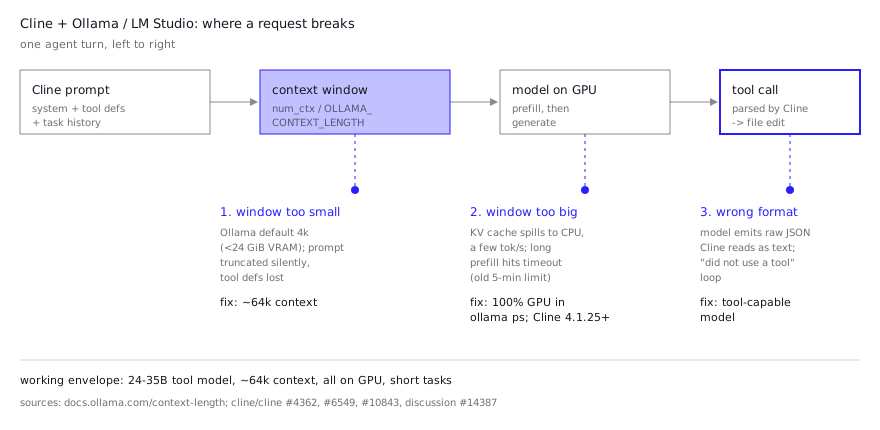
Give Cline about 64k tokens of context, and never leave Ollama at its default. Ollama’s docs set the default by VRAM: 4k tokens under 24 GiB, 32k from 24 to 48 GiB, and 256k at 48 GiB and up. The same page recommends at least 64,000 tokens for agents and coding tools. Cline’s own model table in the Desktop docs uses 64k for most picks and 32k for the smallest ones.
What happens at 4k is worse than an error. A reply in discussion #14387 points out that when the prompt is longer than the context, Ollama truncates it silently, which produces “empty or confused turns”. Cline’s tool definitions sit at the start of the prompt, so they’re the first thing lost. The older issue #4362 lists the 2048-token default as a root cause of local-model loops.
How to set it, by runtime:
- Ollama server-wide:
OLLAMA_CONTEXT_LENGTH=64000 ollama serve, or the context slider in the Ollama app’s settings (Ollama docs). - Ollama per model: build a variant with
PARAMETER num_ctx 64000in a Modelfile andollama create. Cline Desktop’s model details are read-only, and its docs point to this route for custom settings. - LM Studio:
lms load <model> --context-length 65536, or the context field in the model’s load settings. - Verify:
ollama psshows the allocatedCONTEXTand thePROCESSORsplit. Anything other than 100% GPU means slow generation and likely timeouts.
Too much context is the opposite failure. The same discussion estimated that a 27B Q4 model on a 24 GB RTX 3090 fits about 64k at f16 KV cache, and that 128k+ forces CPU offload and “a few tok/s”. The suggested way to stretch it was OLLAMA_FLASH_ATTENTION=1 with OLLAMA_KV_CACHE_TYPE=q8_0, roughly halving the KV cache. The full trade-offs are on our Ollama context length page.
Which local models handle Cline’s tools?
Use a model that is trained for tool calling and listed with the tools tag on ollama.com, sized so model plus context fits in GPU memory. Cline publishes its own shortlist in the Desktop local models docs:
| Model | Ollama tag | Memory with context (Cline’s estimate) | Context | Cline’s note |
|---|---|---|---|---|
| Qwen3.8 27B | qwen3.8:27b | ~23 GB | 64k | Best all-round local model for agentic coding |
| Qwen3.6 35B A3B | qwen3.6:35b-a3b | ~26 GB | 64k | Speed over depth |
| Devstral Small 2 | devstral-small-2:24b | ~21 GB | 32k | Exploring codebases, multi-file edits |
| gpt-oss 20B | gpt-oss:20b | ~16 GB | 64k | 16–24 GB machines |
| Qwen3-Coder-Next | qwen3-coder-next | ~56 GB | 64k | 64 GB+ machines |
| Qwen3 8B | qwen3:8b | ~10 GB | 32k | 8–16 GB machines, simple edits |
The failure to avoid is a model that writes its tool calls in a format Cline doesn’t parse. Issue #10843, open since May 2026, documents qwen2.5-coder:32b emitting raw JSON tool calls that Cline treats as text, so the model repeats them until the task stalls. Later reports in the thread add qwen3.5:2b, gemma4:12b and qwen2.5-coder:14b, and one user on Cline 4.1.17 saw JSON tool calls marked “completed” while no file was written. A .clinerules prompt forcing the expected format helped the original reporter but not a later one. If you see this pattern, switch models rather than fight it. Cline added native tool calls for the Ollama provider in 3.54.0 per the changelog, which helps only with models whose Ollama template supports tools. Our Ollama tool calling guide covers how to check that.
What do developers report in practice?
Developers report that Cline on local models works for focused tasks on a 24 GB-class GPU with a 64k context, and degrades quickly outside that envelope.
- RTX 3090, qwen3.8:27b Q4_K_M. The author of discussion #14387 (September 2026) hit body timeouts, empty replies and cut-off code blocks, and reported that setting
num_ctxto 64000 fixed the timeouts. They also switched Cline to targetedreplace_in_fileedits instead of whole-file writes, and said a task that reached about 78k tokens, past the 64k window, timed out again. Their rule: start a new task after heavy work. - Two RTX 5070 Ti cards, Qwen3.6-27B. A June 2026 Hacker News commenter described this as their daily local setup with Cline and an Ollama back end (HN comment).
- Mid-size models and tool use. A December 2025 HN commenter said Devstral 24B or Qwen3 30B A3B can handle simple tasks, “but often they fail at tool use (especially quantized versions)” (HN comment).
- Maintainer position. When closing issue #4362 in July 2025, a Cline maintainer called making weak models on weak hardware work well “an uphill battle” and described Ollama support as experimental. The changelog since then shows steady local fixes (timeouts, empty-response retries, context compaction), but the expectation is still that local models trail hosted ones.
Put together: use a 24B–35B tool-capable model, keep the window near 64k, keep tasks small, and start fresh tasks often. Cline’s docs give the same advice: “Keep tasks focused” and “start a new task when context gets too large”. If you want to compare Cline against Aider, OpenCode or goose on the same model, see our local LLM coding agent guide. For chat and autocomplete in the editor instead of an agent, the local LLM VS Code setup page covers Continue and llama.vscode.
FAQ
Does Cline work with Ollama for free?
Yes. Cline is open source and Ollama runs models on your own hardware, so there’s no per-token bill. The cost is hardware: Cline’s recommended models need roughly 10 GB to 56 GB of memory including context, per its Desktop docs.
What is the best Ollama model for Cline?
Cline’s own list calls Qwen3.8 27B (qwen3.8:27b) the best all-round local model for agentic coding, at about 23 GB with a 64k context. On 16–24 GB machines it suggests gpt-oss 20B, and on 8–16 GB Qwen3 8B for simple edits.
Why does Cline keep saying “You did not use a tool”?
The model answered in plain text or in a tool format Cline didn’t parse. The usual causes are a truncated context that dropped the tool definitions, or a model without proper tool support (issue #4362, issue #10843). Raise the context to about 64k and switch to a tool-capable model.
How do I fix the Cline Ollama timeout?
Update Cline to 4.1.25 or later, set a context window that keeps the model 100% on GPU (check with ollama ps), and keep tasks short. Raising the timeout alone won’t help if the model is running on the CPU.
Can Cline use Ollama running on another machine?
Yes. Set the base URL in the Ollama provider settings to that machine’s address and port. Cline Desktop can only start Ollama locally, so a remote server has to be running already.
Sources (9)
- Cline docs: Local models (Ollama, LM Studio, Atomic Chat)
- Cline docs: Local Models in Cline Desktop
- Ollama docs: Context length
- Cline CHANGELOG
- LM Studio docs: lms load
- cline/cline discussion #14387: Local Ollama (RTX 3090) + Cline, timeouts and token limits
- cline/cline issue #6549: Ollama times out on long-prefill requests (~300s)
- cline/cline issue #10843: Local Ollama models loop on raw JSON tool calls
- cline/cline issue #4362: Improve Ollama local model compatibility