MoE offloading in llama.cpp keeps expert weights in system RAM and the rest on the GPU. The flags, LM Studio, Ollama and vLLM options, and reported speeds.
MoE offloading in llama.cpp keeps a mixture-of-experts model's expert weights in system RAM while attention, the KV cache and shared layers stay on the GPU. It works because each token uses only a few experts: Qwen3.6-35B-A3B activates 3B of its 35B parameters. Use --n-cpu-moe N to push experts from the first N layers to the CPU, lowering N until VRAM is full.
- --n-cpu-moe N
- 3B of 35B, 8+1 of 256 experts
- 5.1B of 117B
- None (issue #11772 open)
Key takeaways
- llama.cpp has three ways to do it: --cpu-moe (all experts to CPU), --n-cpu-moe N (experts of the first N layers) and --override-tensor (any tensor, by regex).
- Tune --n-cpu-moe down until you run out of VRAM. On one RTX 3090 sweep, Qwen3.6-35B-A3B went from 85 tok/s at N=12 to 140 tok/s with nothing offloaded.
- Prompt processing suffers more than generation: the same sweep fell from 3,360 to about 1,000 tok/s once 12 layers of experts moved to RAM.
- LM Studio exposes the same mechanism as a load setting. Ollama has no supported option; the feature request has been open since August 2025.
- System RAM bandwidth sets the ceiling. Fast dual-channel memory matters more than CPU core count.
MoE offloading in llama.cpp is the reason a 16 GB or 24 GB card can run a 35B, 120B or even 177B mixture-of-experts model at usable speed. The short version: put everything on the GPU (-ngl all), then add --n-cpu-moe N and lower N until VRAM is nearly full. The rest of this page explains why that works, what the other flags do, how LM Studio, Ollama and vLLM compare, and what speeds developers actually report.
Why can MoE models run on a small GPU at all?
MoE models run well on a small GPU because each token only touches a small slice of the weights, and the biggest slice, the experts, is cheap enough to compute on the CPU. In a mixture-of-experts layer, a router picks a few experts per token and ignores the rest. Qwen3.6-35B-A3B has 256 experts per layer across 40 layers and activates 8 routed experts plus 1 shared expert per token, so only 3B of its 35B parameters do work on any given token. gpt-oss-120b activates 5.1B of 117B.
That split maps neatly onto a desktop PC:
- On the GPU: attention weights, the KV cache, embeddings, the router and any shared expert. Every token uses these, and attention over a long context is the part that benefits most from GPU compute.
- In system RAM: the routed expert weights. They are most of the file size, but each token reads only the few experts it was routed to.
- Across PCIe: per layer, only the token’s activations travel between the two, not the weights.
One Hacker News commenter put numbers on how lopsided this is: by their count, the attention weights of DeepSeek R1 (685B) come to around 16 GB and those of Kimi K2 (1T parameters) to about 12 GB (HN, Aug 2025). That is a community calculation, but it explains why trillion-parameter MoE models are even discussed on single-GPU rigs.
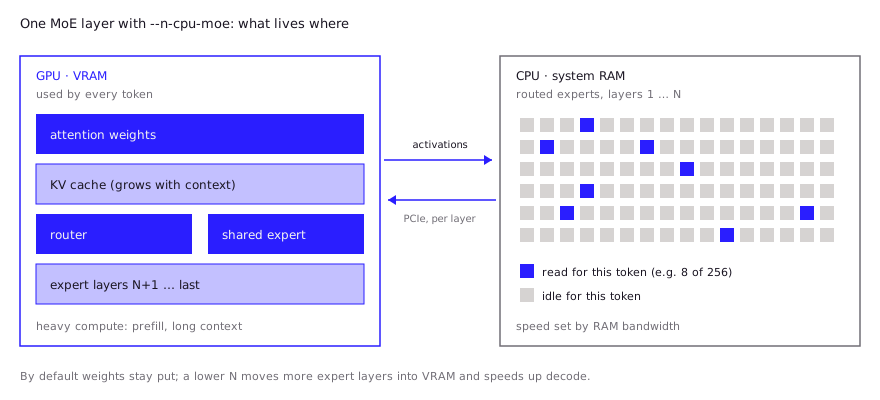
A dense model has no such split. Every weight is used for every token, so moving layers to the CPU slows the whole model down. That is the core difference from pure CPU inference, which is covered in run LLM on CPU.
Which llama.cpp flags offload experts to CPU?
llama.cpp has three flags for expert offloading, all documented in the llama.cpp server README, and --n-cpu-moe is the one most people should use. Under the hood, --cpu-moe and --n-cpu-moe are shortcuts for tensor overrides: the source matches expert tensors with the regex \.ffn_(up|down|gate|gate_up)_(ch|)exps and pins them to the CPU buffer.
| Flag | Short form | What it does | When to use it |
|---|---|---|---|
--cpu-moe | -cmoe | Keeps all MoE expert weights in system RAM | Smallest VRAM footprint; a starting point on 8 to 12 GB cards |
--n-cpu-moe N | -ncmoe N | Keeps experts of the first N layers in RAM, the rest on the GPU | The normal choice; tune N to fill VRAM |
--override-tensor PATTERN=BUFFER | -ot | Places any tensor matching a regex on a given buffer type | Fine control, such as offloading only ffn_up_exps |
--moe-cache-mib N | none | GPU cache (in MiB) for experts that live on the CPU; off by default | Newer flag; few public benchmarks so far |
--fit on | -fit | Adjusts unset arguments to fit device memory; on by default | Let llama.cpp pick, then hand-tune |
The tuning loop is short. Load with all layers on the GPU and a high N, check free VRAM, lower N by a few layers, repeat until the next step would run out of memory. Leave headroom for the KV cache at the context length you actually use, which grows with context (see local LLM hardware requirements for KV cache sizing).
llama-server -m Qwen3.6-35B-A3B-UD-Q4_K_M.gguf \
  -ngl all --n-cpu-moe 20 -fa on -c 32768 --jinja
The -ot route is for cases where whole layers are too coarse. In the llama.cpp gpt-oss guide thread, one user on a 12 GB RTX 3060 offloaded only the ffn_up_exps tensors of layers 20 and up with -ot "\.([2-9][0-9])\.ffn_up_exps.=CPU" and got about 67 tok/s on gpt-oss-20b at 16K context, slightly ahead of -ncmoe 2 at about 64 tok/s. Both setups are explained in more depth in the llama.cpp server guide.
How do you do it in LM Studio, Ollama and vLLM?
LM Studio supports expert offloading as a load setting, Ollama does not officially support it, and vLLM offers a general parameter offload that can target expert weights.
LM Studio. Version 0.3.23 (August 12, 2025) added “Force Model Expert Weights onto CPU” in the advanced load settings, and the release notes say it uses the same technology as llama.cpp’s --n-cpu-moe. LM Studio recommends leaving it off when the whole model fits in VRAM. It can be saved per model.
Ollama. There is no documented switch. The feature request, ollama/ollama#11772, has been open since August 7, 2025, with no maintainer reply visible on the issue. Commenters there report the gap: one user with a Ryzen 7950X, 64 GB RAM and an RTX 3090 measured gpt-oss-120b at about 8.5 tok/s in Ollama against 29.4 tok/s in llama.cpp with --n-cpu-moe 24. Another reported that setting LLAMA_ARG_CPU_MOE=1 with num_gpu 99 on Ollama 0.30.0 lifted Qwen3.6-35B-A3B on an RTX 5080 from 14.6 to 36.5 tok/s, but also needed GGML_CUDA_NO_PINNED=1 to avoid an out-of-memory error. That is an undocumented workaround from one report, so expect it to break between releases. If you need this today, running llama.cpp directly is the reliable path.
vLLM. vLLM has no MoE-specific flag. Its OffloadConfig offers --cpu-offload-gb (GiB per GPU to offload) and --cpu-offload-params, a filter on parameter names where experts matches tensors like mlp.experts.w2_weight. A prefetch backend (--offload-backend prefetch, --offload-prefetch-step) loads offloaded layers ahead of use. This is weight offloading for a serving engine rather than llama.cpp-style CPU compute of experts, so it suits a multi-user server that is a few GB short of fitting, not a single developer squeezing a 120B model onto one consumer card.
How much system RAM and bandwidth do you need?
You need enough RAM to hold whatever does not fit in VRAM plus your OS and apps, and the speed of that RAM, not the CPU core count, sets the generation ceiling. A practical rule: model file size minus usable VRAM, plus 8 GB or more of headroom.
Bandwidth matters because each generated token has to read every active expert held in RAM. A rough upper bound is RAM bandwidth divided by the bytes of active expert weights per token. For example, dual-channel DDR4-3200 has a theoretical peak of 51.2 GB/s (2 channels x 8 bytes x 3,200 MT/s). If about 1.5 GB of a model’s active weights per token live in RAM, the CPU side alone caps out near 34 tok/s before any other overhead. Real numbers land well below such ceilings.
Community data backs the “bandwidth, not cores” point:
- A user in the gpt-oss guide thread with an RX 7900 XT, Ryzen 9 5900X and dual-channel DDR4-3200 named RAM and PCIe speed as the likely bottleneck after their sweep.
- In an InsiderLLM test, a thread sweep on an RTX 3090 with a 6-core i7-8086K peaked at 6 threads (about 16.1 tok/s) and got slightly worse at 12 (about 15.6).
- The same test ran an 82 GB quant of Qwen3.8-Flash-Next (about 177B total, 6B active) on a machine with 62 GB of RAM by memory-mapping the file from NVMe, at about 22.6 tok/s on the 3090. So it can work when the model is larger than RAM, but it leans on a fast SSD.
What speeds do developers report?
Developers report usable speeds on 12 to 24 GB cards, roughly 10 to 85 tok/s with experts offloaded, depending on the model, with a large gap between generation and prompt processing. All figures below are community reports, not our tests, and come from different builds, quants and settings.
| Model (total / active) | GPU | System RAM | Setting | Reported decode | Source |
|---|---|---|---|---|---|
| Qwen3.6-35B-A3B (35B / 3B) | RTX 3090 24 GB | not stated | -ncmoe 0 (CUDA) | 139.6 tok/s | Giles Thomas |
| Qwen3.6-35B-A3B | RTX 3090 24 GB | not stated | -ncmoe 12 (CUDA) | 84.9 tok/s | Giles Thomas |
| Qwen3.6-35B-A3B | RTX 5080 16 GB | not stated | Ollama, all experts on CPU | 36.5 tok/s | Ollama #11772 |
| gpt-oss-20b (MXFP4) | RTX 3060 12 GB | 32 GB | -ncmoe 2, 16K ctx | ~64 tok/s | llama.cpp #15396 |
| gpt-oss-20b | RX 7900 XT 20 GB | 32 GB DDR4-3200 | -ncmoe 8 / -cmoe | ~38 / ~20 tok/s | llama.cpp #15396 |
| gpt-oss-120b (117B / 5.1B) | RTX 3090 24 GB | 64 GB | -ncmoe 24 | 29.4 tok/s | Ollama #11772 |
| gpt-oss-120b | RTX 4080 16 GB | upgraded, not stated | --n-cpu-moe | ~20 tok/s | HN |
| Qwen3.8-Flash-Next (~177B / 6B) | RTX 3060 12 GB | 31 GB DDR4-2133 | -ncmoe 41 | 9.6 to 12.2 tok/s | InsiderLLM |
Two patterns stand out. First, speed climbs steadily as N drops, so the last few layers you fit on the GPU are worth the effort: on the 7900 XT, going from all experts on CPU to -ncmoe 8 nearly doubled decode speed. Second, prompt processing drops much harder than decode. In the Giles Thomas sweep, prompt speed fell from 3,360 tok/s with nothing offloaded to 1,008 tok/s at -ncmoe 12, while decode only fell from 140 to 85. A Hacker News user running Qwen3.5-122B-A10B with --n-cpu-moe 32 posted 18.5 tok/s prompt processing and 13.9 tok/s generation in llama-batched-bench and called prompt processing “absolutely punishing” (HN, Apr 2026). For coding agents that send large contexts, that prefill cost is often what you feel most.
Another HN commenter said offloading experts with --n-cpu-moe while filling all available VRAM can give about a 50% boost on models like gpt-oss-120b (HN, Oct 2025). For Qwen coding models specifically, see the Qwen Coder local guide.
When is a dense model the better choice?
A dense model is the better choice when it fits entirely in VRAM at the context you need, or when your workload is dominated by long prompts. Offloading trades speed for capacity, and the trade only pays when the bigger model is meaningfully better for your task.
Pick a dense model, or a smaller MoE that fits fully on the GPU, when:
- It fits. A 27B dense model that sits fully in 24 GB will usually beat a partly offloaded MoE on prompt processing, which matters for agents and code review over large files.
- Your RAM is slow or small. Single-channel memory or 16 GB of system RAM leaves little room for experts.
- You serve several users. Offloaded experts make every concurrent request wait on the same RAM bandwidth.
Pick an offloaded MoE when the larger model’s quality is the point, when you mainly generate rather than ingest long prompts, and when you have at least 32 GB, ideally 64 GB, of fast dual-channel RAM.
FAQ
What does —n-cpu-moe do in llama.cpp?
It keeps the MoE expert weights of the first N layers in system RAM and leaves everything else on the GPU. Higher N uses less VRAM and runs slower. Set it as low as your VRAM allows.
Is —cpu-moe the same as —n-cpu-moe?
No. --cpu-moe moves the experts of all layers to the CPU, which is the same as setting --n-cpu-moe to the model’s layer count. --n-cpu-moe N lets you keep some expert layers on the GPU, which is usually faster.
Can Ollama offload MoE experts to the CPU?
Not with a supported option as of October 2026. The request is tracked in issue #11772. Use llama.cpp’s llama-server or LM Studio’s “Force Model Expert Weights onto CPU” setting instead.
How much RAM do I need to offload a MoE model?
Enough for the part of the model file that does not fit in VRAM, plus headroom for the OS. For gpt-oss-120b on a 16 to 24 GB card, community setups use 64 GB. Memory-mapping from a fast NVMe can stretch past RAM, at a speed cost.
Does MoE offloading reduce output quality?
No. Offloading changes where weights live, not their values, so output matches the same quant run fully on the GPU. Quality loss comes from the quantization level you pick, covered in GGUF quantization.
Sources (10)
- llama.cpp server README: --cpu-moe, --n-cpu-moe, --override-tensor, --moe-cache-mib (fetched Oct 28, 2026)
- guide: running gpt-oss with llama.cpp, ggml-org/llama.cpp discussion #15396 (Aug 18, 2025)
- LM Studio 0.3.23 release notes: Force Model Expert Weights onto CPU (Aug 12, 2025)
- Ollama issue #11772: use cpu to offload moe weights to reduce the VRAM usage (opened Aug 7, 2025)
- vLLM engine arguments: OffloadConfig (--cpu-offload-gb, --cpu-offload-params)
- Qwen/Qwen3.6-35B-A3B model card, Hugging Face
- openai/gpt-oss-120b model card, Hugging Face
- Benchmarking Qwen 3.6 35B MoE (3B active) on an RTX 3090, Giles Thomas (Jul 24, 2026)
- A 177B Model on a 3060: Qwen3.8-Flash-Next on RTX 3090 and 3060, InsiderLLM (updated Oct 5, 2026)
- Hacker News: gpt-oss-120b on an RTX 4080 with --n-cpu-moe (Sep 23, 2025)