llama.cpp server reference: install llama-server, the flags that matter, router mode for multiple models, API endpoints, API keys and binding to 0.0.0.0.
llama-server is the HTTP server that ships with llama.cpp. Start it with `llama-server -m model.gguf` (or `-hf user/repo`) and it serves OpenAI- and Anthropic-compatible endpoints plus a web UI on 127.0.0.1:9931. Start it with no model and it becomes a router that loads and unloads several GGUF models on demand. It has no authentication until you pass --api-key.
- 127.0.0.1:9931
- Router mode, max 4 loaded by default
- OpenAI, Anthropic, native
- tools/server/README.md, 2026-10-28
Key takeaways
- The default port is now 9931, not 8080. Older guides and tool docs still assume 8080, so pass --port explicitly.
- Context size, GPU layers and slot count all default to auto: --fit picks the largest context that fits in memory.
- Launching llama-server without -m starts router mode, which serves several models from one port and unloads idle ones LRU-first.
- There is no auth by default and CORS reflects any origin. Set --api-key before binding to 0.0.0.0, and keep /health in mind: it is always public.
- Single-user coding setups usually pin -np 1 so one session gets the whole context.
The llama.cpp server, llama-server, is a single C/C++ binary that loads a GGUF model and exposes it over HTTP. This page is a working reference: install, the flags grouped by job, router mode for several models, the endpoints, and how to lock it down. Every flag and default below is quoted from the server README on master as fetched on 2026-10-28. The project moves weekly, so run llama-server --help on your own build before trusting any default, including ours.
What is llama-server, and when should you use it instead of Ollama?
Use llama-server when you want exact control over the GGUF file, the flags and the endpoints, and Ollama when you want a model catalog and one-word pulls. Both serve an OpenAI-style API on your machine. The difference is how much they decide for you. The full runtime trade-off lives in llama.cpp vs Ollama vs vLLM.
Community sentiment tracks that split. In an r/LocalLLaMA thread from December 2025, one user said they moved to llama.cpp because it was “not as easy to use but works better”, another cited Intel Arc support and speed, and a third went back to Ollama for its simpler interface (thread).
How do you install and start llama-server?
Install a prebuilt package, then point llama-server at a GGUF file or a Hugging Face repo. The install docs list one route per OS:
- macOS and Linux:
brew install llama.cpp. The formula updates automatically with releases. - Windows:
winget install llama.cpp. - Any OS: conda-forge (
conda install -c conda-forge llama.cpp, with CUDA, Vulkan or Metal builds), or the binaries on the releases page. - From source: build only the server target with CMake.
# build from source (binary lands in ./build/bin/llama-server)
cmake -B build
cmake --build build --config Release -t llama-server

# start with a local file
llama-server -m ./models/qwen-coder-Q4_K_M.gguf

# or download from Hugging Face (defaults to the Q4_K_M quant if the repo has one)
llama-server -hf ggml-org/GLM-4.7-Flash-GGUF:Q4_K_M
On Windows the same flags apply to llama-server.exe. The README’s Docker image is ghcr.io/ggml-org/llama.cpp:server (and :server-cuda). In a container you must pass --host 0.0.0.0, or the port mapping reaches nothing.
Once it’s running, open the address in a browser for the built-in web UI, or check GET /health. It returns 503 while the model loads and {"status": "ok"} when it’s ready.
Note the port. The current default is 127.0.0.1:9931. Up to at least tag b6000 the default was 8080, and most blog posts, editor docs and Docker examples still use 8080. If a client can’t connect after an upgrade, this is the first thing to check. Pass --port explicitly and the question goes away.
Which llama-server flags matter most?
About fifteen flags cover nearly every setup. Most of the rest are sampling, RoPE and CPU-affinity knobs you can leave alone. Each flag also has an environment-variable form (LLAMA_ARG_*), which is handy in Docker and systemd units.
| Job | Flag | What it does | Default (2026-10-28) |
|---|---|---|---|
| Load a model | -m, --model FNAME | Path to a GGUF file | none (none = router mode) |
| Load a model | -hf user/model[:quant] | Download from Hugging Face, plus mmproj if present | unused |
| Name it | -a, --alias | Model name(s) the API reports, comma-separated | unset |
| Context | -c, --ctx-size N | Context window in tokens | 0 = from model, then fitted |
| Fit to memory | -fit on/off, --fit-ctx N | Shrinks unset options until the model fits | on, minimum context 4096 |
| GPU offload | -ngl N/auto/all | Layers kept in VRAM | auto |
| Attention | -fa on/off/auto | Flash Attention | auto |
| KV cache type | -ctk, -ctv | Cache precision (f16, q8_0, q4_0…) | f16 |
| Concurrency | -np, --parallel N | Number of slots (simultaneous requests) | -1 = auto |
| Concurrency | -kvu / -no-kvu | One shared KV pool for all slots | on when slots are auto |
| Templates | --jinja | Use the model’s Jinja chat template (needed for tool use) | enabled |
| Network | --host, --port | Bind address(es) and port | 127.0.0.1, 9931 |
| Auth | --api-key, --api-key-file | Required key(s), comma-separated or one per line | none |
| Ops | --metrics, --slots | Prometheus endpoint, slot monitor | off, on |
| Ops | --sleep-idle-seconds N | Unload the model after N idle seconds | -1 = never |
Three of these trip people up most.
Context. -c 0 no longer means a small fixed window. With --fit on, the server takes the largest context that fits the free memory at load time. That is convenient on a dedicated GPU and surprising on a shared one. Pin -c if you need headroom, and see context length settings for how much memory each step costs.
Slots. -np splits work across parallel slots. When you set it explicitly, the context is divided between slots unless the KV cache is unified. GitHub issue #17989 shows how easily this confuses people: a user passed --parallel 1, still got 4 slots (the log read setting n_parallel = 4 and kv_unified = true), and closed the issue with a linked fix. If you depend on the slot count, read the startup log or GET /slots rather than assuming.
Offload. Mixture-of-experts models have their own CPU-offload flags (--cpu-moe, --n-cpu-moe), covered in MoE offloading in llama.cpp. Draft-model flags are in speculative decoding in llama.cpp.
How do you serve several models from one llama-server?
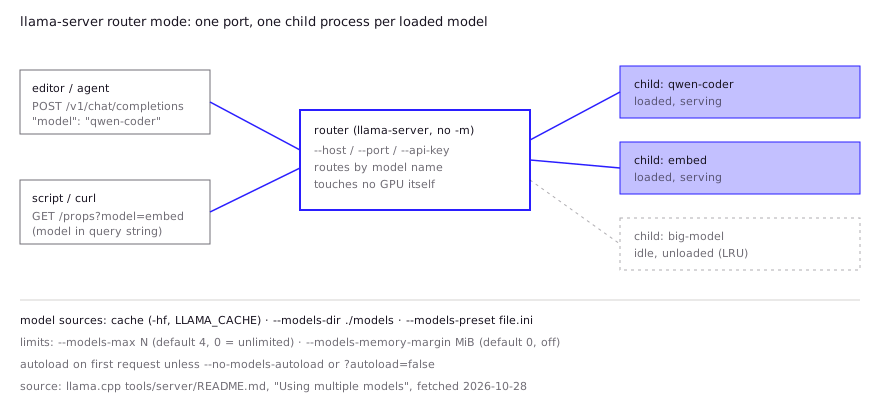
Start llama-server without -m and it runs in router mode: one process that loads and unloads models on demand and forwards each request to a child llama-server per model. The README calls this “Using multiple models”. It answers the old complaint that llama.cpp serves one model at a time. One Hacker News commenter corrected a project README that still said so in October 2026 (HN).
# serve every GGUF in a folder (multi-file models go in their own subfolder)
llama-server --models-dir ./models --models-max 2 -c 32768 -np 1

# or define per-model settings in an INI file
llama-server --models-preset ./my-models.ini
How it behaves, per the README:
- Sources. The router finds models in three places: the Hugging Face cache (anything you fetched with
-hf),--models-dir, and--models-preset. Restart the router after adding files to the cache. - Routing. POST endpoints route by the
"model"field in the JSON body. GET endpoints such as/propsroute by a?model=query parameter. - Limits.
--models-maxcaps loaded models (default 4, 0 = unlimited) and evicts the least recently used.--models-memory-margin Nalso unloads idle models until the new one fits with N MiB left free per device. A model that is serving a request is never unloaded. - Presets. In the INI file, keys are flag names without dashes (
n-gpu-layers = 123,c = 4096), a[*]section holds shared defaults, and command-line flags win over both. Host, port and API key belong to the router and are stripped from presets. - Autoload. Models load on first request unless you pass
--no-models-autoloador add?autoload=falseper request.
Router mode doesn’t add VRAM. One HN commenter described a coding agent that, on its own initiative, spawned a subagent on a lighter model. Their machine fits one model at a time, so llama-server ended up thrashing between the two models (HN). If your harness can pick models, either give it one model name or set --models-max 1 and expect reload pauses.
Which API endpoints does llama-server expose, and how do you secure them?
llama-server speaks three API dialects on one port, and none of them is authenticated until you set a key. The main routes:
| Route | Style | Use |
|---|---|---|
GET /health, /v1/health | native | Readiness probe, always public |
GET /v1/models | OpenAI | Model list (and /models with load state in router mode) |
POST /v1/chat/completions | OpenAI | Chat, tools, JSON schema output |
POST /v1/completions, /v1/responses, /v1/embeddings | OpenAI | Raw completion, Responses API, embeddings |
POST /v1/messages, /v1/messages/count_tokens | Anthropic | Clients built for Claude’s API |
POST /infill | native | Fill-in-the-middle code completion |
GET /slots, /metrics | native | Per-slot state, Prometheus (needs --metrics) |
To expose the server beyond localhost, do these four things in order:
- Set a key. Use
--api-key(or--api-key-file, one key per line). Clients then sendAuthorization: Bearer <key>, orx-api-keyon the Anthropic route. A bad key gets an OpenAI-style 401Invalid API Key. - Bind deliberately.
--host 0.0.0.0listens on every IPv4 interface. You can pass a comma-separated list or a.sockpath instead to bind only where you need it. - Tighten CORS. By default the server reflects any
Originwith credentials allowed. The README recommends setting--cors-originsto your frontend’s origin on a LAN, and an API key plus a reverse proxy for anything public. TLS is available natively only if you build with-DLLAMA_OPENSSL=ONand pass--ssl-key-file/--ssl-cert-file. Otherwise terminate TLS at the proxy. - Leave agent tools off.
--tools,--agentand the MCP proxy flags are marked experimental: “do not enable in untrusted environments”. They expose file read/write and shell execution over the API.
A common pattern among HN commenters is to keep the server on a private network rather than the internet. One runs llama-server on a stronger machine on the LAN, reaches it over Tailscale, and keeps the coding agent itself in a Docker container with a single workspace mount (HN).
How do you connect editors and coding agents to llama-server?
Point any OpenAI-compatible client at http://<host>:<port>/v1, with any non-empty key if you didn’t set one. The README’s own examples use base_url="http://localhost:9931/v1" and api_key="sk-no-key-required".
curl http://127.0.0.1:9931/v1/chat/completions \
  -H "Content-Type: application/json" \
  -H "Authorization: Bearer $LLAMA_API_KEY" \
  -d '{"model": "qwen-coder", "messages": [{"role": "user", "content": "Write a Python retry decorator"}]}'
Some practical notes:
- The model field. In single-model mode the server answers whatever model name you send. In router mode the name selects the model, so set
-aaliases or preset names that match what your editor sends. - Tool calling. Agent harnesses need tool calls parsed from the chat template.
--jinjais on by default now, but older builds and some blog commands pass it explicitly. Tool use on/v1/messagesrequires it. - Claude Code and other Anthropic clients. Use the
/v1/messagesroute. The setup is covered in using a local LLM with Claude Code. - Tracking token use. One HN commenter points agent users to
GET /slotsfor up-to-date per-session token counts when a harness reports context use vaguely (HN).
What do developers report in practice?
The recurring pattern in public reports: people pin the flags that defaults get wrong for their workload, and the bugs they hit are usually multi-GPU or slot accounting, not the API. These are community reports, not our tests.
- A long-context, single-user coding setup. One HN commenter posted their full command for Qwen 3.8 27B (Unsloth UD-Q4_K_XL) at 131k context:
--ctx-size 131072 --parallel 1 --cache-type-k q8_0 --cache-type-v q8_0 --host 0.0.0.0 --port 8080, plus a draft model for speculative decoding (HN). Three choices stand out: one slot so the whole window serves one agent, a q8_0 KV cache instead of the f16 default, and an explicit port. - Row split on old multi-GPU rigs. A user running a 32B Q8_0 model across three Tesla P100s got garbled output from the second chat turn onward with
--split-mode row. Removing the flag fixed the output but cut speed sharply. Disabling Intel VT-d (IOMMU) in the BIOS fixed it, after a contributor pointed at GPU peer-to-peer access (issue #16517). The defaultlayersplit avoids this. - Slot counts that don’t match the flag. See issue #17989 above. Verify with
/slots. - Model thrash under agents. See the router section above. One loaded model plus an agent that calls a second model means reloads on every switch.
FAQ
What is the default port for llama.cpp server?
On current builds, 9931, bound to 127.0.0.1. Older releases (for example tag b6000) used 8080, which is why many guides and client configs still show 8080. Set --port explicitly to avoid the ambiguity.
How do I make llama-server reachable from other machines?
Pass --host 0.0.0.0 (or a specific interface address) and open the port in your firewall. Set --api-key first, because the server has no authentication by default, and consider a reverse proxy with TLS.
Can llama.cpp server run multiple models at once?
Yes. Start it without -m to use router mode, give it --models-dir or --models-preset, and requests route by their model field. By default up to 4 models stay loaded, with least-recently-used eviction.
Is llama-server OpenAI-compatible?
It serves /v1/chat/completions, /v1/completions, /v1/responses, /v1/embeddings and /v1/models, and the README says compatibility “suffices to support many apps” without claiming full spec parity. It also serves the Anthropic Messages API at /v1/messages.
How do I see the llama-server arguments for my version?
Run llama-server --help. The README flag tables are generated from the same help output, but your installed build may be older or newer than the docs you’re reading.
Sources (9)
- llama.cpp HTTP Server README (tools/server/README.md, master, fetched 2026-10-28)
- llama.cpp server README at tag b6000 (port default 8080)
- llama.cpp docs: Install pre-built version (docs/install.md)
- Homebrew formula: llama.cpp
- GitHub issue #17989: --parallel 1 initializes 4 slots (Dec 13, 2025)
- GitHub issue #16517: Garbled output with --split-mode row (Oct 11, 2025)
- Hacker News comment: full llama-server command for Qwen 3.8 27B at 131k context (Oct 25, 2026)
- Hacker News comment: agent subagent forces llama-server to thrash between models (Sep 30, 2026)
- r/LocalLLaMA thread: users on switching from Ollama to llama.cpp (Dec 2025)