Langfuse self hosted, step by step: the v4 architecture, the Docker Compose quickstart, tracing Ollama, LiteLLM and the OpenAI SDK, MIT vs EE, and alternatives.
Langfuse is an open-source LLM tracing and evaluation platform you can self-host for free. Clone the repo, replace every CHANGEME secret in docker-compose.yml, run docker compose up, and open port 3000. The stack is six containers: web, worker, Postgres, ClickHouse, Redis and MinIO. Point Ollama or LiteLLM at it with a project key pair. Core features are MIT; only enterprise admin features such as SCIM, audit logs and retention policies need a licence key.
- v4.74.0 (Nov 3, 2026)
- MIT core, ee/ folders under a commercial licence
- 4 cores, 16 GiB RAM, ~100 GiB disk
- ClickHouse, Inc. (acquired Jan 16, 2026)
Key takeaways
- Self-hosted Langfuse v4 runs six services: web (UI and API), worker (async ingestion and evals), Postgres, ClickHouse, Redis or Valkey, and S3-compatible blob storage.
- The Docker Compose setup is for testing on one VM: Langfuse recommends at least 4 cores, 16 GiB RAM and about 100 GiB disk, and it has no high availability or backups.
- Ollama traces arrive through the drop-in langfuse.openai client pointed at localhost:11434/v1; LiteLLM uses the langfuse_otel callback and LANGFUSE_OTEL_HOST.
- Since June 2025, evals, the playground, annotation queues and prompt experiments are MIT in self-hosted Langfuse; RBAC roles, audit logs, retention policies and SCIM need an enterprise key.
- Self-hosters report that disk and ClickHouse are what break: unrotated Docker logs filled one 244 GiB disk, and an ephemeral ClickHouse volume hid old traces after a restart.
Why trace a local LLM app?
Because a local model fails quietly, and a trace is the only record of what it was actually sent and what it returned. Running Langfuse self hosted keeps that record on your own hardware, which is the point if you moved to local models for privacy in the first place.
A trace in Langfuse is one request through your app: the prompt, every model call, tool calls and retrieval steps nested inside it, with latency, token counts and cost per step. On top of traces you get:
- Latency per step. You see whether the slow part is the model, the embedding call or your own retrieval code.
- Token counts. Local models have no bill, but they have a context window. Traces show when a RAG pipeline is stuffing 20k tokens into a 32k model.
- Prompt versions. Prompts live in Langfuse with labels, so a trace tells you which version produced a bad answer.
- Evals and scores. You can score traces by hand, with annotation queues, or with an LLM-as-a-judge evaluator that runs on the worker.
- Datasets. Save failing traces as test cases and rerun them when you swap models or quants.
If you serve one model to a whole team, this is the layer that answers “which prompt broke on Tuesday”. For the serving side, see self-hosted LLM server for dev teams.
What does a self-hosted Langfuse deployment need?
Six services: two Langfuse containers and four data stores. The architecture is the same in Docker Compose, Kubernetes and the cloud templates, and v4 introduced no new services.
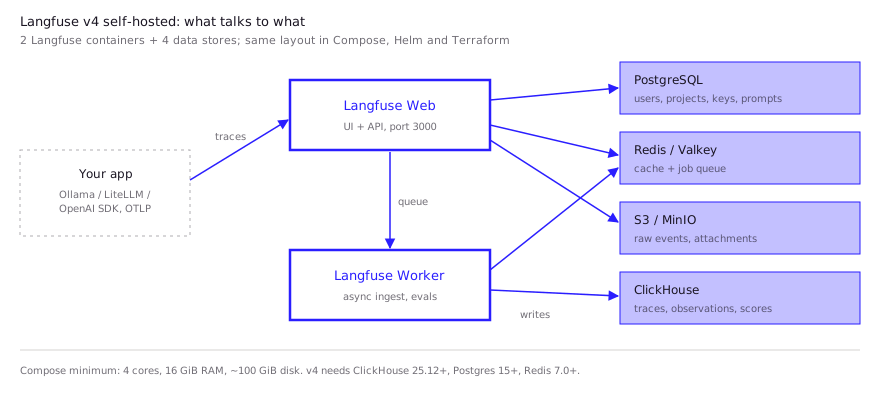
| Component | Image in the Compose file | What it holds |
|---|---|---|
| Langfuse Web | langfuse/langfuse:4 | UI and public API, port 3000 |
| Langfuse Worker | langfuse/langfuse-worker:4 | Async ingestion, evals, exports |
| PostgreSQL | postgres:17 | Users, projects, API keys, prompts |
| ClickHouse | clickhouse-server:26.3 | Traces, observations, scores |
| Redis / Valkey | redis:7 | Cache and job queue |
| MinIO (S3) | chainguard/minio | Raw events and multimodal attachments |
Minimum versions for v4, per the upgrade guide: ClickHouse 25.12, PostgreSQL 15 (16 recommended) and Redis 7.0 (7.2 recommended). ClickHouse is the heavy part. That is not an accident: ClickHouse, Inc. acquired Langfuse on January 16, 2026, and the Langfuse LICENSE file now carries ClickHouse’s copyright. The core stays MIT.
How do you start it with Docker Compose?
Clone the repo, change the secrets, and bring the stack up. The official guide calls this “the simplest way to run Langfuse to give it a try”, and that framing is accurate: it is one VM with no high availability, no horizontal scaling and no backups.
For a VM, Langfuse recommends at least 4 cores and 16 GiB of memory (a t3.xlarge on AWS) and about 100 GiB of disk. On a laptop that is also running a 27B model, budget RAM for both.
git clone --depth=1 https://github.com/langfuse/langfuse.git
cd langfuse
# edit every line marked "# CHANGEME" in docker-compose.yml first
openssl rand -hex 32   # use the output as ENCRYPTION_KEY
docker compose up -d
Then open http://localhost:3000. There is no default login: click Sign up to create the first user, create a project, and generate an API key pair (pk-lf-... and sk-lf-...).
What to change before it holds real data:
- Every
# CHANGEMEvalue. That covers the Postgres, ClickHouse, Redis and MinIO passwords,SALT,NEXTAUTH_SECRETandENCRYPTION_KEY. The defaults ship aspostgres,clickhouse,miniosecretand a key of 64 zeros. - Log rotation. Docker’s default
json-filedriver does not rotate logs. The guide warns this “can exhaust disk space”; setmax-sizeandmax-fileon every service. - Exposure. Only the web container (3000) and MinIO (9090) need outside access. The worker, the MinIO console and the databases bind to 127.0.0.1. Firewall everything else.
- Upgrades.
docker compose up --pull alwayspulls new images. The Compose tags pin the major version (:4), so a major upgrade is a deliberate edit.
For more than one developer’s worth of traffic, the docs point to the Helm chart or the AWS, Azure and GCP Terraform templates.
How do you send traces from Ollama, LiteLLM or the OpenAI SDK?
Set three environment variables and use either the Langfuse OpenAI wrapper or an OpenTelemetry callback. The current Python SDK (v5) is built on OpenTelemetry and reads LANGFUSE_BASE_URL for a self-hosted host.
pip install langfuse openai --upgrade
export LANGFUSE_PUBLIC_KEY="pk-lf-..."
export LANGFUSE_SECRET_KEY="sk-lf-..."
export LANGFUSE_BASE_URL="http://localhost:3000"
Ollama. Ollama serves an OpenAI-compatible endpoint, so the Langfuse docs use the drop-in OpenAI client. Change the import and the base URL; nothing else.
from langfuse.openai import OpenAI

client = OpenAI(base_url="http://localhost:11434/v1", api_key="ollama")
resp = client.chat.completions.create(
    model="llama3.1",
    messages=[{"role": "user", "content": "Explain this stack trace"}],
)
The same wrapper works for llama.cpp’s llama-server, vLLM or LM Studio, since they all expose /v1. The endpoint details are in Ollama’s OpenAI-compatible API.
LiteLLM. The current integration exports over OpenTelemetry to /api/public/otel. It reads LANGFUSE_OTEL_HOST, which defaults to Langfuse’s US cloud, so for self-hosting you must set it explicitly.
export LANGFUSE_OTEL_HOST="http://localhost:3000"In the SDK, set litellm.callbacks = ["langfuse_otel"]. On the proxy, add the same callback under litellm_settings in config.yaml. Every model behind the proxy is then traced in one place. Building the proxy itself is covered in LiteLLM with Ollama.
Anything else. Because ingestion accepts OTLP at /api/public/otel, any OpenTelemetry-instrumented framework can send spans without a Langfuse-specific SDK. The repo lists native integrations for LangChain, LlamaIndex, Haystack, the Vercel AI SDK, DSPy, CrewAI and others.
What do you lose vs Langfuse Cloud?
Mostly operations, not features. Since June 4, 2025, all product features (LLM-as-a-judge evals, annotation queues, prompt experiments and the playground) are MIT in self-hosted Langfuse, starting with v3.65. Langfuse’s licence page says core features are available in OSS “without any limits”.
| Self-hosted OSS (MIT) | Self-hosted with enterprise key | Langfuse Cloud | |
|---|---|---|---|
| Tracing, prompts, datasets, evals, playground | Yes | Yes | Yes |
| Regular SSO | Yes | Yes | Yes |
| Project-level RBAC roles, protected prompt labels | No | Yes | Plan-dependent |
| Audit logs, data retention policies, server-side masking | No | Yes | Plan-dependent |
| SCIM, Org Management and Instance Management APIs | No | Yes | Plan-dependent |
| Upgrades, backups, scaling, on-call | You | You | Langfuse |
The enterprise code sits in the ee/ folders under a separate licence. Pricing for the enterprise key is not on the licence page; it points to sales. The real cost of self-hosting is the stack: ClickHouse upgrades with migrations, backups you have to set up yourself, and disk that fills. The v3 to v4 backfill alone needs about 3x your current ClickHouse data volume while it runs.
What are the open-source alternatives?
Arize Phoenix and Comet Opik are the closest self-hostable options. LangSmith is not open source, and self-hosting it requires an Enterprise plan.
| Tool | Licence | Self-host start | Storage | Notes |
|---|---|---|---|---|
| Langfuse | MIT core + EE folders | docker compose up, port 3000 | Postgres + ClickHouse + Redis + S3 | Prompts, evals, datasets; ~37k GitHub stars |
| Arize Phoenix | Elastic License 2.0 | docker run -p 6006:6006 -p 4317:4317 arizephoenix/phoenix | SQLite or Postgres 14+ | OpenTelemetry/OpenInference native; lightest to run |
| Comet Opik | Apache-2.0 | ./opik.sh, UI on port 5173 | Bundled stack | Tracing plus eval suites; ~23k stars |
| LangSmith | Proprietary | Enterprise add-on, Helm | Managed by your contract | “Self-hosted LangSmith is an add-on to the Enterprise plan” |
Phoenix is the pick if you want one container on a laptop next to Ollama. Elastic License 2.0 is source-available, not OSI open source: it bars offering Phoenix itself as a hosted service, which rarely matters for internal tracing. Langfuse is the pick when you need prompt management and team features, and accept the heavier stack.
What do developers report in practice?
The pattern in community reports is consistent: the app works, and the data stores need care.
- Disk filled by logs. A self-hoster on Langfuse 3.177.1 with ClickHouse 26.5.1 reported in GitHub issue #16339 that after the disk filled, ClickHouse kept writing errors to stderr until its Docker log reached about 89 GiB of a 244 GiB disk. Setting
max-size: 10mandmax-file: 3freed about 81 GiB. A fix applying rotation to all six Compose services went in through PR #16363. - Ephemeral ClickHouse loses history. One team on AWS ECS Fargate ran ClickHouse on ephemeral storage. After a restart, older traces vanished from the UI even though the raw events were still in S3, per issue #10778. The maintainer’s answer: ephemeral volumes are not a supported setup, and backups are the self-hoster’s job.
- Bulk reads are slow through the API. A Hacker News commenter who ran self-hosted Langfuse behind LiteLLM from a Jupyter notebook for synthetic-data experiments liked the unified trace and score UI. They found the trace retrieval API too slow for bulk scans, though, and queried the database directly instead (HN comment).
- Major upgrades hurt. In the Hacker News thread on the ClickHouse acquisition, one commenter recalled the v2 to v3 move to ClickHouse as a painful migration (HN comment). The v4 guide now asks for a ClickHouse upgrade first and roughly 3x disk headroom.
- Small installs use less than the guide asks. Sevalla, a hosting provider, published its own measurements: ClickHouse idled at 520 MB and peaked at 860 MB after 22,600 observations, and the web container peaked at 1.2 GB (Sevalla guide). That is a single-user load, not a sizing rule.
If your traces include RAG context, plan retention early. Storage grows with prompt size, and a vector store such as those compared in Qdrant vs Chroma pushes a lot of text into every prompt.
FAQ
Is Langfuse free to self-host?
Yes. The core is MIT and runs without a licence key, including tracing, prompt management, datasets, evals and the playground. Only enterprise features (RBAC roles, audit logs, retention policies, SCIM, instance management) need a paid key.
Is Langfuse self-hosted the same as Langfuse Cloud?
The product features match; the difference is who runs it. Cloud is managed by the Langfuse team. Self-hosted means you handle ClickHouse, Postgres, upgrades and backups, and enterprise admin features need a licence key.
Can Langfuse run without ClickHouse?
Not on v3 or v4. ClickHouse stores all traces, observations and scores. Only the legacy v2 ran on Postgres alone, and v4 drops the old Postgres trace tables during migration.
Does Langfuse work with Ollama?
Yes. Use the langfuse.openai drop-in client with base_url="http://localhost:11434/v1", or put LiteLLM in front of Ollama and enable the langfuse_otel callback.
Langfuse vs LangSmith: which can you self-host?
Both, but on different terms. Langfuse self-hosting is free and MIT for core features. LangSmith self-hosting is an add-on to its Enterprise plan, with pricing through sales.
Sources (10)
- Langfuse docs: Self-host Langfuse (architecture, v4)
- Langfuse docs: Docker Compose deployment
- Langfuse docs: License key and enterprise features
- Langfuse docs: Upgrade v3 to v4 (ClickHouse, Postgres, Redis minimums)
- Langfuse docs: Ollama integration
- Langfuse docs: LiteLLM SDK and proxy integration (OpenTelemetry)
- Langfuse, LICENSE and docker-compose.yml on GitHub (fetched Nov 4, 2026)
- Langfuse changelog: open sourcing all remaining product features (Jun 4, 2025)
- Langfuse blog: Langfuse joins ClickHouse
- Arize Phoenix docs: Docker deployment