Run LiteLLM in front of Ollama: config.yaml with ollama_chat/, llama-server and vLLM backends, fallbacks, per-developer keys and budgets, and Claude Code.
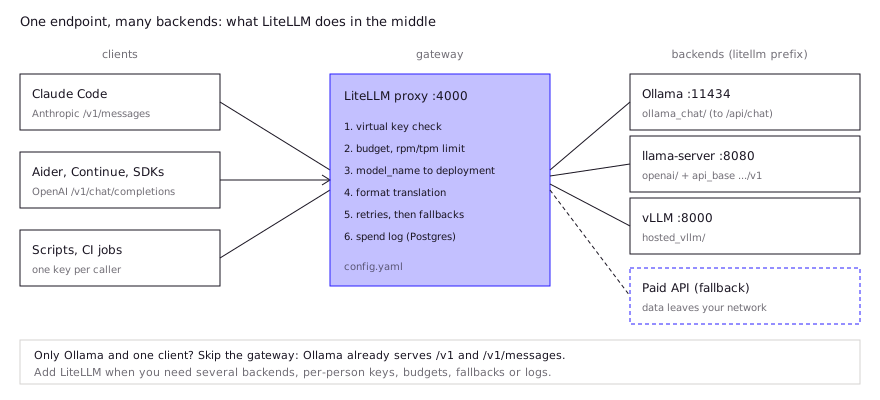
LiteLLM is an open-source proxy that gives Ollama, llama-server, vLLM and paid APIs one OpenAI- and Anthropic-style endpoint on port 4000. For Ollama, register models with the ollama_chat/ prefix, which calls /api/chat. The proxy adds virtual keys, budgets, fallbacks and spend logs, which need Postgres. Pin the LiteLLM version: releases were backdoored on PyPI in March and October 2026.
- 4000
- ollama_chat/
- Postgres + master key
- 1.82.7, 1.82.8, 1.107.0
Key takeaways
- Use the ollama_chat/ prefix, not ollama/. LiteLLM's docs recommend it; ollama/ calls the older /api/generate endpoint.
- llama-server and other OpenAI-compatible servers go in as openai/<name> with an api_base ending in /v1. vLLM has its own hosted_vllm/ prefix.
- Virtual keys, budgets and spend tracking need a master key and a Postgres DATABASE_URL. Without the database the proxy only routes.
- Tool calling through ollama_chat/ has an open bug (issue #24091). Reporters worked around it with openai/ plus Ollama's /v1 endpoint.
- If you only run Ollama for one tool, you may not need LiteLLM: Ollama already serves OpenAI /v1 and Anthropic /v1/messages.
LiteLLM in front of Ollama is one config.yaml and one command: list each model with the ollama_chat/ prefix and its api_base, start litellm --config config.yaml, and every client talks to http://localhost:4000 with an OpenAI or Anthropic SDK. The rest of this page covers when the gateway is worth running, how to add llama-server, vLLM and a paid fallback, how keys and budgets work, and the tool-calling bugs developers keep hitting.
Why put a proxy in front of local models?
A LiteLLM proxy earns its place when you have more than one backend or more than one person. Ollama on its own already serves an OpenAI-compatible /v1 and, per Ollama’s docs, a subset of Anthropic’s /v1/messages, so a single developer pointing one tool at one Ollama box gains little. See the Ollama API guide for that case.
What the gateway adds:
- One endpoint and one model namespace over Ollama, llama-server, vLLM and paid APIs. Clients ask for
qwen-coder; the config decides where it runs. - Virtual keys per developer, CI job or tool, each restricted to certain models.
- Budgets and rate limits per key, user or team.
- Retries and fallbacks, for example from a busy local GPU to a second box or a paid API.
- Spend and request logs in Postgres.
- Format translation, so Anthropic-format clients such as Claude Code can reach models that only speak OpenAI’s format.
The cloudscale engineering team, who evaluated self-hosted coding models in 2026, used LiteLLM exactly this way: as “a single API endpoint that can route requests across multiple backends”, sitting between Caddy and vLLM and also routing to hosted models (write-up). They also reported upgrading vLLM and LiteLLM “almost daily” during the test, which is the maintenance cost to plan for.
How do you configure LiteLLM for Ollama?
Register each Ollama model under model_list with the ollama_chat/ prefix and Ollama’s base URL, then start the proxy. This is the shape of the example in LiteLLM’s Ollama docs:
model_list:
  - model_name: qwen-coder              # what clients ask for
    litellm_params:
      model: ollama_chat/qwen3-coder:30b
      api_base: http://localhost:11434
      keep_alive: "8m"                  # optional, -1 keeps the model loaded
    model_info:
supports_function_calling: truepip install 'litellm[proxy]==<pinned-version>'
litellm --config config.yaml # serves on http://0.0.0.0:4000Pin the version to an explicit release that is not one of the backdoored builds listed in the security section below. Never run an unpinned pip install litellm.
What is the difference between ollama/ and ollama_chat/?
The two prefixes call different Ollama endpoints, and LiteLLM recommends ollama_chat/.
| Prefix | Ollama endpoint it calls | Use it for |
|---|---|---|
ollama_chat/ | POST /api/chat (messages array) | Chat, agents, tool calling. LiteLLM’s docs: “We recommend using ollama_chat for better responses.” |
ollama/ | POST /api/generate (single prompt) | Plain completions, /v1/completions style calls |
openai/ + api_base: http://host:11434/v1 | Ollama’s OpenAI-compatible /v1 | The workaround developers use when ollama_chat/ drops tool calls (see below) |
Two settings are not on LiteLLM’s Ollama page: a default api_base (every example passes http://localhost:11434 explicitly, so do the same) and context length. Set num_ctx on the Ollama side, in a Modelfile or with OLLAMA_CONTEXT_LENGTH, as covered in the Ollama API guide.
How do you add llama-server, vLLM and a cloud fallback?
Each backend is another model_list entry with its own prefix, and fallbacks are a map from one model_name to an ordered list of others. llama.cpp’s llama-server speaks OpenAI’s format, so it goes in as openai/. LiteLLM’s OpenAI-compatible docs say a “Not Found” error usually means the api_base is missing its /v1 suffix, and that the openai/ route needs some API key value even if your server ignores it. vLLM has a dedicated hosted_vllm/ prefix that does not need a placeholder key (vLLM provider page).
model_list:
  - model_name: qwen-coder
    litellm_params:
      model: ollama_chat/qwen3-coder:30b
      api_base: http://localhost:11434
  - model_name: llamacpp-coder
    litellm_params:
      model: openai/local-model
      api_base: http://localhost:8080/v1
      api_key: none
  - model_name: team-vllm
    litellm_params:
      model: hosted_vllm/<served-model-name>
      api_base: http://gpu-box:8000
  - model_name: cloud-fallback
    litellm_params:
      model: openai/<paid-model-id>
      api_key: os.environ/OPENAI_API_KEY

litellm_settings:
  num_retries: 2
  request_timeout: 120
  fallbacks: [{"qwen-coder": ["team-vllm", "cloud-fallback"]}]

router_settings:
  allowed_fails: 3        # cooldown after more than 3 failures...
  cooldown_time: 30       # ...for 30 seconds

general_settings:
  master_key: os.environ/LITELLM_MASTER_KEY
  database_url: os.environ/DATABASE_URL
The keys come from LiteLLM’s reliability docs: num_retries retries a model group before falling back, fallbacks applies to errors such as 429 and 500, and context_window_fallbacks (under router_settings) catches prompts that are too long for the first model.
One decision is not technical. A fallback from a local model to a paid API sends that prompt, and whatever code it contains, to a third party. If you run local models for privacy, leave the paid API out of the fallback chain, or give it its own model_name that people choose on purpose.
How do you give each developer a key and a budget?
Set a master key starting with sk- and a Postgres DATABASE_URL, then create one virtual key per person with /key/generate. Without the database, LiteLLM routes requests but cannot issue keys or enforce budgets (virtual keys docs).
curl http://localhost:4000/key/generate \
  -H "Authorization: Bearer $LITELLM_MASTER_KEY" \
  -H "Content-Type: application/json" \
  -d '{"models": ["qwen-coder", "team-vllm"], "max_budget": 10, "budget_duration": "30d", "metadata": {"user": "dev-1"}}'
Budgets are in dollars, which matters for local models. LiteLLM’s budget docs say a model whose input_cost_per_token and output_cost_per_token are set to 0 is treated as free and skips budget checks; if the cost fields are unset, the model is not treated as free and budget checks still apply. So mark Ollama and llama-server entries as free if budgets should only cap paid usage, and use rpm_limit and tpm_limit on the key to stop one script from monopolizing the GPU.
Team sizing, Postgres setup and the network checklist for a shared server live in the self-hosted team LLM guide.
How do you point Claude Code or other agents at it?
Point the agent’s base URL at the proxy, use a virtual key as its API key, and ask for a model_name from your config. For Claude Code, LiteLLM’s tutorial uses:
export ANTHROPIC_BASE_URL="http://localhost:4000"
export ANTHROPIC_AUTH_TOKEN="sk-<virtual-key>"
claude --model qwen-coder
Three caveats from the same tutorial:
- The
--modelvalue must match amodel_nameexactly. - With
CLAUDE_CODE_ENABLE_GATEWAY_MODEL_DISCOVERY=1, the model picker keeps only gateway models whose id contains “claude” or “anthropic”. Non-Anthropic models need a matching name, or you pass--modelby hand. - Declaring
max_input_tokensin LiteLLM does not change when Claude Code compacts. SetCLAUDE_CODE_AUTO_COMPACT_WINDOWto the local model’s real window, or the client keeps filling context the backend rejects.
OpenAI-format agents (Aider, Continue, OpenCode, the OpenAI SDK) take http://localhost:4000 or http://localhost:4000/v1 as the base URL and the virtual key as the API key. Model-specific Claude Code tuning is covered in running Claude Code on a local LLM.
What do developers report in practice?
Tool calling is where LiteLLM-plus-Ollama setups break, and the failures are quiet: the model answers in text instead of calling a tool.
| Report | Setup | What happened | Status |
|---|---|---|---|
| Issue #24091, opened Mar 19, 2026 | LiteLLM 1.82.4, Ollama 0.17.7, ollama_chat/qwen3.5:9b | Ollama returned a valid tool_calls array; LiteLLM returned tool_calls=None and finish_reason='stop' | Open. Still reported on LiteLLM 1.99.0 with Ollama 0.33.2 in September |
| PR #25608, Apr 2026 | Anthropic /v1/messages streaming routed to Ollama | Ollama sends the whole tool call in one chunk; the stream wrapper dropped it, leaving input: {} | Closed unmerged in August 2026 |
| cloudscale write-up, May 2026 | Claude Code through LiteLLM to self-hosted vLLM | The translation layer “did not work reliably”; they switched to OpenCode | Team report |
What follows from these reports:
- The workaround developers report for dropped tool calls is to register the model as
openai/<model>withapi_base: http://localhost:11434/v1, so LiteLLM talks to Ollama’s own OpenAI layer instead of itsollama_chat/adapter. One commenter on #24091 confirmed this worked for them. - Test streaming and non-streaming separately. The PR above only affected streaming on the Anthropic path, which is the path Claude Code uses.
- Separate model problems from gateway problems. LiteLLM’s docs say not every Ollama model supports function calling, and the proxy falls back to JSON-mode tool calls when native support is missing. Before blaming the proxy, curl Ollama’s
/api/chatdirectly with the same tools and compare. - For Claude Code alone, try Ollama’s native
/v1/messagesfirst. It removes one translation layer. Ollama documents thattool_choiceand token counting are unsupported there.
Is LiteLLM safe to run in 2026?
Treat LiteLLM as an internet-facing service that holds every provider key, and pin and verify every upgrade. Two 2026 incidents shipped backdoored releases. In March, versions 1.82.7 and 1.82.8 on PyPI carried a credential stealer, which reached the top of Hacker News as a Tell HN post. On October 21, version 1.107.0 was malicious on PyPI and on several Docker Hub and GHCR tags, including latest and main-stable. LiteLLM’s incident post named 1.106.2 as the last safe release and says to rotate every provider key, master key, virtual key and the database password on any host that ran it.
Exposure is the other risk. The Register, reporting Lumen Black Lotus Labs research on October 7, 2026, said a botnet had infected more than 3,000 servers and that most victims ran “vulnerable, internet-facing versions of LiteLLM and Ollama” (article). Keep both on a private network, put TLS and authentication in front, and never pull a latest tag in production.
FAQ
What is the difference between LiteLLM and Ollama?
Ollama runs models on your hardware. LiteLLM runs no models; it is a gateway that forwards requests to Ollama and other backends and adds keys, budgets, fallbacks and logs.
Do I need LiteLLM to use Ollama with Claude Code?
No. Ollama serves an Anthropic-compatible /v1/messages endpoint, so ANTHROPIC_BASE_URL=http://localhost:11434 works directly. Add LiteLLM when you need several backends or per-person keys.
What api_base should I use for Ollama in LiteLLM?
http://localhost:11434 for ollama_chat/ and ollama/. Use http://localhost:11434/v1 only when you register the model with the openai/ prefix.
Can LiteLLM serve Ollama embedding models?
LiteLLM’s Ollama provider page documents chat and completion, not embeddings. If you need embeddings through the proxy, the OpenAI-compatible route to Ollama’s /v1/embeddings is the path to test first.
Does LiteLLM need a database?
Only for virtual keys, budgets and spend logs, which need Postgres. Plain routing and fallbacks work from config.yaml alone.
Sources (10)
- LiteLLM docs: Ollama provider (ollama vs ollama_chat, proxy config, tool calling)
- LiteLLM docs: OpenAI-compatible endpoints (openai/ prefix, /v1 api_base)
- LiteLLM docs: Proxy reliability (retries, fallbacks, cooldowns)
- LiteLLM docs: Budgets and rate limits (max_budget, budget_duration, free models)
- LiteLLM docs: Use Claude Code with non-Anthropic models
- LiteLLM: Security incident, October 21, 2026 (v1.107.0)
- Ollama docs: Anthropic compatibility (/v1/messages)
- BerriAI/litellm issue #24091: LiteLLM fails to parse Ollama's tool_calls (community reports)
- BerriAI/litellm PR #25608: streaming drops tool arguments for Ollama on /v1/messages (closed unmerged)
- cloudscale engineering blog: Self-hosting coding LLMs (May 4, 2026)