Set up a self-hosted LLM server for a dev team: vLLM behind a LiteLLM gateway, KV-cache sizing, per-developer keys, a security checklist and Docker commands.
To self-host a coding LLM for a team, run vLLM or SGLang on a GPU server and put an OpenAI-compatible gateway such as LiteLLM in front of it for per-developer keys, rate limits and spend logs. Size the box by KV cache, not model weights: every concurrent developer needs cache for their full context. Never expose the inference server directly, because vLLM's API key covers only part of its routes.
- vLLM, SGLang
- LiteLLM (Postgres for keys)
- 26B to 35B models
- Raw vLLM port
Key takeaways
- Ollama serves one request per model by default; vLLM and SGLang batch concurrent requests, which is what a shared team server needs.
- Size VRAM as weights plus KV bytes per token times context length times concurrent developers. Weights alone will mislead you.
- vLLM's --api-key does not protect /metrics, /health or /tokenize, and its docs say to put a reverse proxy with a route allowlist in front.
- A gateway gives you what the engine doesn't: per-developer keys, rate limits and spend logs. LiteLLM needs Postgres for that, and it needs pinned, patched versions: a 2026 SQL injection was fixed in v1.83.7, and the 1.107.0 release was backdoored on October 21, 2026.
- Community reports agree on the shape: one GPU box, a 26B to 35B coding model, quantized, with a hosted model as fallback.
What changes when 10+ developers share one model?
Concurrency becomes the whole problem for a self-hosted LLM server. The cloudscale team, who evaluated self-hosting coding models in 2026, upgraded vLLM and LiteLLM almost daily and concluded it is viable but “not plug-and-play.” A single developer on a laptop sends one request at a time, and Ollama or llama.cpp handle that fine. Ten developers with coding agents send overlapping requests with long, mostly identical prompts, and a runtime that queues them one by one turns every autocomplete into a wait.
Three things change at team scale:
- Batching. vLLM and SGLang batch concurrent requests onto the same GPU and reuse cached prompt prefixes. Ollama processes one request per model by default, and its
OLLAMA_NUM_PARALLELsetting multiplies memory use by context length, per one 2026 sizing guide. - Identity. You need to know who sent what, cut off one runaway script, and revoke one laptop’s access without rotating a shared secret.
- Operations. Someone owns upgrades, drivers and monitoring, and the engine and gateway both move fast.
What does a self-hosted LLM server stack look like?
The common stack has three layers: a reverse proxy for TLS, an OpenAI-compatible gateway, and the inference engine. The cloudscale write-up uses Caddy for TLS, LiteLLM for access control and usage tracking, and vLLM for inference. A studio that posted its design to r/LocalLLaMA planned the same shape for about 10 users: LiteLLM in front of three independent vLLM instances, one per GPU (thread mirror).
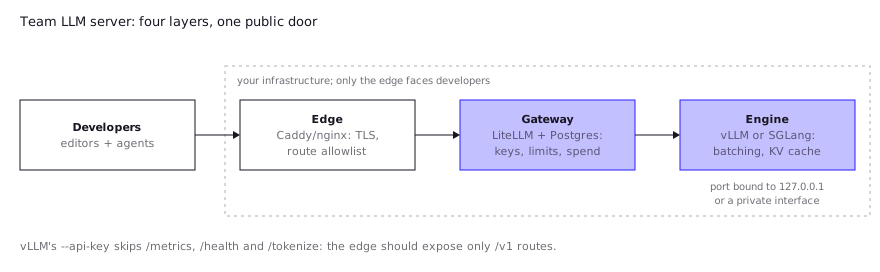
| Layer | Job | Typical choice |
|---|---|---|
| Edge | TLS, route allowlist, IP limits | Caddy, nginx, a cloud load balancer |
| Gateway | Per-user keys, rate limits, spend logs, model aliases | LiteLLM proxy |
| Engine | Batching, KV cache, tool-call parsing | vLLM or SGLang |
| Monitoring | Queue depth, cache pressure, latency | Prometheus scraping the engine |
vLLM or SGLang? Both are production engines. SGLang is an open-source serving framework hosted under the LMSYS non-profit, with prefix caching (RadixAttention) as a headline feature. vLLM has the larger body of team-scale write-ups, so this guide uses it for commands. For a coding workload, test both on your own prompts; the deciding factors are usually which one supports your chosen model’s tool-call format and how stable it is on your GPUs.
How do you size GPUs for concurrent developers?
Size the server by KV cache. Weights are a fixed cost; the KV cache grows with every developer’s context. In the r/LocalLLaMA design thread above, one commenter worked it through for Qwen3-Coder-30B-A3B at 4-bit: weights near 15.7 GiB and the cache near 96 KiB per token at fp16, so one 32K-token session needs roughly 3 GiB. On a 24 GB card that leaves room for about two full-length sessions after overhead, which is why the commenter said ten concurrent 32K sessions would not fit across three 24 GB GPUs.
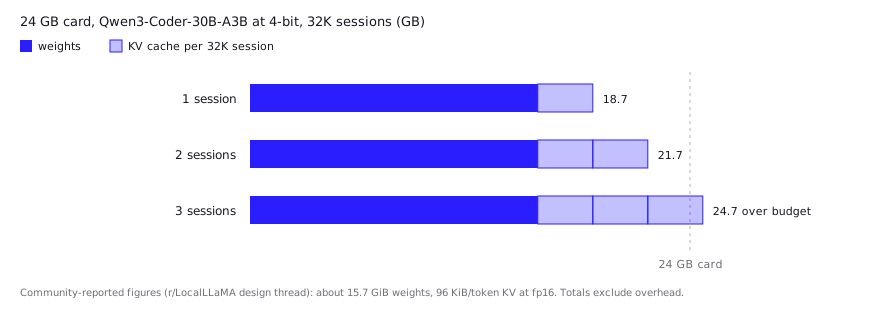
The general rule: VRAM needed = weights + (KV bytes per token × context length × concurrent sessions) + overhead. KV bytes per token comes from the model’s config.json: layers × KV heads × head dimension × 2 (K and V) × bytes per value. An FP8 KV cache (--kv-cache-dtype fp8) halves it relative to 16-bit.
That is community arithmetic from reported figures, not a test, but you can check it against the formula for your own model.
| Question | Why it matters |
|---|---|
| How many developers are active at the same moment? | Not headcount. Plan for peak simultaneous sessions, which is usually a fraction of the team. |
| What context length do agents actually use? | Agents resend the repo context on every turn. 128K context at 10 sessions needs more cache than most weights. |
| Dense or mixture-of-experts model? | MoE models like the “A3B” variants run few active parameters per token, so they are fast, but all weights still sit in VRAM. |
| One big GPU or several small ones? | Independent replicas avoid tensor-parallel overhead on PCIe-only cards when the model fits on one card. |
Real configurations people report: cloudscale ran Qwen3.6-35B-A3B in FP8 on one 96 GB RTX PRO 6000 Max-Q (NVIDIA lists 96 GB GDDR7, 1,792 GB/s, 300 W) with a 131,072-token window and --max-num-seqs 8, and called 26B to 35B models the sweet spot for that card. A Hacker News commenter (thread) said they serve a 27B model at INT8 on the same class of GPU through vLLM and cap concurrency at three sequences. For broader hardware tiers see local LLM hardware requirements. Cost per token is covered in self-host vs API cost.
Which model should the team serve?
Serve the strongest coding model that fits your KV budget, and expect it to trail the best hosted models. Cloudscale found Qwen2.5-Coder-32B and a 33B DeepSeek coder “not sufficient,” a Gemma 4 model a big step up but still well behind Claude Code, and a Qwen3.6 35B MoE the first that felt “actually usable.” Model names turn over every few months, so treat this as a snapshot and check the model card for the licence before rollout.
Tool calling is the part that breaks first. Agents depend on structured calls, and vLLM needs --enable-auto-tool-choice plus a --tool-call-parser that matches the model family (its docs list qwen3_xml for Qwen3-Coder and hermes for Qwen2.5). Mismatch the parser and agents see malformed calls. Ubicloud measured only about 92% valid tool calls with Kimi K2.6 on vLLM 0.28 until they enabled constrained decoding, which newer vLLM exposes as --tool-strict-level. Per-call reliability compounds across long agent chains, so test it before you trust it.
How do you handle auth, keys and usage tracking?
Put a gateway in front and issue one virtual key per developer. LiteLLM’s virtual keys require a Postgres database and a master key. You generate keys by calling /key/generate, and each key can carry models, tpm_limit, rpm_limit and max_budget. Spend is tracked per key, per user (/user/new, then user_id on key creation) and per team (/team/new).
Without a database, virtual keys and spend tracking are unavailable and max_budget is not enforced, per LiteLLM’s quickstart. Do not skip Postgres for a team deployment.
What to put in each key:
- A model allowlist, so scripts can’t hit your largest model by accident.
- A requests-per-minute and tokens-per-minute cap, so one agent loop can’t starve nine colleagues.
- An owner in the metadata, so the logs map to a person.
- A short rotation schedule, and revocation when a laptop is lost.
For the gateway itself, LiteLLM’s production guide allocates 1 vCPU and 4 GiB per worker as a floor, tells you to set LITELLM_MASTER_KEY and LITELLM_SALT_KEY (never change the salt after adding models), and says to use Redis once you run more than one instance.
What is the security and data-handling checklist?
Treat the inference server as an internal service and never publish its port. This matters because vLLM’s --api-key is narrower than it looks. Per the vLLM security guide, the key protects the /v1, /v2, /inference and /cohere prefixes. It does not protect /metrics, /health, /version, /tokenize, /detokenize, /pooling, /score or several operational routes. The docs say not to rely on the key alone and to run a reverse proxy that allowlists only the routes you intend to expose.
Checklist:
- Engine reachable only from the gateway’s network. Bind the published port to localhost or a private interface.
- Reverse proxy exposes
/v1/chat/completions,/v1/completionsand/v1/modelsat most. -
VLLM_SERVER_DEV_MODEis unset. vLLM warns its dev endpoints must not be used in production. - Multi-node setups on an isolated network. vLLM’s inter-node traffic is unencrypted and accepts connections without checks.
- Dynamic LoRA loading disabled or admin-only.
- One engine instance per trust boundary. vLLM does not isolate tenants that share a process; for multi-tenant use it recommends a per-tenant
cache_salt. - Gateway patched. LiteLLM CVE-2026-42208 was a SQL injection reachable with a crafted
Authorization: Bearerheader in versions 1.81.16 through 1.83.6, fixed in 1.83.7 and later. Pin versions and read advisories. - Gateway pinned to a known-good release, never
latest. On October 21, 2026, LiteLLM 1.107.0 was published with a credential stealer and backdoor on PyPI and on the GHCR and Docker Hub tagsv1.107.0,latest,main-latestandmain-stablefor about two hours. Datadog names 1.106.2 as the last clean version and advises treating any host that installed or pulled it as compromised and rotating its credentials. It was LiteLLM’s second supply chain compromise of 2026, after 1.82.7 and 1.82.8. - Prompt logging decided on purpose. Spend logs can store prompts and responses, which are your source code.
- Usage policy written down: which repos may be sent, and which tools are allowed to execute generated code.
Self-hosting solves the third-party data problem and creates a first-party one: the logs on your box now hold your developers’ code. Apply the same retention rules you would to a CI server. If you plan to use the server for review automation, see local LLM code review.
What is a reference deployment?
A minimal reference deployment is two commands: one for the engine, one for the gateway. Replace <model> with a model your hardware fits. The engine command follows the vLLM Docker docs, with the tool-calling and cache flags from the cloudscale configuration.
docker run --runtime nvidia --gpus all \
    -v ~/.cache/huggingface:/root/.cache/huggingface \
    --env "HF_TOKEN=$HF_TOKEN" \
    --env "VLLM_API_KEY=$VLLM_API_KEY" \
    -p 127.0.0.1:8000:8000 \
    --ipc=host \
    vllm/vllm-openai:latest \
    --model <model> \
    --max-model-len 131072 \
    --gpu-memory-utilization 0.92 \
    --enable-prefix-caching \
    --enable-auto-tool-choice \
    --tool-call-parser <parser-for-your-model> \
    --kv-cache-dtype fp8 \
    --max-num-seqs 8
The vLLM docs note the CUDA image runs as root by default and can run as the vllm user with --user 2000:0. --ipc=host or --shm-size is needed because PyTorch shares memory between processes.
For the gateway, LiteLLM’s quickstart brings up the proxy and Postgres together:
curl -sSLO https://github.com/BerriAI/litellm/raw/main/docker/docker-compose.quickstart.yml
printf 'LITELLM_MASTER_KEY=sk-%s\nLITELLM_SALT_KEY=sk-%s\n' "$(openssl rand -hex 32)" "$(openssl rand -hex 32)" > .env
docker compose -f docker-compose.quickstart.yml up -d
Before you run it, open the compose file and replace any floating image tag (latest, main-stable) with a specific, known-good version. Floating tags served the backdoored 1.107.0 build during the October 2026 compromise (see the checklist above).
Then register the engine as a model in the LiteLLM Admin UI or config.yaml, pointing at the engine’s private /v1 URL with the engine key, and issue a key per developer:
curl 'http://localhost:4000/key/generate' \
  --header 'Authorization: Bearer <your-master-key>' \
  --header 'Content-Type: application/json' \
  --data-raw '{"models": ["<alias>"], "rpm_limit": 60, "metadata": {"user": "dev@example.com"}}'
Developers then point their editor or agent at your gateway URL as an OpenAI-compatible base URL with their personal key. Watch these vLLM metrics at /metrics (scraped from inside your network): vllm:num_requests_waiting, vllm:kv_cache_usage_perc, vllm:time_to_first_token_seconds and vllm:inter_token_latency_seconds. A growing waiting queue with high cache usage means you are out of KV cache, not compute.
What do developers report in practice?
Reports agree that the engine is the easy part and the tuning is the work. These are community and engineering-blog reports, not our tests.
- Configuration is the main cost. Cloudscale found context window, KV cache and VRAM tuning the hardest part, with different parameters for each model, and their settings were explicitly not final.
- Claude Code needs care. The same team said Claude Code uses the Messages API rather than Chat Completions, and LiteLLM’s translation layer “did not work reliably” for them. vLLM’s current docs list an Anthropic-style
/v1/messagesendpoint, so test that path directly. OpenCode, they said, worked well from the start. - Do not shard what fits on one card. In the r/LocalLLaMA design thread, a commenter advised independent replicas over tensor parallelism for a model that fits on a single 24 GB GPU, noted that 32 attention heads cannot split three ways, and warned that a heavy quantization may be the real reason users drift back to a hosted model.
- Most home setups are single-user. The Hacker News thread linked above had many single-GPU homelab reports and very few team-scale ones, so be skeptical of tokens-per-second figures from one-user setups when planning for ten.
- Keep a hosted fallback. Both the studio design and cloudscale’s evaluation kept hosted models in the mix for hard tasks.
FAQ
What is the best server for self-hosting an LLM for a team?
For several concurrent users, vLLM or SGLang on a GPU server behind a gateway such as LiteLLM. Ollama is simpler but handles one request per model by default, so it suits one machine and one user.
How many developers can one GPU serve?
It depends on model size, context length and KV-cache precision, not headcount. One reported setup on a 96 GB card capped the engine at 8 sequences; a 24 GB card with a 4-bit 30B model fits about two full 32K sessions.
Can I run a self-hosted LLM in Docker?
Yes. vLLM publishes the vllm/vllm-openai image, which exposes an OpenAI-compatible server on port 8000. Mount the Hugging Face cache, pass --ipc=host, and keep the port off the public network.
Is a vLLM API key enough to secure the server?
No. It protects the main /v1 routes but not /metrics, /health or /tokenize. vLLM’s docs recommend a reverse proxy that allowlists only the routes you need.
Do I need a gateway if I only have one model?
Yes, if more than a few people use it. The gateway is where per-developer keys, rate limits and spend logs live; the engine has none of those.
Sources (11)
- vLLM docs: Using Docker
- vLLM docs: Security
- vLLM docs: Tool Calling
- vLLM docs: Production metrics
- LiteLLM docs: Virtual Keys
- LiteLLM docs: Production best practices
- LiteLLM: CVE-2026-42208 SQL injection advisory (Apr 29, 2026)
- Datadog Security Labs: LiteLLM supply chain compromise (Oct 21, 2026)
- cloudscale.ch engineering blog: Self-hosting coding LLMs (May 4, 2026)
- Ubicloud: Fixing Tool-Call Accuracy in vLLM
- SGLang documentation