Qdrant vs Chroma vs pgvector for local RAG: embedded vs server modes, hybrid search and filtering, vendor benchmarks, ops burden, licences, plus FAISS.
Qdrant vs Chroma comes down to what you need locally. Chroma is the quickest start in a Python process, but its hybrid and BM25 Search API is Chroma Cloud only. Qdrant runs the same API embedded or as a Rust server, with sparse vectors, fusion and indexed payload filters on your own box. pgvector wins when Postgres is already in your stack. FAISS is a library, not a database.
- v1.20, Rust, Apache-2.0
- v1.5.9, Apache-2.0
- v0.8.7, PostgreSQL License
- v1.15.1 library, MIT
Key takeaways
- Chroma's Search API, which carries hybrid search with RRF, is Chroma Cloud only as of November 2026; local Chroma has dense search, metadata filters and $contains/$regex document filters.
- Qdrant 1.20 does dense + sparse or BM25 hybrid search with RRF or DBSF fusion on a self-hosted node, and its Python client has a serverless local mode for development.
- pgvector 0.8.7 indexes up to 2,000 dimensions (4,000 as halfvec) and filters after the index scan, which iterative scans (0.8.0+) were added to fix.
- Published head-to-head benchmarks are vendor-run: Qdrant's own suite skips pgvector and Chroma, and Tiger Data's 50M-vector test favors Postgres on throughput, Qdrant on tail latency.
- All three have LangChain and LlamaIndex integrations, and any of them can sit behind an MCP server for Continue or another coding agent.
Which should you use: Qdrant, Chroma or pgvector?
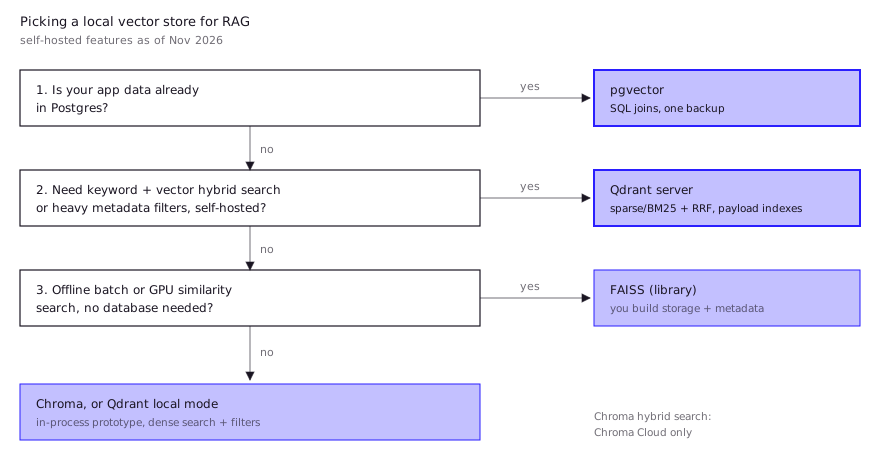
Pick by where your data already lives and whether you need hybrid search on your own machine. In the Qdrant vs Chroma choice specifically, the deciding fact in November 2026 is that Chroma’s hybrid search ships only in Chroma Cloud, while Qdrant’s runs on a single self-hosted node. If you already run Postgres, pgvector removes a whole service from your stack.
| Your situation | Pick | Why |
|---|---|---|
| Notebook or script, small corpus, dense search is enough | Chroma | pip install chromadb, in-process, persistent to a folder |
| Code or docs RAG where exact identifiers matter (hybrid search) | Qdrant | Dense + sparse or BM25 fusion on a local server |
| App data already in Postgres, need joins and transactions | pgvector | Vectors sit next to rows; one backup, one auth model |
| Heavy metadata filtering (per-repo, per-tenant, per-path) | Qdrant | Indexed payload filters feed the HNSW search |
| Offline batch similarity, research, GPU search | FAISS | Fast library, no server, but you build the database parts |
Chroma itself scales further than a notebook; what usually ends the prototype stage is the missing local hybrid search, not size. For the retrieval pipeline around the store (chunking, fusion, reranking), see RAG for codebase.
How do Qdrant, Chroma and pgvector differ in architecture?
They sit at three different layers: Chroma is an embeddable database with an optional server, Qdrant is a dedicated search server with an embeddable dev mode, and pgvector is an extension inside a general-purpose database.
- Qdrant is written in Rust and licensed Apache-2.0 (README). You normally run it as a server (
docker run -p 6333:6333 qdrant/qdrant). The Python client also has a local mode,QdrantClient(":memory:")orQdrantClient(path="..."), which runs the same code without a server; the README calls it “useful for development, prototyping and testing” and says to “switch to server mode” to scale (qdrant-client). Current release: server and client v1.20.0, October 2026. - Chroma is Apache-2.0 and starts in-memory or persistent inside your Python or JS process;
chroma run --path /chroma_db_pathturns it into a client-server setup (README). The company says it relaunched a Rust rewrite of the core in 2025 (Chroma on HN). The latest stable PyPI release is 1.5.9 (May 5, 2026); dev builds of 1.5.10 were still appearing in October. - pgvector adds
vector,halfvecandsparsevectypes to Postgres, with HNSW and IVFFlat indexes. Indexed vectors are capped at 2,000 dimensions (4,000 forhalfvec), and HNSW onsparsevechandles up to 1,000 non-zero elements (README). Version 0.8.7 ships Docker images for Postgres 16 to 18. Licence: PostgreSQL License. - FAISS, the baseline, is Meta’s MIT-licensed C++ library with Python wrappers, with optional CUDA or ROCm GPU support (README). It stores and searches vectors. Documents, metadata, updates and crash safety are yours to build.
The 2,000-dimension cap matters for code RAG: most local embedding models fit, but a 3,072-dimension API model would need halfvec. See best embedding model for code for model sizes.
Which supports hybrid (keyword + vector) search and filtering?
Qdrant has the most complete self-hosted hybrid search of the three, pgvector can do it with plain SQL, and local Chroma cannot fuse keyword and vector rankings.
Qdrant. The Query API runs sub-queries as prefetch stages, then fuses them. You can pair a dense vector with a sparse vector (SPLADE-style) or with BM25 on a full-text-indexed field, and merge with RRF or DBSF; newer versions let you weight each prefetch in RRF (hybrid queries docs). Filtering uses payload indexes. Qdrant’s indexing docs say the HNSW graph only gets filter-aware edges if the payload index exists before the graph is built, so create indexes on fields like repo or path before you ingest.
Chroma. Locally you get dense search plus metadata filters and document filters: $contains and $not_contains (case-sensitive substring) and $regex (full-text search docs). That is filtering, not ranking. The Search API, which adds “hybrid search with RRF”, is documented as “available in Chroma Cloud only”, with single-node support “planned” (Search API).
pgvector. Hybrid search is Postgres full-text search (plainto_tsquery, ts_rank_cd) plus a vector query, merged with RRF or a cross-encoder, in SQL (README). Filtering is the known weak spot. Approximate indexes filter after the scan: the README’s example is a filter matching 10% of rows with the default hnsw.ef_search of 40, which returns only about 4 rows on average. Version 0.8.0 added iterative index scans (SET hnsw.iterative_scan = strict_order; or relaxed_order) to keep scanning until enough rows match.
| Feature (self-hosted, Nov 2026) | Qdrant | Chroma | pgvector |
|---|---|---|---|
| Dense ANN | HNSW | HNSW | HNSW, IVFFlat |
| Sparse vectors | Yes | Cloud Search API | sparsevec |
| BM25 / keyword ranking | Yes, full-text index | No (substring/regex filter only) | Postgres full-text |
| Built-in rank fusion | RRF, DBSF | Cloud only | Write it in SQL |
| Metadata filtering | Indexed payload, filter-aware HNSW | Metadata where | SQL WHERE, post-filter + iterative scans |
| Quantization | Scalar, product, binary | Not documented for local | halfvec, binary via expressions |
How do they perform?
No neutral benchmark compares all three on filtered, hybrid workloads; the published head-to-heads are vendor-run, and at local RAG scale latency differences are rarely what decides.
- Qdrant’s benchmarks compare Qdrant with Elasticsearch, Milvus, Redis and Weaviate on four ANN datasets (up to 10M vectors), on an 8-vCPU Azure server with a 25 GB memory cap. Qdrant says it “achieves highest RPS and lowest latencies in almost all the scenarios.” The page answers its own FAQ on bias with “Probably, yes”, publishes the code, and was last updated in 2024. It doesn’t include pgvector or Chroma (Qdrant benchmarks).
- Tiger Data’s test (Postgres 16.8 with the pgvectorscale extension vs Qdrant 1.13.4) used 50M 768-dimension Cohere embeddings on AWS r6id.4xlarge machines, without filters. At 99% recall, Postgres served 471.57 QPS to Qdrant’s 41.47, while Qdrant had better tail latency (p99 38.71 ms vs 74.60 ms). Qdrant built the index in about 3.3 hours vs about 11.1 for pgvectorscale (Tiger Data). Tiger Data sells Postgres, and pgvectorscale is its own extension, not stock pgvector.
- ANN-Benchmarks includes FAISS (IVF, IVF-PQ, HNSW), hnswlib, Qdrant and pgvector, but not Chroma, and measures pure ANN recall against throughput (ann-benchmarks.com).
The practical read: a code or docs index of a few hundred thousand chunks fits in RAM on any of them. Quality differences will come from chunking, the embedding model and hybrid retrieval long before they come from the engine.
How easy is each to run locally and in production?
Chroma and Qdrant local mode need zero setup, Qdrant server is one container, and pgvector is free to run only if you already operate Postgres.
# Chroma: in-process, or a local server
pip install chromadb
chroma run --path ./chroma_db

# Qdrant: server with persistent storage
docker run -p 6333:6333 -p 6334:6334 \
  -v "$(pwd)/qdrant_storage:/qdrant/storage:z" qdrant/qdrant

# pgvector: Postgres 17 with the extension preinstalled
docker run -e POSTGRES_PASSWORD=dev -p 5432:5432 pgvector/pgvector:pg17
For a shared team box, the trade-offs change:
- Qdrant server needs its own backups, auth and monitoring. In return, you get quantization that its README says cuts RAM “by up to 97%”, plus sharding when you outgrow one node.
- Chroma server is the lightest server to run, but self-hosted you keep only dense search and filters.
- pgvector inherits Postgres replication, backups and roles. You also inherit autovacuum tuning and slow HNSW builds (see below).
Integration is not a differentiator. LangChain has langchain-qdrant, langchain-chroma and langchain-postgres, and LlamaIndex has a vector-store package for each. Continue’s current guide for custom code retrieval wraps the store in an MCP server, and it notes that any vector database works there (Continue docs). If several developers will share the index, plan it with the rest of your self-hosted LLM stack for a dev team, and trace retrieval quality with self-hosted Langfuse.
What do developers report in practice?
Practitioner reports line up with the docs: Chroma users hit the missing local hybrid search, and pgvector users hit filtering and index-build pain as data grows.
- Chroma’s local gap. One Reddit poster asked for an easier Chroma alternative because the free single-node version lacks hybrid search and BM25, which the hosted version has. Replies pointed to Qdrant, or to Elasticsearch/OpenSearch (Reddit thread). This is one small thread, but it matches Chroma’s own docs.
- pgvector at growing scale. The first employee at a RAG company that grew from tens of thousands to billions of embeddings said starting with pgvector is wise. They also said high-cardinality filters “still feel like a bit of an afterthought” (low-cardinality ones can use partial indexes), autovacuum needs tuning under heavy updates, and HNSW builds are slow enough to make hyperparameter tests hard (HN).
- Filter queries that degrade quietly. A team using pgvector HNSW in production saw query times grow linearly with the candidate count. The cause was how its filtered SQL was written, not the index (HN).
- Typical pgvector size. An engineer who leads semantic search on Google Cloud’s AlloyDB, and says so in the comment, reported that the customer pgvector HNSW deployments they see usually hold 0 to 10M vectors, held back by build times and memory (HN). That is a competitor’s view.
- Ops simplicity cuts both ways. A commenter writing for Chroma said people switch from Qdrant to Chroma to avoid sizing nodes and managing shards (HN). That is about the managed cloud, not local Chroma, and it comes from a vendor.
- Benchmark skepticism. Another HN user wrote that pgvector comparisons are dominated by Tiger Data posts with “very suspicious benchmarks” (HN). Weight vendor numbers accordingly.
FAQ
Is Qdrant better than Chroma?
For self-hosted RAG that needs keyword matching or heavy filtering, yes: Qdrant does hybrid fusion and indexed filtering on your own node, while Chroma keeps hybrid search in its cloud. For a quick in-process prototype with dense search only, Chroma is simpler.
Is pgvector good enough for RAG?
Usually, at code or docs scale. It handles HNSW search, SQL filters and full-text hybrid search. Use 0.8.0 or later for iterative scans on filtered queries, and expect slow index builds as you approach millions of vectors.
Qdrant vs Chroma vs FAISS: what is the difference?
Qdrant and Chroma are databases: they store documents and metadata, persist them and filter them. FAISS is a similarity-search library that you embed in your own code. It is fast, including on GPU, but persistence, metadata and updates are your job.
Can Qdrant run without Docker or a server?
Yes, for development. The Python client’s local mode (QdrantClient(path="./db")) persists to disk in-process with the same API. The project recommends server mode once you need to scale.
What is the best vector database for local RAG?
There isn’t one winner. Use pgvector if Postgres is already there, Qdrant if you want hybrid search and filters on your own hardware, and Chroma for the fastest notebook start.
Sources (10)
- Qdrant GitHub README (Rust, Apache-2.0, payload filtering, sparse vectors, quantization)
- qdrant-client README: local mode and FastEmbed
- Hybrid and Multi-Stage Queries, Qdrant documentation
- Chroma GitHub README (modes, Apache-2.0)
- Search API overview, Chroma docs (Cloud only)
- pgvector README (index types, dimension limits, filtering, hybrid search)
- Vector Database Benchmarks, Qdrant (vendor-run, updated 2024)
- Pgvector vs. Qdrant: Open-Source Vector Database Comparison, Tiger Data (vendor-run, 2025)
- FAISS GitHub README (library, MIT, CPU and GPU)
- Custom code RAG with an MCP server, Continue docs