Ollama has no built-in MCP client. How Ollama MCP setups actually work, which hosts connect local models to MCP servers, a working config, and what breaks.
Ollama does not speak MCP. As of October 2026 its feature request for MCP support (issue #7865) is still open, and no release through v0.40.12 adds it. To use MCP servers with a local model, run an MCP host such as ollmcp, Open WebUI, Continue or LM Studio. The host lists tools from each MCP server, passes them to Ollama's tool-calling API, and executes the calls the model returns.
- No (issue #7865 open)
- v0.40.12, Oct 27, 2026
- v0.6.31+, HTTP only
- Since 0.3.17
Key takeaways
- Ollama is an inference server with a tool-calling API. It is not an MCP client, and its MCP feature request has been open since November 2024.
- The MCP host does the work: it connects to each server, turns MCP tools into tool schemas, runs the model's tool calls and returns the results.
- ollmcp is the most direct Ollama MCP client; Open WebUI, Continue and LM Studio are MCP hosts that run local models.
- MCPHost, the most-cited Ollama bridge, is archived and points users to its successor, Kit.
- Developers report loops, ignored tools and long-context failures with small models, so keep the tool list short and confirm calls.
Does Ollama support MCP natively?
No. As of October 28, 2026, Ollama has no built-in MCP client, so ollama run cannot connect to an MCP server on its own. The feature request, issue #7865, has been open since November 27, 2024, has no linked pull request, and shows no stated plan from maintainers. The release notes for v0.40.3 through v0.40.12, the latest release (October 27, 2026), don’t mention MCP.
What Ollama does have is tool calling: you POST to /api/chat with a tools array of JSON Schema function definitions, and a tool-capable model can answer with tool_calls instead of text (Ollama docs). That is the hook every Ollama MCP setup uses. A Hacker News commenter summed up the split well: Ollama “can merely run models which output instructions back to a connected system”, and a host like MCPHost does the actual MCP connection (HN, Sep 2025).
So “ollama mcp support” in practice means: pick an MCP host that knows how to talk to Ollama.
How does MCP connect to a local model?
MCP connects to a local model through a host application that sits between the MCP servers and the model. The MCP architecture docs define three roles:
- MCP host: the AI application (an editor, a chat UI, a CLI agent). It owns the conversation and the model connection.
- MCP client: one per server, created by the host, holding a dedicated connection.
- MCP server: the program that exposes tools, resources and prompts, over stdio (local process) or Streamable HTTP (remote).
The spec is explicit that MCP “does not dictate how AI applications use LLMs.” The host fetches each server’s tools with tools/list, merges them into one registry, hands them to the model, and when the model emits a tool call, routes it to the right server with tools/call and puts the result back into the conversation.
With Ollama, the host translates MCP tool definitions into the tools array of Ollama’s chat API. Ollama never sees MCP; it only sees function schemas and returns tool_calls.
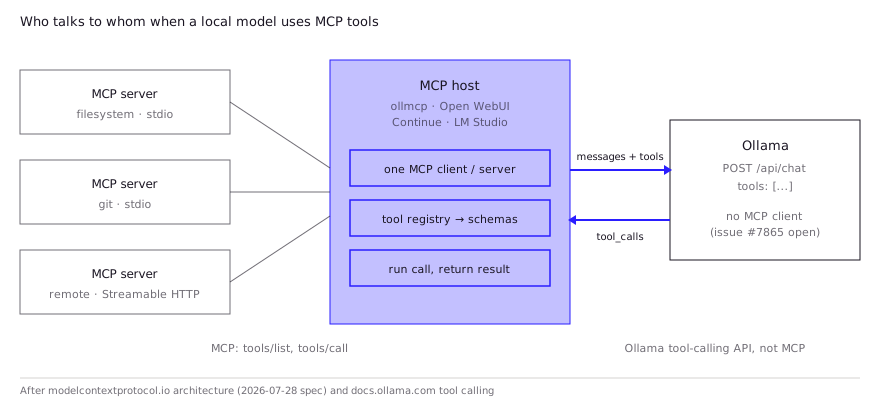
This also explains a common confusion: “Ollama MCP server” usually means something different. Most projects with that name are MCP servers that expose Ollama to another host (for example, letting Claude Desktop hand subtasks to a local model). They don’t give Ollama the ability to use tools.
Which clients can use local models with MCP servers?
Four documented hosts cover most setups; pick by where you work (terminal, browser, editor, desktop app).
| Host | Talks to | MCP transports | Notes (from docs, Oct 2026) |
|---|---|---|---|
| ollmcp | Ollama directly (default http://localhost:11434) | stdio, SSE, Streamable HTTP | Terminal UI; tool calls need your confirmation by default; toggle tools per server |
| Open WebUI | Ollama and OpenAI-compatible APIs | Streamable HTTP only (native, v0.6.31+) | Admin-only; stdio servers need the mcpo proxy |
| Continue | Any configured model, including Ollama | stdio, SSE, Streamable HTTP | MCP tools work in agent mode only |
| LM Studio | Its own runtime, not Ollama | Local and remote servers | MCP host since 0.3.17; Cursor-style mcp.json |
| MCPHost | Ollama (-m ollama/<model>) | stdio, remote | Archived, read-only; README points to successor Kit |
Two notes on the table. MCPHost still shows up in most tutorials, but the repository is archived, so don’t build on it. And LM Studio is a separate runtime: it is the easiest desktop MCP path, but if you’re committed to Ollama, it replaces Ollama rather than fronting it. For a code-editor workflow, Continue is the one to look at; our local LLM coding agent guide covers that side.
How do you set up Ollama with an MCP server?
The shortest documented path is ollmcp, because it is built for Ollama and reads the same mcpServers JSON format most MCP servers already document. The steps below come from the ollmcp README; it needs Python 3.11+ and a running Ollama.
- Pull a model with tool-calling support (Ollama tags these “tools” on its model library).
- Install ollmcp.
- Describe your servers in a JSON file.
- Start ollmcp with that file and the model.
ollama pull qwen3
uv tool install --upgrade ollmcp   # or: pip install --upgrade ollmcp
A server file mixing a local stdio server and a remote HTTP server, in the format the README documents:
{
  "mcpServers": {
    "playwright": {
      "command": "npx",
      "args": ["@playwright/mcp@latest"]
    },
    "internal-api": {
      "type": "streamable_http",
      "url": "http://localhost:8000/mcp",
      "headers": { "X-API-Key": "your-api-key-here" }
    }
  }
}ollmcp -j servers.json -m qwen3Useful flags from the README: -H points at a non-default Ollama URL (a GPU box on your LAN, say), and --claude-desktop loads the servers already configured for Claude Desktop. Inside the session, /tools lets you switch individual tools or whole servers off, which matters more with local models than with hosted ones (see below). If you’d rather call Ollama from your own code through its OpenAI-compatible API, the loop is the same: list MCP tools, pass them as tools, execute tool_calls, append results.
For Open WebUI, the setup is in the admin panel (Settings > Admin > Integrations, type “MCP (Streamable HTTP)”). Its docs warn that picking the OpenAPI type for an MCP server can freeze the UI, and that stdio servers need mcpo in front, for example uvx mcpo --port 8000 --api-key "top-secret" -- <your MCP server command>.
Which local models handle MCP tool calls well?
Models trained for tool calling, and the bigger the better; the protocol doesn’t help a model that can’t pick tools. Open WebUI’s docs say it bluntly: MCP “does not improve the model’s ability to use them.” Hard benchmarks for MCP specifically are thin, so the honest answer is a set of community reports:
| Model | What was reported | Source |
|---|---|---|
| Qwen3 4B (2.6 GB in Ollama) | Does tool calling “reasonably well” on a Mac | Simon Willison, HN, May 2025 |
| Small IBM Granite | Worked well with a SearXNG search MCP in LM Studio | HN, Nov 2025 |
| gpt-oss-20b | Looped searches with the same search MCP | HN, Nov 2025 |
| Gemma 3 12B | Stuck in a navigation loop with Playwright MCP; other models ignored tools | HN, Jun 2025 |
| Nemotron-9B, Qwen3-8B | Used with Ollama, Continue and MCP servers on an 8 GB VRAM laptop | Author’s write-up, HN, Nov 2025 |
| Qwen 3.5, Gemma 4, gpt-oss-120b | “Solid at reasonable quants” when given the right data; deciding when to call tools is the weak spot | HN, May 2026 |
These are single reports, not controlled tests, and model generations move fast. What they agree on is more useful than any one row: tool-trained models from the Qwen line show up repeatedly as working, the failures reported are loops and ignored tools rather than broken output, and the host and context setup matter as much as the weights. For model-by-model tool-calling details in Ollama, see Ollama tool calling.
What do developers report in practice?
The recurring pattern is that it works on short tasks and degrades as context grows. One developer who connects local models to MCP servers through LM Studio said they were “blown away” by the results, but that problems “creep up when you hit longer context” (HN, Oct 2025). LM Studio’s own docs warn about the same thing: some MCP servers designed for hosted models use enough tokens to overflow a local model’s context.
Practical fixes that follow from those reports and the docs:
- Expose fewer tools. Every tool’s name, description and JSON Schema is sent with each request. Turn off servers and tools you don’t need for the task (in ollmcp, the
/toolsmenu). - Raise the context window deliberately. Ollama’s context length is a setting, not a given; check it before blaming the model. Our Ollama context length guide covers the settings.
- Watch for loops. Two of the reports above are loops (repeated navigation, repeated searches). Cap tool-call rounds in your host if it supports it, and stay in the loop for the first runs.
- Expect rough edges in the hosts. The Gemma 3 report started with simply finding the right panel in LM Studio, and Open WebUI’s docs warn of “occasional breaking changes” while the MCP ecosystem evolves.
What are the security risks of giving a local model MCP tools?
The same as with a hosted model: a local model doesn’t make tool use safer, it only keeps your data on your machine. LM Studio’s docs warn that MCP servers “can run arbitrary code, access your local files, and use your network connection” and say never to install them from untrusted sources. The bigger risk is indirect prompt injection: a web page, issue or file the model reads through one tool can carry instructions that steer its next tool call. Keep confirmations on (ollmcp enables them by default), give servers the narrowest file and network scope they need, and read our guide to prompt injection in coding agents before wiring a model to anything with write access.
FAQ
Does Ollama have an MCP client?
No. As of October 2026, Ollama has no built-in MCP client, and feature request #7865 is still open. Use a host such as ollmcp, Open WebUI or Continue, which connects to MCP servers and calls Ollama’s tool-calling API.
What is the difference between an Ollama MCP server and an Ollama MCP client?
An Ollama MCP client (such as ollmcp) lets an Ollama model use MCP tools. An “Ollama MCP server” exposes Ollama as a tool to another host, for example so Claude Desktop can hand work to a local model. Most people searching for one want the client.
Can a local LLM use MCP?
Yes, if it supports tool calling and runs behind an MCP host. The model never speaks MCP; the host translates MCP tools into function schemas and runs the calls. Small models work for short tasks but are reported to loop or ignore tools as context grows.
What is the best local LLM for MCP?
There is no MCP-specific benchmark to settle it. Community reports favor tool-trained models, with Qwen-family models mentioned most often as working well; failures cluster around small models in long contexts. Test your own tools with confirmations on.
Does Open WebUI support MCP with Ollama?
Yes, natively since v0.6.31, but only for MCP servers over Streamable HTTP and only when added by an admin. Local stdio servers need the mcpo proxy, which exposes them as OpenAPI endpoints Open WebUI can call.
Sources (10)
- Model Context Protocol (MCP) support, ollama/ollama issue #7865 (opened Nov 27, 2024; open as of Oct 28, 2026)
- Tool calling, Ollama documentation
- Architecture overview, Model Context Protocol documentation (protocol version 2026-07-28)
- mcp-client-for-ollama (ollmcp), GitHub README
- MCP support, Open WebUI documentation
- mcpo: MCP-to-OpenAPI proxy, GitHub README
- MCP, Continue documentation
- Use MCP servers, LM Studio documentation
- MCPHost (archived), mark3labs GitHub README
- Ollama releases, GitHub (v0.40.12, Oct 27, 2026)