Is Ollama safe? Local models keep prompts on your machine, cloud models don't, and the API has no auth. CVEs, exposed servers and a hardening checklist.
Ollama is safe for local use if you keep three things in check. Local models never send prompts to Ollama, but :cloud models do. The API on port 11434 has no authentication, so it must stay on localhost or behind a proxy; SentinelLABS and Censys counted 175,108 exposed hosts. And you need to stay patched: CVE-2026-7482 leaked process memory before 0.17.1.
- 127.0.0.1:11434
- None
- 175,108
- CVE-2026-7482, CVSS 9.1
Key takeaways
- Local models: Ollama's privacy policy says it does not see your prompts or data. Cloud models process prompts on Ollama's servers, transiently and without training.
- The API has no built-in authentication. It binds to 127.0.0.1:11434 by default, but the official Docker command publishes the port on all interfaces.
- SentinelLABS and Censys logged 175,108 internet-reachable Ollama hosts over 293 days; over 48% advertised tool calling.
- Most Ollama CVEs need network access to the API. Binding to localhost removes the remote ones; updating removes the rest.
- GGUF is not pickle and doesn't execute code on load. The residual risk is parser bugs and whatever tools you let model output trigger.
“Is Ollama safe” is usually three separate questions. Does it send my prompts anywhere? Can someone else reach it? Can a model file hurt me? The short answer is that Ollama is safe for local use on a machine you control, provided you run local models (not :cloud ones), keep the API on localhost, and stay on a current release. Each of those conditions has failed in public, so here they are one at a time.
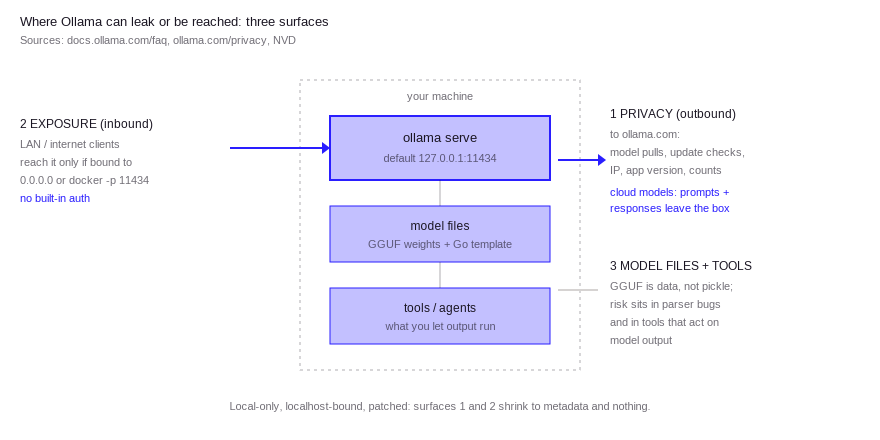
Does Ollama send your prompts or code anywhere?
Not when you run a local model. When you run a cloud model, yes. Ollama’s FAQ and privacy policy say the same thing: “Ollama runs locally. We don’t see your prompts or data when you run locally.”
The other half matters more than people expect. For cloud-hosted models, the policy says Ollama processes “your prompts and responses transiently to provide the service.” It also says the content “is not stored beyond the time required to fulfill the request,” that diagnostic logs exclude prompt and response content, and that Ollama does not train on your inputs or outputs.
What still leaves the machine in local mode is metadata. The policy lists “limited device and usage metadata (such as app version and request counts),” IP address, and model download metadata. Pulling a model or checking for an update is a request to Ollama’s servers, so Ollama learns that your IP pulled a given model. It does not learn what you asked it.
The real privacy trap is the naming. A Hacker News post from February 2026 describes a security engineer who believed he was running GLM-5 locally on a 16 GB M1. He was actually running ollama run glm-5:cloud, which sends every prompt to remote GPUs through the same CLI and the same localhost:11434 endpoint (HN, Feb 15, 2026). The poster’s point is about UX: nothing in the terminal says your data is leaving. If your reason for using Ollama is that code stays on the box, turn cloud features off:
# local-only mode: disables cloud models and web search
export OLLAMA_NO_CLOUD=1
# or set "disable_ollama_cloud": true in ~/.ollama/server.json, then restart
Both options come from the Ollama FAQ. If you do want hosted inference with written retention terms, compare providers on that basis first; we cover that in zero data retention LLM APIs.
What are the real security risks of running Ollama?
The main risk is network exposure, because the Ollama API has no authentication. Anyone who can reach port 11434 can chat with your models, pull new ones, push them elsewhere, create models from uploaded files and delete what you have. These are the same Ollama API endpoints your editor plugin uses.
Out of the box this is fine. The FAQ states that “Ollama binds 127.0.0.1 port 11434 by default,” so only your own machine can connect. The trouble starts in three common setups:
OLLAMA_HOST=0.0.0.0, set so a phone, a second laptop or Open WebUI on another box can connect. That publishes the unauthenticated API to every network the host is on.- The official Docker command. The Docker docs use
-p 11434:11434, which Docker binds on all host interfaces, and the image itself setsOLLAMA_HOST=0.0.0.0inside the container. A Hacker News commenter added that rootful Docker’s port publishing is known to bypassufwrules (HN, Jan 2026, citing moby#4737), so a firewall you think is protecting you may not be. - IPv6. Another commenter on the same thread pointed out that a host with a public IPv6 address can be reachable without any router port-forward (HN).
The scale is not hypothetical. Cisco found 1,139 Ollama servers answering unauthenticated requests through Shodan’s index in September 2025, 214 of them with models loaded (Cisco). SentinelLABS and Censys then logged 175,108 unique exposed hosts across 130 countries over 293 days. Over 48% of them advertised tool calling (SentinelLABS). The researchers’ recommendation is to treat an LLM endpoint like any other externally reachable service, with authentication, monitoring and network controls. An open Ollama box is free compute for someone else, and with tools attached it can do more than generate text.
Has Ollama had security vulnerabilities?
Yes, and several were serious. Almost all of them need network access to the API, so a localhost-bound, updated install avoids nearly every one. These are from NVD and the linked advisories:
| CVE | What it does | Affected | Fixed in | CVSS 3.1 |
|---|---|---|---|---|
| CVE-2024-37032 | Model digest not validated; path traversal when resolving model paths | before 0.1.34 | 0.1.34 | 8.8 |
| CVE-2024-39720 | Malformed 4-byte GGUF crashes the server via the create route | before 0.1.46 | 0.1.46 | 8.2 |
| CVE-2024-39722 | /api/push path traversal reveals which files exist on the host | before 0.1.46 | 0.1.46 | 7.5 |
| CVE-2025-0312 | Crafted GGUF triggers a null-pointer crash (DoS) | up to 0.3.14 | later releases | 7.5 |
| CVE-2026-7482 “Bleeding Llama” | Heap out-of-bounds read in the GGUF loader leaks env vars, API keys and other users’ prompts | before 0.17.1 | 0.17.1 | 9.1 |
| CVE-2026-42248 / 42249 | Windows updater skips signature checks; header path traversal can plant a startup executable | Windows 0.12.10–0.17.5 confirmed | see below | 9.8 |
| CVE-2026-108836 | Server-side request forgery in the pull API’s name validation | up to 0.34.1 | 0.34.2 | 7.3 |
Two of these deserve a closer look.
Bleeding Llama was reported to Ollama on February 2, 2026. Ollama shared a fix PR on February 25, but the CVE was only published on May 1 after the researcher went to a third-party CNA, so many people learned about it months after the patch shipped (Cyera). Exploiting it requires reaching /api/create and /api/push, which is one more reason not to expose the port.
The Windows updater pair is the exception to “just bind to localhost,” because the attacker has to control the update response through a man-in-the-middle, a compromised update server or a local foothold, not reach your API. CERT Polska confirmed 0.12.10 through 0.17.5. Its NVD entry notes the maintainers did not supply a version range. Mondoo says the same code shipped through v0.23.2 and the fix was merged to main on May 11, 2026. Current releases postdate that merge (v0.40.12 shipped October 27, 2026, per the releases page). If you’re on an older Windows build, update by hand from ollama.com rather than through the in-app updater.
Can a downloaded model file be malicious?
A GGUF file can’t run code just by being loaded, the way a pickle can. It can still crash or exploit a buggy parser, and its chat template controls what the model sees. Hugging Face’s pickle security docs explain why PyTorch .bin checkpoints are dangerous: unpickling can import and call arbitrary Python functions such as exec. GGUF is a tensor container with metadata, so the threat model is different. In practice the risks are:
- Parser bugs. CVE-2024-39720, CVE-2025-0312 and CVE-2026-7482 in the table above were all triggered by malformed GGUF input. Patching fixes them, but a file from an unknown uploader is still untrusted input to C and Go
unsafecode. - Templates. Ollama templates use Go template syntax. A sibling project shows why templates matter: CVE-2024-34359 in llama-cpp-python rendered a GGUF’s embedded Jinja2 chat template without a sandbox. That bug is not in Ollama, but it is the class of issue to watch.
- Behavior. A fine-tune can be trained to write subtly bad code or to follow instructions hidden in its inputs. No file scanner catches that. What you control is what model output is allowed to do: run shell commands, edit files, call APIs. That’s the subject of prompt injection in coding agents.
Pull from the official library or from publishers you can identify, and treat everything else like any other downloaded binary.
How do you harden Ollama on a laptop or a team server?
Keep it on localhost, turn off what you don’t use, and put real authentication in front of anything shared. This checklist follows the Ollama FAQ, Cisco’s recommendations and SentinelLABS’ advice to treat edge LLMs like any other externally reachable service.
Laptop or single workstation
- Leave
OLLAMA_HOSTunset, or set it to127.0.0.1. Check what is actually listening on your own machine withss -ltnp | grep 11434(Linux) orlsof -iTCP:11434 -sTCP:LISTEN(macOS). - In Docker, publish to loopback only:
-p 127.0.0.1:11434:11434. - Set
OLLAMA_NO_CLOUD=1if nothing should leave the machine. - Stay current. Anything before 0.17.1 is exposed to Bleeding Llama.
- On Windows builds older than the May 2026 fix, turn off auto-download updates and update manually.
- Only add origins to
OLLAMA_ORIGINSthat you actually use. By default it allows127.0.0.1and0.0.0.0.
Team server
- Never publish 11434 directly. Put a reverse proxy or API gateway in front with authentication, TLS, rate limits and request logs, or keep access inside a VPN.
- Restrict
/api/create,/api/pull,/api/pushand/api/deleteat the proxy so clients can only reach chat, generate and embeddings. - Run the server under its own service account, and keep cloud credentials out of its environment. Bleeding Llama leaked environment variables.
- Watch for model pulls you didn’t make and for unfamiliar client IPs.
The gateway pattern is covered in more depth in self-hosting an LLM for a dev team.
Is Ollama safe for enterprise use?
It can be, as one component, but Ollama on its own has no authentication, roles, per-user quotas or audit trail. The table shows what each layer covers:
| Concern | Ollama itself | You add |
|---|---|---|
| Data residency (local models) | Prompts stay on the host | Local-only mode, egress firewall |
| Authentication and roles | None | Gateway with SSO or API keys |
| Audit logging | Server logs only | Gateway request logs |
| Patch cadence | Frequent releases; disclosure has been slow at times | Version pinning and an update SLA |
| Supply chain | Official library plus arbitrary GGUF imports | An allowlist of models and publishers |
The disclosure history belongs in a vendor review. Cyera and Striga both reported weeks of slow or no response before third parties stepped in (Cyera, CERT Polska). That doesn’t disqualify Ollama, but it does mean you should run your own scanners against the version you deploy instead of waiting for advisories.
Ollama Cloud is a separate decision. You’re trusting a hosted provider with your prompts under the privacy policy quoted above, so review it the way you’d review any API vendor. Our Ollama Cloud review covers it.
What do developers report in practice?
Practitioners mostly agree that the software is fine and the defaults around it are where people get hurt. On the Hacker News thread about the 175K exposed hosts, the top correction was that Ollama listens only on localhost by default. Commenters then pointed to the Docker instructions and IPv6 as the ways people end up exposed without meaning to (HN thread).
The earlier Cisco thread split on who is to blame. One side argued that a server protocol should ship with authentication. The other compared Ollama to Redis, which also shipped without authentication for years, and said exposing it is the operator’s choice (HN, Sep 2025). Both sides agreed on the fix: a proxy with authentication in front.
The cloud models generate the most recent unease. Besides the glm-5:cloud post above, a March 2026 Hacker News post reports that a coding question sent to deepseek-v3.1:671b-cloud came back with an answer to an unrelated medical question. The poster linked a similar r/ollama report and suspected a server-side prompt-pairing bug (HN, Mar 11, 2026). These are unconfirmed single reports, not a documented incident. But they show the difference: local inference has no other tenants to mix you up with.
FAQ
Is Ollama safe to use on my personal computer?
Yes, with local models, the default localhost binding and a current version. The documented incidents involve exposed ports, outdated versions or cloud models.
Does Ollama collect data or telemetry?
Not your prompts when you run locally. Its privacy policy says it may collect limited device and usage metadata such as app version and request counts, plus IP address and model download metadata.
Is Ollama Cloud safe for private code?
It sends prompts and responses to Ollama’s servers, which the policy says are processed transiently, not stored or used for training. Whether that’s acceptable is a policy decision, not a technical one. For code that must not leave the machine, set OLLAMA_NO_CLOUD=1.
Does Ollama have an API key or password?
The local server has no built-in authentication. To share it, put a reverse proxy with authentication or a VPN in front of it.
Can a GGUF model contain a virus?
It can’t execute code on load the way a pickle can. A malformed GGUF has crashed and exploited Ollama’s parser in past CVEs, though, so stay updated and prefer models from known publishers.
Sources (10)
- Ollama FAQ: network binding, local-only mode, proxies (docs.ollama.com)
- Ollama Privacy Policy (last updated March 2026)
- NVD: CVE-2026-7482, heap out-of-bounds read in the GGUF loader, fixed in 0.17.1
- Bleeding Llama: Critical Unauthenticated Memory Leak in Ollama, Cyera Research (May 2026)
- CERT Polska: CVE-2026-42248 and CVE-2026-42249, Ollama for Windows updater (Apr 29, 2026)
- Silent Brothers: Ollama Hosts Form Anonymous AI Network Beyond Platform Guardrails, SentinelLABS with Censys (2026)
- Detecting Exposed LLM Servers: A Shodan Case Study on Ollama, Cisco (Sep 2025)
- Pickle Scanning, Hugging Face Hub security docs
- Hacker News: 175K+ publicly-exposed Ollama AI instances discovered (Jan 31, 2026)
- Hacker News: Where does Ollama run glm-5:cloud? (Feb 15, 2026)