gpt-oss on Ollama: memory needs for 20b and 120b, setting reasoning effort, why thinking can't be turned off, and what breaks in tool calling and JSON output.
To run gpt-oss with Ollama, use ollama run gpt-oss:20b (14GB download, fits in 16GB of memory) or gpt-oss:120b (65GB, aimed at an 80GB GPU or a 128GB Mac). Both are OpenAI's Apache 2.0 MoE models in native MXFP4. Set reasoning effort with think: low, medium or high. Thinking cannot be switched off, and tool calls only work reliably if you send the model's reasoning back each turn.
- 21B total, 3.6B active, 14GB
- 117B total, 5.1B active, 65GB
- 128K (131,072 tokens)
- Apache 2.0
Key takeaways
- gpt-oss:20b is a 14GB download that runs within 16GB of memory; gpt-oss:120b is 65GB and targets a single 80GB GPU or a large-memory Mac.
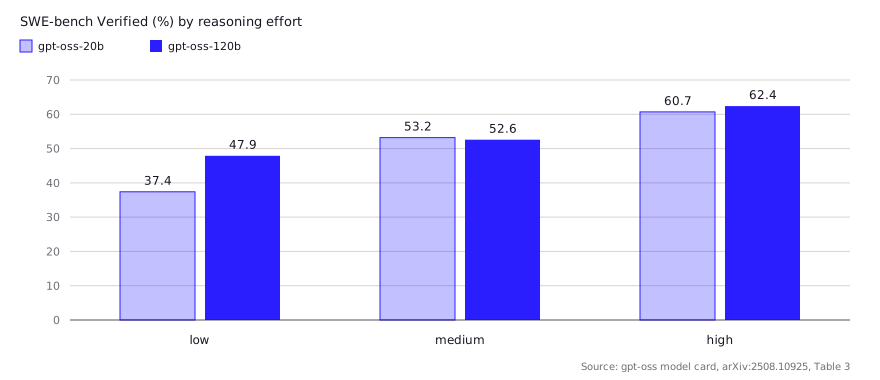
- Reasoning effort matters more than size for coding: on OpenAI's card, gpt-oss-20b scores 37.4 on SWE-bench Verified at low effort and 60.7 at high.
- Thinking cannot be disabled on gpt-oss. Use low effort to shorten it and --hidethinking or the separate thinking field to keep it out of your output.
- For tool calling, send the returned thinking back with every follow-up request. An Ollama maintainer called this a requirement for gpt-oss.
- Ollama ships OpenAI's original MXFP4 weights. Imported GGUFs with re-quantized layers can produce worse output.
Running gpt-oss with Ollama takes one command: ollama run gpt-oss:20b on a machine with 16GB of memory, or ollama run gpt-oss:120b if you have roughly 80GB. Both are OpenAI’s open-weight reasoning models, released in August 2025 under Apache 2.0, and Ollama serves them in their native MXFP4 format with no extra quantization. The command is the easy part. The decisions that change your results are which size fits your memory, which reasoning effort you pick, and whether your client sends the model’s reasoning back when it calls tools.
What is gpt-oss and which size fits your machine?
gpt-oss is a pair of mixture-of-experts models, and the 20b fits a 16GB machine while the 120b needs about 65GB before context. Each token only activates a small slice of the weights (3.6B or 5.1B parameters), which is why both run faster than their total size suggests. OpenAI post-trained the MoE weights in MXFP4, which Ollama describes as 4.25 bits per parameter, so there is no separate Q4 or Q8 tag to choose.
| gpt-oss:20b | gpt-oss:120b | |
|---|---|---|
| Total / active parameters | 20.91B / 3.61B | 116.83B / 5.13B |
| Layers / experts per layer | 24 / 32 (4 active) | 36 / 128 (4 active) |
| Checkpoint size (model card) | 12.8 GiB | 60.8 GiB |
| Ollama download | 14GB | 65GB |
| Context window | 131,072 tokens | 131,072 tokens |
| Memory guidance | “within 16GB of memory” | “a single 80GB GPU” |
| llama.cpp total at 8K / 131K context | 14.9 / 17.9 GB | 64.0 / 68.5 GB |
Sources: architecture and checkpoint sizes from the model card; download sizes from the Ollama library; memory guidance from the Hugging Face cards for 20b and 120b; totals by context from the llama.cpp guide.
The KV cache is unusually small. Per the model card, attention layers alternate between fully dense and a banded window of 128 tokens, and one Hacker News user running gpt-oss-120b in Ollama on a 128GB M4 Max said the full 128K context added only about 4.8GB of RAM (comment). OpenAI’s cookbook puts the practical floor at 16GB of VRAM or unified memory for 20b and 60GB or more for 120b. If you’re sizing a new machine, the local LLM hardware requirements guide covers the trade-offs.
How do you run it in Ollama, LM Studio and llama.cpp?
All three runtimes load the same MXFP4 weights, and each has an official one-line start. In Ollama:
ollama pull gpt-oss:20b
ollama run gpt-oss:20b
# OpenAI-compatible endpoint for your tools:
# base_url http://localhost:11434/v1, any api_key, model "gpt-oss:20b"
In LM Studio, the model card gives lms get openai/gpt-oss-20b. For llama.cpp, the maintainers’ guide uses the ggml-org GGUFs and the embedded chat template:
llama-server -hf ggml-org/gpt-oss-20b-GGUF --ctx-size 0 --jinja -ub 2048 -b 2048
# 16GB Mac: keep 12 MoE layers on the CPU
llama-server -hf ggml-org/gpt-oss-20b-GGUF --n-cpu-moe 12 -c 32768 --jinja --no-mmap
Two practical notes. First, the library lists a 128K window, but Ollama’s default context is set by your VRAM: 4K under 24 GiB and 32K up to 48 GiB. For coding, start the server with OLLAMA_CONTEXT_LENGTH=64000 ollama serve or raise it in the app settings. Second, stick to the original weights. An Ollama maintainer wrote on Hacker News that Ollama’s gpt-oss is the native MXFP4 release, and that many GGUFs online have parts re-quantized to q8_0, which “folks get some strange results from” (comment). The llama.cpp guide gives the same advice: the models were trained in MXFP4 and need no further quantization. Ollama Cloud also lists gpt-oss:20b-cloud and gpt-oss:120b-cloud tags, which run remotely, not on your machine.
If you want a coding agent rather than a chat window, OpenAI’s Codex CLI can point at the local model. Simon Willison noted that codex --oss -m gpt-oss:20b runs it against Ollama.
How do you set reasoning effort, and can you turn thinking off?
You set effort to low, medium or high, and you cannot turn thinking off; you can only shorten it or hide it. gpt-oss was trained with three effort levels, which the model card says go in the system prompt as Reasoning: high. Ollama maps that onto its think field. Its thinking docs show gpt-oss advertising "values": ["low", "medium", "high"] with "default": "medium", and think takes one of those strings:
# Native API
curl http://localhost:11434/api/chat -d '{
  "model": "gpt-oss:20b",
  "think": "high",
  "messages": [{"role": "user", "content": "Refactor this function to be pure."}]
}'

# OpenAI-compatible API: use reasoning_effort instead
curl http://localhost:11434/v1/chat/completions -H "Content-Type: application/json" -d '{
  "model": "gpt-oss:20b",
  "reasoning_effort": "low",
  "messages": [{"role": "user", "content": "Rename this variable everywhere."}]
}'
In issue #11766, an Ollama collaborator explained that reasoning_effort on /v1 and think on the native API are the same setting, that think: true means medium, and that think: false “would be same as reasoning_effort:none if gpt-oss supported turning off thinking”. It doesn’t. The model was trained to reason before answering in a separate channel, so there is no “off” level. What you can do:
- Use low effort for edits, renames and boilerplate where speed matters more than depth.
- Hide the trace. The CLI’s
--hidethinkingflag prints only the answer (Ollama blog), and the API returns reasoning in its ownthinkingfield, so your app can drop it. - Don’t show raw reasoning to end users. OpenAI’s model card says it put no optimization pressure on the chain of thought and that developers should not show it to users without filtering or summarizing.
Effort has a large effect on coding scores, which is why the choice is worth making per task rather than leaving it at the default.
High effort has a known failure mode in Ollama. Issue #12606 collects reports of gpt-oss:20b looping in its reasoning, or repeating a tool call, at high effort. One reporter said the loops stopped after setting temperature 1.0, top_p 1.0 and top_k 0, and a maintainer replied that the model “is pretty sensitive and meant to be run with default parameters”. That matches the llama.cpp guide, which recommends --temp 1.0 --top-p 1.0 and no repetition penalty.
Does tool calling and structured output work?
Yes, both work on current Ollama, but tool calling only stays reliable if your client returns the model’s reasoning on every follow-up turn. The reason is the harmony format. gpt-oss writes to three channels: analysis for reasoning, commentary for tool calls, and final for the answer. The model card says it “will not work correctly” without harmony. Ollama renders and parses harmony for you and returns standard tool_calls, thinking and content fields, the loop described in the Ollama tool calling guide.
The catch is that gpt-oss can call tools in the middle of its reasoning. OpenAI’s cookbook says you must “return the reasoning returned by the API back into a subsequent call”. In issue #12203, a user’s gpt-oss:120b leaked reasoning into tool calls and got 500 “error parsing tool call” errors. A maintainer said passing thinking back was “absolutely a requirement” for gpt-oss, and doing so fixed the main problem. The reporter still saw occasional malformed calls when arguments held large code files, and added a retry.
| Symptom | Likely cause | Fix |
|---|---|---|
| Model starts a tool call, then stops or loops | Client drops thinking between turns | Append the assistant message with its thinking and tool_calls before the tool result |
| 500 “error parsing tool call” | Reasoning leaked into arguments, or very large arguments | Pass thinking back; add a retry (#12203) |
| Tool calls fail in Cline or Roo Code | Those clients don’t use native tool calls | Use a client with native tool support; the llama.cpp guide flags this |
| Empty content where JSON was expected | Old Ollama mixed reasoning into the format path | Upgrade; fixed on /v1 per #11691 |
For structured output, pass a JSON schema in format (native) or response_format (/v1). Issue #11691 reported empty or reasoning-filled responses on Ollama 0.11.0. A contributor closed it in September 2026, saying gpt-oss on the OpenAI endpoint now “returns valid JSON with the reasoning in its own field”. Asking for tools and a schema in the same request is less settled, so test that combination; the Ollama structured output guide has the details. The broader thread on tool calls that never complete, #12187, was still open in October 2026, with one commenter reporting that the cloud tag worked on Ollama 0.32.15.
How good is it for coding?
On OpenAI’s own numbers, gpt-oss-20b at high effort is close to the 120b on coding, and both are far weaker at low effort. The model card reports, at low, medium and high effort:
- SWE-bench Verified: 20b scores 37.4, 53.2 and 60.7; 120b scores 47.9, 52.6 and 62.4.
- Codeforces Elo (with tools): 20b scores 1251, 2064 and 2516; 120b scores 1653, 2365 and 2622.
- Tau-Bench Retail (tool use): 20b scores 35.0, 47.3 and 54.8; 120b scores 49.4, 62.0 and 67.8.
These are vendor scores in OpenAI’s own harness, not an independent leaderboard. The gap between the sizes is wider on tool use than on SWE-bench, which matters if you plan to run an agent. How gpt-oss ranks against Qwen, Devstral and other 2026 coding models is covered in best local LLM for coding.
What do developers report in practice?
Developers report fast generation on recent hardware, slower numbers in Ollama than in tuned llama.cpp, and tool calling that works once set up properly. Speeds below are community-reported, single setups, and not our tests.
| Setup | Runtime | Model | Reported speed | Source |
|---|---|---|---|---|
| RTX 4090 24GB | llama.cpp | 20b | ~222 tok/s | llama.cpp guide |
| RTX 3090 24GB | llama.cpp | 20b | ~162 tok/s | llama.cpp guide |
| M4 Max 36GB | llama.cpp | 20b | ~92 tok/s | llama.cpp guide |
| M1 Max 64GB | Ollama | 20b | 40.7 tok/s | HN |
| M4 Max 128GB | Ollama | 120b, 128K ctx | 65 tok/s | HN |
- Ollama can be slower than llama.cpp on the same chip. The M1 Max figure above (Ollama, 40.7 tok/s) sits well below the ~75 tok/s the llama.cpp guide lists for an M1 Max. Different context sizes and builds, so treat it as a hint to benchmark both, not a fixed ratio.
- It is usable for daily work, with caveats. One HN user said Ollama with gpt-oss:20b and 120b on a laptop works “quite well for 90% of the stuff I do”, while noting that tool calling “takes a bit of work” (comment). Another, on a 64GB M1 Max in VS Code with Copilot, found gpt-oss:20b through Ollama “unusably slow” next to a hosted model (comment).
- Memory headroom matters. A commenter setting up Codex with gpt-oss:20b recommended at least 24GB of GPU memory on a Mac and noted the model takes about 16GB in
~/.ollama(comment). That is more conservative than the 16GB on the card, and closer to what you need with an IDE and a browser open.
What does the licence allow?
gpt-oss is Apache 2.0, so commercial use, modification and fine-tuning are allowed with the usual attribution. The repos also carry a short usage policy that asks you to “comply with all applicable law”. There is no separate acceptable-use list of the kind Llama or Gemma ship. The practical difference is explained in LLM licence and acceptable use.
FAQ
What are the gpt-oss Ollama requirements?
gpt-oss:20b needs about 16GB of VRAM or unified memory (14GB download). gpt-oss:120b is a 65GB download that OpenAI targets at a single 80GB GPU; the cookbook says 60GB or more. Both run with partial CPU offload on less, at lower speed.
How do I disable thinking for gpt-oss in Ollama?
You can’t. gpt-oss has no “off” level, so think: false does not remove reasoning. Set think: "low" to shorten it, and use --hidethinking in the CLI or ignore the thinking field in the API to keep it out of your output.
How do I set gpt-oss reasoning effort in Ollama?
On /api/chat, send "think": "low", "medium" or "high". On the OpenAI-compatible /v1 endpoint, send reasoning_effort with the same values. Medium is the default.
Does gpt-oss 20b work with the Ollama API and OpenAI SDK?
Yes. Point the OpenAI SDK at http://localhost:11434/v1 with any API key and model gpt-oss:20b. Ollama does not support OpenAI’s Responses API natively; the cookbook suggests a proxy for that.
Why does gpt-oss tool calling fail in Ollama?
Most often because the client does not send the model’s reasoning back with the tool result. gpt-oss can call tools mid-reasoning, and Ollama’s maintainers say returning the thinking is required. Older Ollama versions and clients without native tool calls also cause failures.
Sources (10)
- Ollama library: gpt-oss (tags and sizes)
- gpt-oss-120b & gpt-oss-20b Model Card (OpenAI, arXiv:2508.10925)
- openai/gpt-oss-20b model card, Hugging Face
- openai/gpt-oss-120b model card, Hugging Face
- OpenAI Cookbook: How to run gpt-oss locally with Ollama
- openai/harmony: response format renderer
- Ollama docs: Thinking
- guide: running gpt-oss with llama.cpp, ggml-org/llama.cpp discussion #15396
- ollama/ollama issue #12203: gpt-oss:120b thinking being returned in tool calls
- ollama/ollama issue #11766: Support reasoning effort for gpt-oss